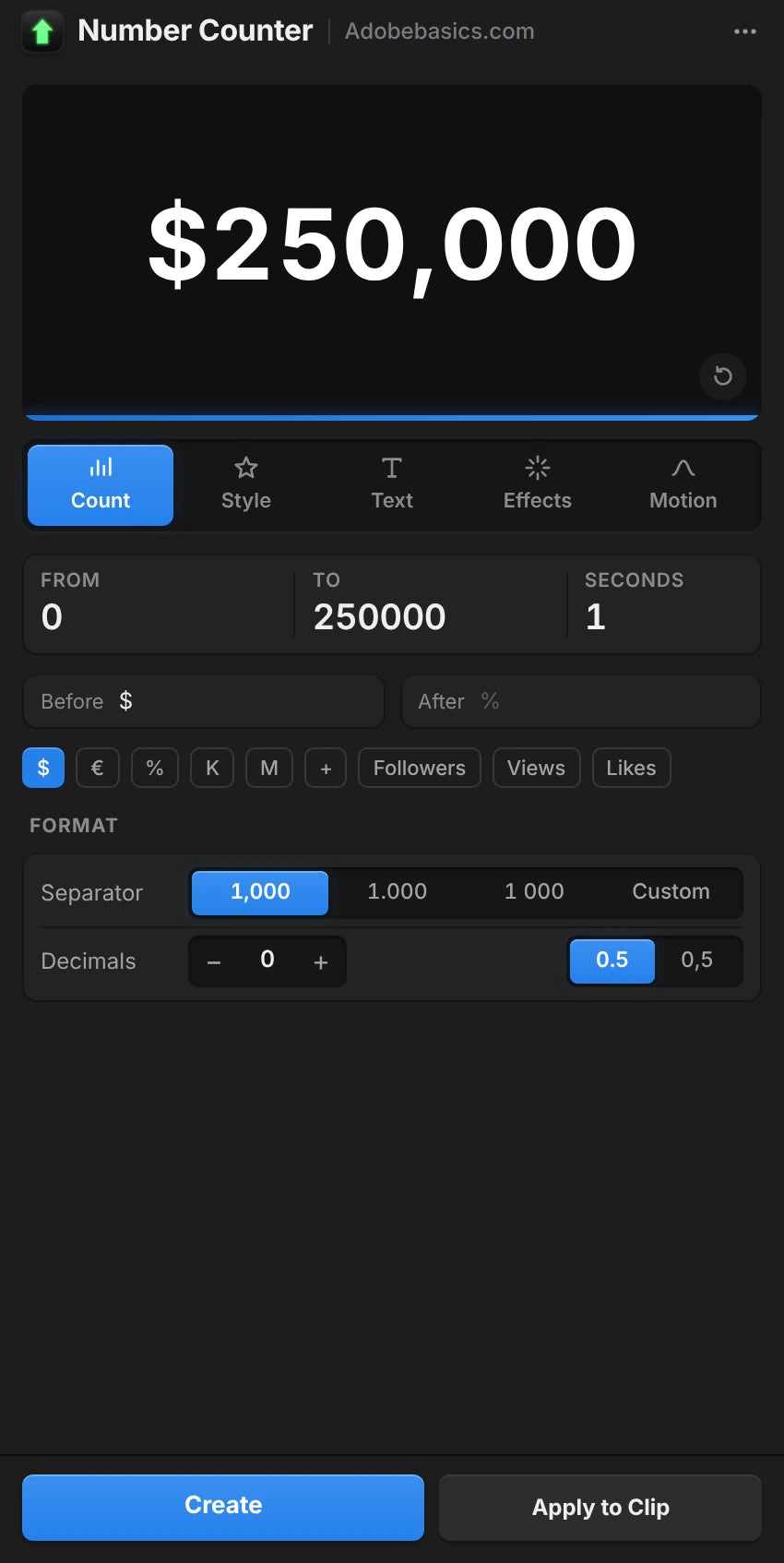

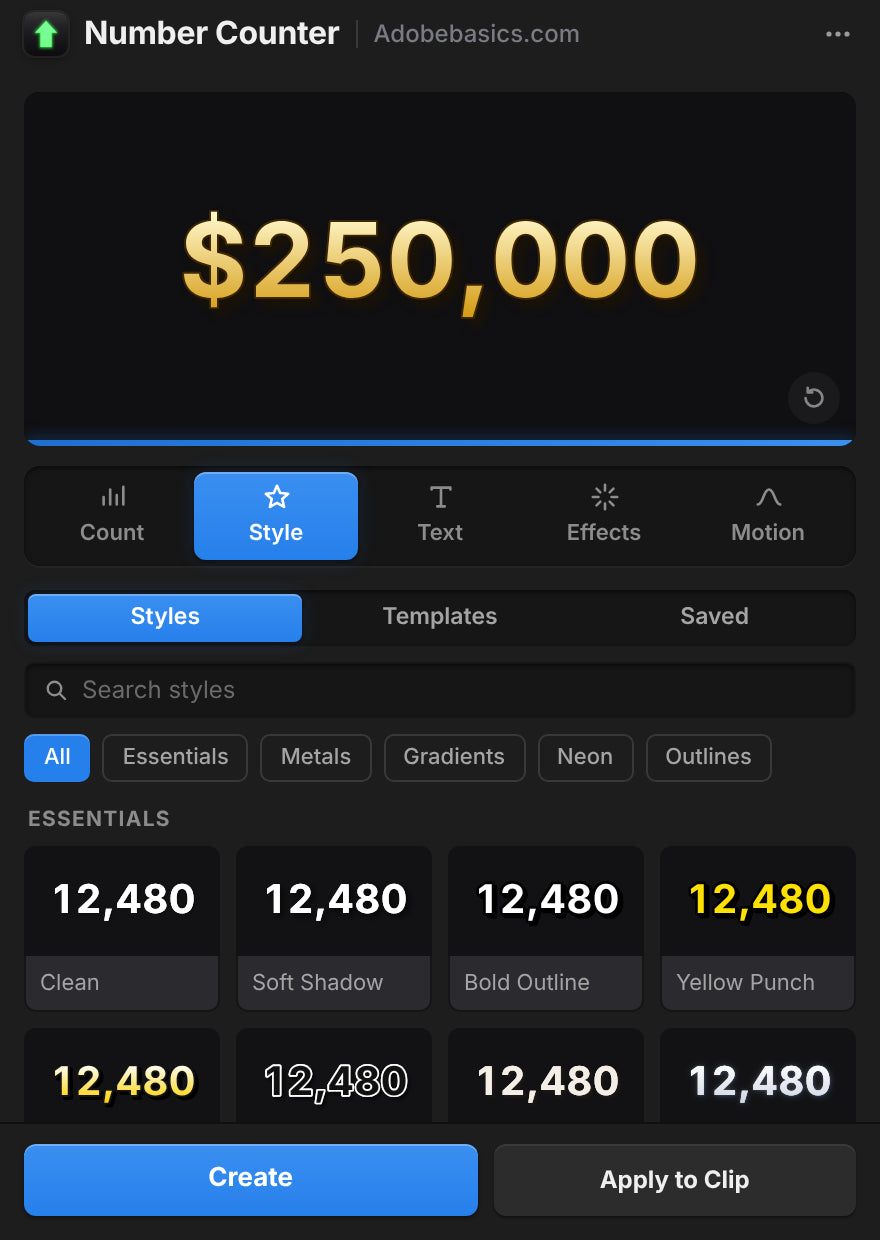
Het Number Counter-paneel, in Premiere Pro
Number Counter
Animeer getallen met één klik.
Maak van elk getal een vloeiende teller die de aandacht vasthoudt. Typ twee getallen en omzet, abonnees, prijzen en statistieken tellen vanzelf op.
Premiere Pro 2021–2027
- Windows en Mac
- Gratis updates
Geld-teruggarantie Werkt het niet in je Premiere Pro? Neem binnen 14 dagen contact met ons op.

Number Counter
Gemaakt door de mensen die Premiere Pro uitleggen.
700+ tutorials en duizenden reacties lieten ons zien wat editors ophoudt. Dus bouwden we de tools die we zelf als editors wilden: simpel en zonder gedoe.
Bekijk de tutorials- 200K+editors gebruiken onze tools
- 30M+weergaven op onze YouTube-tutorials
- 90K+volgers op socials
- 37K+editors in onze Discord-community
Geanimeerde getallen. Met één klik.

Tel alles
Stijlen
Sjablonen
Een native effect en een paneelvenster, in één installatie.
Computers per licentie
Easing-curves
Prijzen, percentages en volgers
GPU-versneld. Snel op elke computer.
Premiere Pro 2021–2027
Eén installer voor elk systeem.
Counting
Type two numbers. It counts.
Type a From and a To value in the panel. The counter runs from one to the other, up or down, and the preview plays it before you add it.
- Any two numbersLike 0 to 250,000, or 2,400 down to 0.
- SecondsSet how long the count takes.
- Quick textOne click adds $, €, %, K, M, Followers, Views or Likes.
TemplatesPro
72 templates. Ready to count.
Followers, prices, percentages, speeds, scores and countdowns. Click one and the numbers, the text and the format are set.
- 6 groupsSocial, Money, Stats, Measurements, Time, Sports and Games.
- SearchFind one by name, or filter by group.
- A starting pointChange any value after you click.
StylesPro
58 styles. One click each.
Gold, chrome, neon, gradients and bold outlines, in five groups with search. A style sets the color, stroke, shadow, glow and gradient, and leaves your numbers, text and font alone. The same 58 styles are in the effect's Style menu.
- Essentials 8
- Metals 10
- Gradients 18
- Neon 12
- Outlines 10
Number format
Prices, percentages, big numbers.
Up to 10 decimals, with a comma, a period or a space between the thousands, your own separator, or none.
- Decimals0 to 10 places. They count along with the number.
- Separators1,000, 1.000, 1 000, or any text you type.
- Steady digitsEvery digit takes the same width, so the number doesn't shift.
Text
Your font. Any text around it.
Pick any font installed on your computer. Put any text before and after the number, in any language.
- FontsEvery installed font, with search and styles.
- Size, tracking and capsPlus alignment, faux bold and faux italic.
- Before and after$, %, km/h, Followers or a whole phrase.
Styling
Stroke, shadow, glow, gradient. Built in.
Each one is a switch with its own settings, so there are no extra effects to stack on the clip.
- StrokeColor, width and order.
- Shadow and glowDirection, distance and softness. Radius and intensity.
- GradientTwo colors, down, across or diagonal, on the fill.
Motion
30 easing curves. Motion blur built in.
The easing sets how the count moves. Expo slows into the final number. Back and Bounce overshoot and settle.
- Start delayHold the first number for up to 10 seconds.
- Motion blurWith an adjustable shutter angle.
- TransformPosition, scale, rotation and opacity built in.
Wiggle
Wiggle the whole text. Or every letter.
A handheld drift in position and rotation. Move the whole counter, each word or each letter on its own.
- 3 modesWhole Text, Words or Letters.
- Anchor pointChoose the point each piece rotates around.
- Your own feelSpeed, sideways, up and down, rotation and seed.
Saved presetsPro
Save your own. Use them in every project.
Set up a counter you like and press Save as Preset. It keeps everything: the numbers, the text, the format and the style.
- One clickYour presets load like the built-in ones.
- In the effect tooSave Preset and Load Preset sit in Effect Controls.
- Yours to keepEach preset is a file on your computer.
What you get
A native effect. And a panel that builds it for you.
Number Counter installs two things: an effect in your Effects panel and its own panel window. Build the counter in the panel, then fine-tune it in Effect Controls.

The effectIn your Effects panel
A real Premiere Pro effect.
It renders on your graphics card like Premiere Pro's own effects, so the count plays back smoothly and exports fast.
- GPU accelerated: Metal on Mac, CUDA on Windows
- Every setting in Effect Controls, in 12 clear groups
- Transparent, or drawn over the clip
- Position, scale, rotation and opacity built in

The panelIts own window
A panel that sets it up for you.
Build the counter with a live preview and add it in one click. Select a counter later and the panel loads it for editing.
- Live preview with five tabs: Count, Style, Text, Effects and Motion
- Create adds the counter on a new track
- Apply to Clip puts it over your footage
- Auto Apply updates the clip as you change things
Twee versies. Eén keer betalen.
Beide versies hebben het effect en het paneel. Pro ontgrendelt 58 stijlen, eigen presets en 72 sjablonen.
Number Counter Standard
Het effect en het paneel.
$29.99 one-time
- Native GPU-effect en het paneelvenster
- Live voorvertoning, Create en Apply to Clip
- Elke instelling: tellen, opmaak, tekst, styling en beweging
- 30 easing-curves, wiggle en bewegingsonscherpte
- Elk geïnstalleerd lettertype, elke tekst ervoor en erna
Number Counter Pro
Ontgrendel alles wat Number Counter kan.
130 stijlen en sjablonen
$34.99 one-time
Maar $5 meer dan Standard.
- Alles uit Standard
- Ontgrendel 58 stijlen in 5 groepen, van goud tot neon
- Ontgrendel eigen presets om je tellers te bewaren
- Ontgrendel 72 sjablonen voor volgers, prijzen, statistieken en meer
- Zoeken met groepsfilters
Je download en licentiesleutel staan direct na het afrekenen klaar. We mailen ze je ook.
Elke instelling. Eén effect.
Teller en opmaak
- Begin- en eindwaarde. Twee willekeurige getallen, omhoog of omlaag.
- Duur. Hoe lang het tellen duurt, in seconden.
- Startvertraging. Houdt het eerste getal vast voordat het telt.
- 30 easing-curves. Van Linear tot Expo, Back, Elastic en Bounce.
- Decimalen. Van geen tot 10.
- Duizendtalscheiding. Komma, punt, spatie, apostrof, geen of je eigen.
- Decimaalteken. Punt of komma.
- Vaste cijferbreedte. Cijfers houden tijdens het tellen dezelfde breedte.
Tekst en styling
- Lettertype en stijl. Elk geïnstalleerd lettertype.
- Tekst ervoor en erna. Elke tekst, in elke taal.
- Grootte, kleur en uitlijning. Met een eigen tekstpositie.
- Spatiëring en hoofdletters. Alles in hoofdletters, kleinkapitalen, nep-vet en nep-cursief.
- Rand. Kleur, breedte en volgorde.
- Schaduw. Kleur, dekking, richting, afstand en zachtheid.
- Glow. Drempel, straal en intensiteit.
- Verloop. Twee kleuren tussen twee punten, op de vulling.
Beweging en presets
- Wiggle. Hele tekst, woorden of letters, met ankerpunt, snelheid, correlatie en seed.
- Bewegingsonscherpte. Instelbare sluiterhoek.
- Transformeren. Positie, ankerpunt, schaal, rotatie en dekking.
- Achtergrond. Transparant, of over de clip.
- 58 stijlen, in Pro. Essentials, Metals, Gradients, Neon en Outlines.
- 72 sjablonen, in Pro. Social, Money, Stats, Measurements, Time, Sports en Games.
- Opgeslagen presets, in Pro. Bewaar je eigen tellers en laad ze in elk project.
Specifications
- Version
- 1.1.0 · November 21, 2026 What's new
- Premiere Pro
- 2021–2027
- Operating system
- Mac macOS 11 or later, Apple silicon and IntelWindows 10 and 11, 64-bit
- GPU accelerated
- Metal on Mac, CUDA on NVIDIA graphics cards
- Languages
- English, Deutsch, Français, Español, Português (Brasil), 日本語, 한국어
- Versions
- Standard the effect, the panel and every settingPro adds 58 styles, 72 templates and your saved presets
- Numbers
- Any length, up to 10 decimals, any thousands separator, 30 easings
- Fonts
- Any font
- Keyframeable
- Every control, in Effect Controls
- Text before and after
- Any language, Arabic and Hebrew too
- Resolution
- Up to 8K
- High bit depth
- 32-bit float and linear color
- Works offline
- Up to 7 days at a time
- License
- 2 computers, one-time payment, commercial use
- Updates
- Free, from Check for Updates
- Download
Drie stappen. Dan telt het.
Eén installer voegt het effect en het paneel toe aan Premiere Pro.
1Download Number Counter
Je download en licentiesleutel verschijnen direct na het afrekenen. We mailen ze je ook.
2Start de installer
Sluit Premiere Pro af en start hem. Hij voegt het effect en het paneel toe.
3Open het paneel
Kies Window › Extensions › Number Counter, typ je getallen en klik op Create.
Premiere Pro 2021 en nieuwer · Windows 10 en 11 · macOS 11 en nieuwer
Vloeiende keyframes. Eén klik verwijderd.
Elke teller, prijs en statistiek, gewoon in Premiere Pro. Eén keer betalen, voor altijd van jou.
- Premiere Pro 2021–2027
- Windows en Mac
Geld-teruggarantie als het niet werkt
Neem binnen 14 dagen na aankoop contact met ons op. Hulp binnen 24 uur om het op te lossen. Lukt het ons niet, dan krijg je je geld terug.