






The QuickPaste panel, inside Premiere Pro


QuickPaste
Вставляй изображения прямо в Premiere Pro.
Добавляй любое изображение в монтаж одним нажатием. Скопируй картинку из интернета, скриншот или файл и нажми ⌘V или Ctrl+V в Premiere Pro. Оно попадет в выбранную корзину или прямо под указатель воспроизведения — без сохранения и импорта.
 Premiere Pro 2021–2027
- Windows и Mac
- Бесплатные обновления

On your phone? Get the link on your computer.
Гарантия возврата денег Не работает в твоем Premiere Pro? Напиши нам в течение 14 дней.
QuickPaste
Создано теми, кто учит Premiere Pro.
700+ уроков и тысячи комментариев показали нам, что замедляет монтажеров. Поэтому мы создали инструменты, которых хотели сами как монтажеры: простые и без лишних хлопот.
Смотреть уроки- 200K+монтажеров пользуются нашими инструментами
- 30M+просмотров наших уроков на YouTube
- 90K+подписчиков в соцсетях
- 37K+монтажеров в нашем сообществе Discord
Скопируй. Вставь. Монтируй дальше.
Твоя обычная вставка.
Прямо в Premiere Pro.
Файлы Adobe тоже вставляются.
Вставь цвет
HEX, RGB, HSL, CMYK или OKLCH.
Любое изображение
Даже HEIC, AVIF и RAW.

Premiere Pro 2021–2027
Главное.
-
Вставка
Скопируй. Вставь в Premiere.
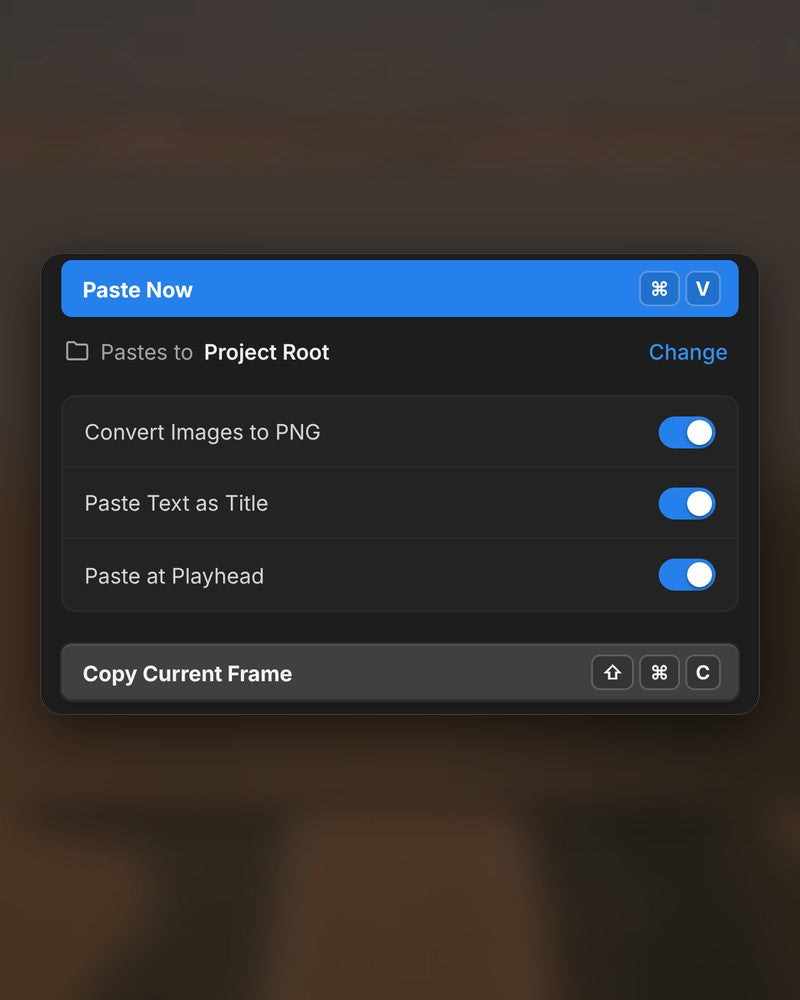
Скопируй изображение где угодно и нажми ⌘V. Оно попадет в корзину или на таймлайн с Paste at Playhead.
-
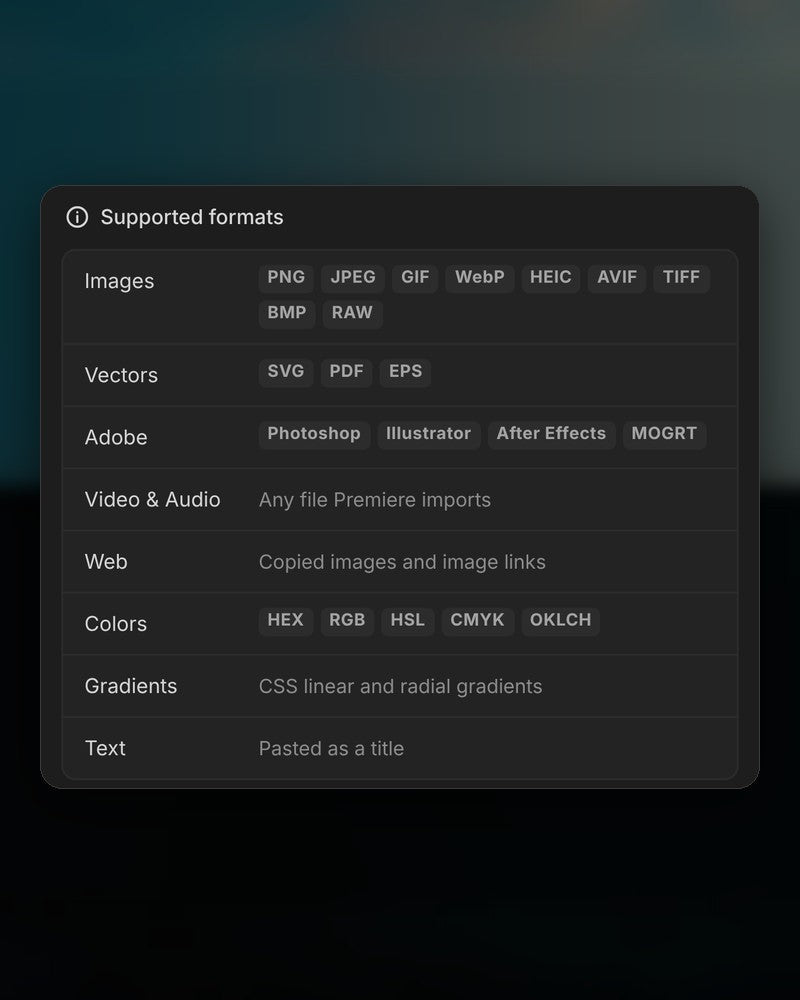
Форматы
Изображения, файлы, цвета и текст.
Изображения приходят как PNG, даже WebP и HEIC. Файлы Photoshop, Illustrator и After Effects тоже вставляются.
-
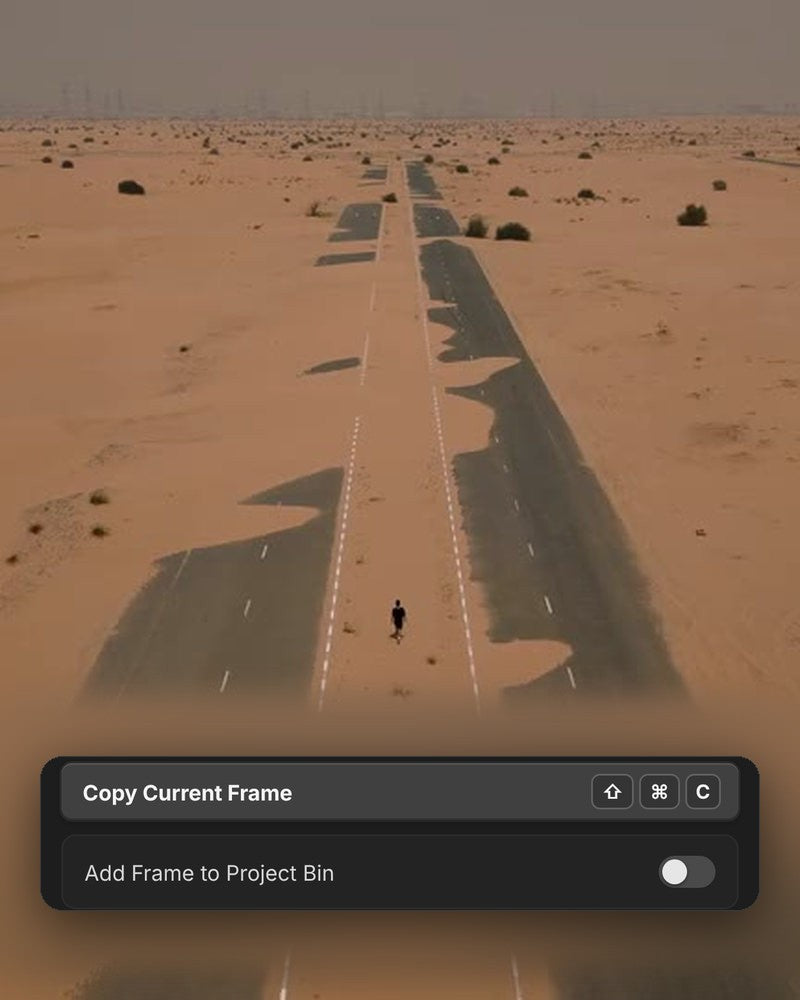
Копирование кадра
Скопируй кадр. Вставь куда угодно.
Кадр под указателем воспроизведения, как полноразмерный PNG, готовый для чата или письма.
В загрузке
-
Приложение QuickPaste
-
Лицензионный ключ
-
Плагин Premiere Pro
Установщик и лицензионный ключ. И то и другое ты получишь при оформлении заказа, а установщик настроит приложение QuickPaste и плагин Premiere Pro за тебя.
-

Paste
Just paste. Nothing else to press.
Copy an image anywhere and press ⌘V in Premiere Pro. It lands on the timeline at the playhead, with no save and no import.
- From anywhereA browser, a screenshot, a chat or a design app.
- At the playheadOn a track that is free, so nothing moves.
- On WindowsCtrl+C and Ctrl+V work the same way.
Convert
Any image in. A clean PNG out.
Every copied image becomes a PNG before it reaches Premiere Pro. No converting by hand.
- Every image formatWebP, HEIC, AVIF, JPEG, GIF, TIFF, BMP and RAW.
- Nothing to download firstCopy an image on a web page and paste.
- Ready in your projectThe PNG lands in the bin you choose.
Colors
Copy a color. Get a matte.
Copy a color code from anywhere and press ⌘V. A color matte the size of your frame lands at the playhead.
- Every formatHEX, rgb(), hsl(), oklch(), cmyk() and more.
- Your frame sizeThe matte matches your sequence.
- Named by colorEach matte is named after its HEX value.
Gradients
Copy a gradient. Paste a gradient.
Paste a CSS linear or radial gradient. It becomes a gradient matte, sized to your sequence.
- Linear and radialRepeating gradients too.
- Same colorsEvery color stop, in its place.
- Easy to findEach one is named after its colors.
Text
Copy text. Get a title.
Copy any text, from a browser, a script or a chat, and press ⌘V. With Paste Text as Title on, it lands at the playhead as a title you can edit.
- Named for youThe clip takes the first line of your text.
- A real titleEdit it in Premiere Pro like any other.
- Your choiceOne switch in the panel turns it off.
PDFs and vectors
Paste a PDF. Get every page.
PDFs and SVGs are drawn sharp at your frame size. A PDF with several pages becomes one still per page, end to end.
- Up to 50 pagesOne after another from the playhead.
- Always sharpDrawn at your sequence’s frame size.
- Odd formats tooHEIC, AVIF, camera RAW and more become PNG.
Motion Graphics templates
A template? Paste it in.
Copy a .mogrt file and press ⌘V. It lands at the playhead, ready to edit.
- Its full lengthPlaced for the template’s whole duration.
- Never on your editIt goes on the lowest track that is free.
- Edit as usualChange its text and colors in Premiere Pro.
Several files
Copy a few. Paste them in order.
Copy files in Finder or File Explorer and press ⌘V. They land end to end at the playhead, on a track that is free.
- Nothing movesClips after the playhead are never pushed along.
- Lowest free trackPicked for the clips’ whole length.
- Anything Premiere importsVideo, audio, PSD, AI, AEP and more.
Bins
Every paste. In its bin.
Choose a bin in the panel, or make a new one. Everything you paste lands there.
- Your pickAny bin in your project, or the project root.
- New binName it in the panel and QuickPaste makes it.
- Files kept safeSaved in QuickPaste’s own folder, never a temp folder.
Copy frame
Need a still? Copy the frame.
Press ⇧⌘C in Premiere Pro. The frame under the playhead is on your clipboard, ready to paste anywhere.
- Full sizeA PNG at your sequence’s frame size.
- In your project tooTurn on Add Frame to Project Bin to keep a copy.
- On WindowsShift+Ctrl+C, and Ctrl+V to paste.
Три шага. И вставляй.
Один пошаговый установщик настроит приложение и плагин Premiere Pro за тебя.
1Скачай QuickPaste
Загрузка появится сразу после оплаты. Мы также пришлем ее по e-mail.
2Запусти установщик
Открой установщик и следуй шагам. Он настроит приложение и плагин Premiere Pro за тебя.
3Скопируй и вставь
Скопируй изображение откуда угодно и вставь прямо в Premiere Pro.

Что добавляет QuickPaste.
Большинство плагинов вставки добавляют кнопку, меню или новое сочетание клавиш. QuickPaste использует ⌘V или Ctrl+V, которые ты и так нажимаешь.


Купи набором и сэкономь 15%
Получи весь набор для Premiere.
- Asteria ProSmooth text animations
- EaseFlow ProПлавный easing
- BetterFXЛюбой эффект — одно сочетание клавиш
- SuperGlowПремиальное свечение
- QuickPasteВставка изображений и файлов
- Number Counter ProAnimated numbers
- ClearFrame ProSafe zones for every app
Specifications
- Version
- 1.5.3 · 21 ноября 2026 г. What's new
- Premiere Pro
- 2021–2027 and Premiere Pro (Beta)
- Operating system
- Mac macOS 11 or later, Apple silicon and IntelWindows 10 and 11, 64-bit
- Languages
- English, Deutsch, Français, Español, Português (Brasil), 日本語, 한국어
- Pastes
- Images, SVG, PDF, Illustrator artwork, styled text, MOGRTs, gradients and image links
- Keyboard shortcuts
- Colors
- HEX, RGB, HSL, CMYK and OKLCH
- Gradients
- CSS linear and radial
- Works offline
- Up to 7 days at a time
- License
- 2 computers, one-time payment
- Updates
- Free and automatic
- Download
- Mac 10.3 MB · Windows 4.8 MB
Скопируй. Нажми ⌘V или Ctrl+V.
Плати один раз — пользуйся всегда.
- Premiere Pro 2021–2027
- Windows и Mac
Гарантия возврата денег если не работает
- Напиши нам в течение 14 дней после покупки.
- Поможем все исправить в течение 24 часов.
- Если не сможем исправить, вернем деньги.