สร้างโดยคนที่ สอน Premiere Pro

บทเรียนกว่า 700 ตอนและความคิดเห็นนับพันทำให้เรารู้ว่าอะไรทำให้นักตัดต่อทำงานช้าลง เราจึงสร้างเครื่องมือที่เราอยากได้ในฐานะนักตัดต่อ: เรียบง่ายและไม่ยุ่งยาก

ดูบทเรียน

ตัวเลขเคลื่อนไหว ในคลิกเดียว

Number Counter

นับอะไรก็ได้

58

สไตล์

72

เทมเพลต

เอฟเฟกต์ + แผง

เอฟเฟกต์เนทีฟและหน้าต่างแผง ในการติดตั้งครั้งเดียว

2

คอมพิวเตอร์ต่อหนึ่งไลเซนส์

30

เส้นโค้ง easing

$99.99

ราคา เปอร์เซ็นต์ และยอดผู้ติดตาม

Motion blur

ฟอนต์ใดก็ได้

Glow

สร้างมาเพื่อความเร็ว

เร่งความเร็วด้วย GPU รวดเร็วบนคอมพิวเตอร์ทุกเครื่อง

Premiere Pro 2021–2027

จ่ายครั้งเดียว ใช้ได้ตลอดไป

macOS Windows

ตัวติดตั้งเดียวสำหรับแต่ละเวอร์ชัน

Counting

Type two numbers. It counts.

Type a From and a To value in the panel. The counter runs from one to the other, up or down, and the preview plays it before you add it.

  • Any two numbersLike 0 to 250,000, or 2,400 down to 0.
  • SecondsSet how long the count takes.
  • Quick textOne click adds $, €, %, K, M, Followers, Views or Likes.

TemplatesPro

72 templates. Ready to count.

Followers, prices, percentages, speeds, scores and countdowns. Click one and the numbers, the text and the format are set.

  • 6 groupsSocial, Money, Stats, Measurements, Time, Sports and Games.
  • SearchFind one by name, or filter by group.
  • A starting pointChange any value after you click.

StylesPro

58 styles. One click each.

Gold, chrome, neon, gradients and bold outlines, in five groups with search. A style sets the color, stroke, shadow, glow and gradient, and leaves your numbers, text and font alone. The same 58 styles are in the effect's Style menu.

  • Essentials 8
  • Metals 10
  • Gradients 18
  • Neon 12
  • Outlines 10

Number format

Prices, percentages, big numbers.

Up to 10 decimals, with a comma, a period or a space between the thousands, your own separator, or none.

  • Decimals0 to 10 places. They count along with the number.
  • Separators1,000, 1.000, 1 000, or any text you type.
  • Steady digitsEvery digit takes the same width, so the number doesn't shift.

Text

Your font. Any text around it.

Pick any font installed on your computer. Put any text before and after the number, in any language.

  • FontsEvery installed font, with search and styles.
  • Size, tracking and capsPlus alignment, faux bold and faux italic.
  • Before and after$, %, km/h, Followers or a whole phrase.

Styling

Stroke, shadow, glow, gradient. Built in.

Each one is a switch with its own settings, so there are no extra effects to stack on the clip.

  • StrokeColor, width and order.
  • Shadow and glowDirection, distance and softness. Radius and intensity.
  • GradientTwo colors, down, across or diagonal, on the fill.

Motion

30 easing curves. Motion blur built in.

The easing sets how the count moves. Expo slows into the final number. Back and Bounce overshoot and settle.

  • Start delayHold the first number for up to 10 seconds.
  • Motion blurWith an adjustable shutter angle.
  • TransformPosition, scale, rotation and opacity built in.

Wiggle

Wiggle the whole text. Or every letter.

A handheld drift in position and rotation. Move the whole counter, each word or each letter on its own.

  • 3 modesWhole Text, Words or Letters.
  • Anchor pointChoose the point each piece rotates around.
  • Your own feelSpeed, sideways, up and down, rotation and seed.

Saved presetsPro

Save your own. Use them in every project.

Set up a counter you like and press Save as Preset. It keeps everything: the numbers, the text, the format and the style.

  • One clickYour presets load like the built-in ones.
  • In the effect tooSave Preset and Load Preset sit in Effect Controls.
  • Yours to keepEach preset is a file on your computer.

What you get

A native effect. And a panel that builds it for you.

Number Counter installs two things: an effect in your Effects panel and its own panel window. Build the counter in the panel, then fine-tune it in Effect Controls.

Number Counter in Premiere Pro's Effect Controls, with the effect name and its Presets, Counter and Number Format groups open.

The effectIn your Effects panel

A real Premiere Pro effect.

It renders on your graphics card like Premiere Pro's own effects, so the count plays back smoothly and exports fast.

  • GPU accelerated: Metal on Mac, CUDA on Windows
  • Every setting in Effect Controls, in 12 clear groups
  • Transparent, or drawn over the clip
  • Position, scale, rotation and opacity built in
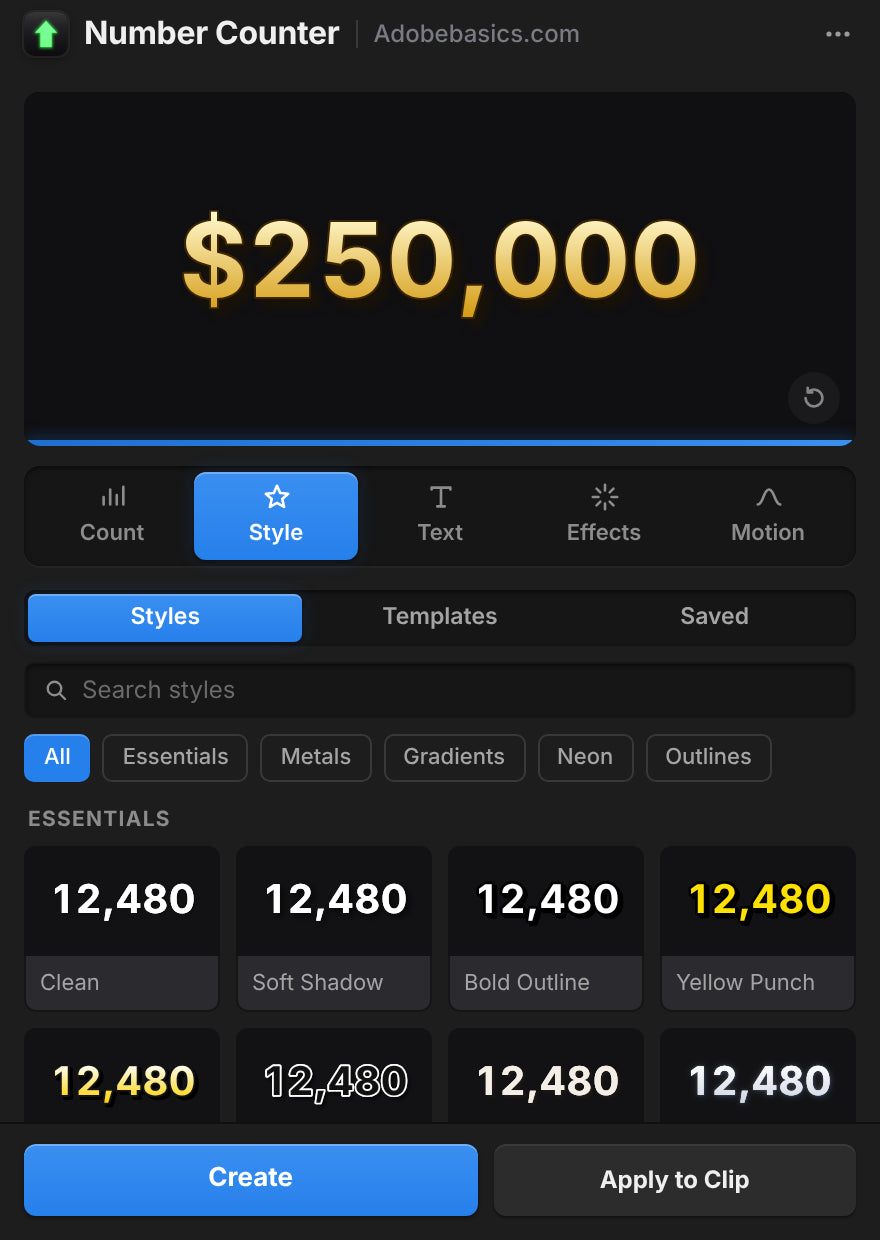
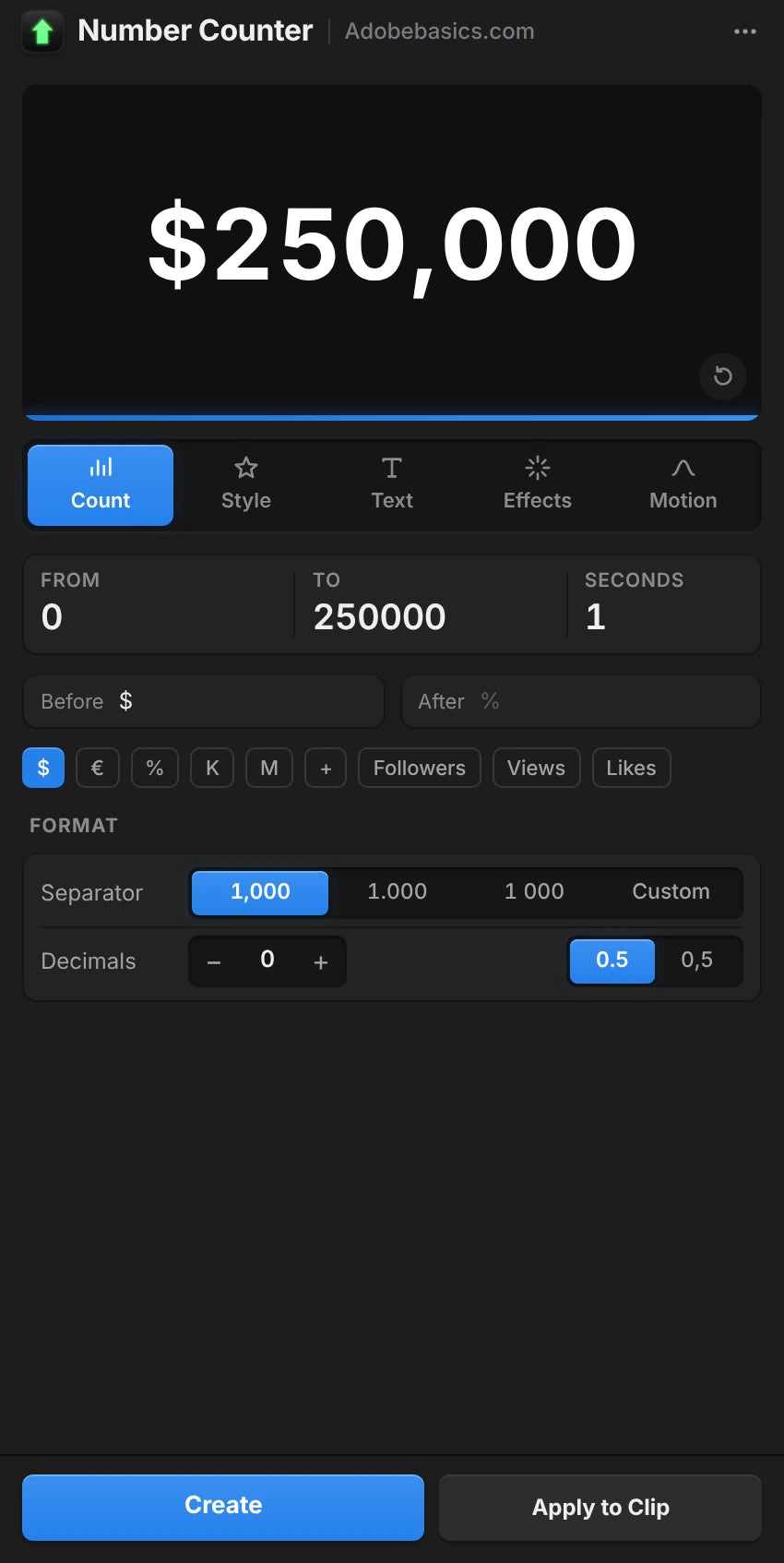
The Number Counter panel in Premiere Pro, on the Style tab with a gold $250,000 preview.

The panelIts own window

A panel that sets it up for you.

Build the counter with a live preview and add it in one click. Select a counter later and the panel loads it for editing.

  • Live preview with five tabs: Count, Style, Text, Effects and Motion
  • Create adds the counter on a new track
  • Apply to Clip puts it over your footage
  • Auto Apply updates the clip as you change things

สองเวอร์ชัน จ่ายครั้งเดียว

ทั้งสองเวอร์ชันมีเอฟเฟกต์และแผง Pro ปลดล็อก 58 สไตล์ พรีเซ็ตที่กำหนดเอง และ 72 เทมเพลต

Number Counter Standard

เอฟเฟกต์และแผง

$29.99 one-time

  • เอฟเฟกต์ GPU เนทีฟและหน้าต่างแผง
  • ตัวอย่างแบบเรียลไทม์ Create และ Apply to Clip
  • ทุกการตั้งค่า: การนับ รูปแบบ ข้อความ สไตล์ และการเคลื่อนไหว
  • เส้นโค้ง easing 30 แบบ wiggle และ motion blur
  • ฟอนต์ที่ติดตั้งไว้ใดก็ได้ ข้อความใดก็ได้ก่อนและหลัง
เลือก Standard
ยอดนิยมที่สุด

Number Counter Pro

ปลดล็อกทุกสิ่งที่ Number Counter ทำได้

130 สไตล์และเทมเพลต

$34.99 one-time

เพิ่มอีกเพียง $5 จาก Standard

  • ทุกอย่างใน Standard
  • ปลดล็อก 58 สไตล์ ใน 5 กลุ่ม ตั้งแต่ทองจนถึงนีออน
  • ปลดล็อกพรีเซ็ตที่กำหนดเอง เพื่อบันทึกตัวนับของคุณเอง
  • ปลดล็อก 72 เทมเพลต สำหรับผู้ติดตาม ราคา สถิติ และอื่นๆ
  • ค้นหา ด้วยตัวกรองกลุ่ม
เลือก Pro

ไฟล์ดาวน์โหลดและคีย์ไลเซนส์พร้อมทันทีหลังชำระเงิน เราส่งอีเมลให้คุณด้วย

เลิกสร้างตัวนับใหม่ซ้ำๆ

ถ้าทำด้วยมือ การนับที่ลื่นไหล 2 วินาทีคือคลิปข้อความ 60 คลิปที่ 30 fps ด้วย Number Counter คุณแค่พิมพ์ตัวเลขสองตัว

ฟีเจอร์ Number Counter (แนะนำ) ทำด้วยมือใน Premiere
นับเอง ด้วยฟอนต์ใดก็ได้
จุลภาค ทศนิยม และ $ ตั้งครั้งเดียว
มี easing และ motion blur ในตัว
สไตล์และเทมเพลต คลิกเดียว 130
เรนเดอร์บนการ์ดจอของคุณ
อยู่ใน Premiere Pro

ทุกการตั้งค่า เอฟเฟกต์เดียว

ตัวนับและรูปแบบ

  • ค่าเริ่มต้นและค่าสิ้นสุด. ตัวเลขสองตัวใดก็ได้ ขึ้นหรือลง
  • ระยะเวลา. การนับใช้เวลานานเท่าไร เป็นวินาที
  • หน่วงเวลาเริ่ม. ค้างตัวเลขแรกไว้ก่อนเริ่มนับ
  • เส้นโค้ง easing 30 แบบ. ตั้งแต่ Linear ถึง Expo, Back, Elastic และ Bounce
  • ทศนิยม. ตั้งแต่ไม่มีถึง 10 ตำแหน่ง
  • ตัวคั่นหลักพัน. จุลภาค จุด เว้นวรรค อะพอสทรอฟี ไม่มี หรือกำหนดเอง
  • เครื่องหมายทศนิยม. จุดหรือจุลภาค
  • ความกว้างตัวเลขคงที่. ตัวเลขมีความกว้างเท่ากันขณะนับ

ข้อความและสไตล์

  • ฟอนต์และสไตล์. ฟอนต์ที่ติดตั้งไว้ใดก็ได้
  • ข้อความก่อนและหลัง. ข้อความใดก็ได้ ในภาษาใดก็ได้
  • ขนาด สี และการจัดแนว. พร้อมตำแหน่งข้อความของตัวเอง
  • ระยะห่างตัวอักษรและตัวพิมพ์ใหญ่. ตัวพิมพ์ใหญ่ทั้งหมด small caps ตัวหนาจำลอง และตัวเอียงจำลอง
  • เส้นขอบ. สี ความกว้าง และลำดับ
  • เงา. สี ความทึบ ทิศทาง ระยะ และความนุ่ม
  • แสงเรือง. Threshold, radius และ intensity
  • การไล่สี. สองสีระหว่างสองจุด บนพื้นผิวเติม

การเคลื่อนไหวและพรีเซ็ต

  • Wiggle. ทั้งข้อความ คำ หรือตัวอักษร พร้อม anchor point ความเร็ว correlation และ seed
  • Motion blur. ปรับ shutter angle ได้
  • Transform. ตำแหน่ง anchor point สเกล การหมุน และความทึบ
  • พื้นหลัง. โปร่งใส หรือวางทับคลิป
  • 58 สไตล์ ใน Pro. Essentials, Metals, Gradients, Neon และ Outlines
  • 72 เทมเพลต ใน Pro. Social, Money, Stats, Measurements, Time, Sports และ Games
  • พรีเซ็ตที่บันทึกไว้ ใน Pro. บันทึกตัวนับของคุณเองและโหลดในโปรเจกต์ใดก็ได้

Specifications

Version
1.1.0 · 21 พฤศจิกายน 2026 What's new
Premiere Pro
2021–2027
Operating system
Mac macOS 11 or later, Apple silicon and IntelWindows 10 and 11, 64-bit
GPU accelerated
Metal on Mac, CUDA on NVIDIA graphics cards
Languages
English, Deutsch, Français, Español, Português (Brasil), 日本語, 한국어
Versions
Standard the effect, the panel and every settingPro adds 58 styles, 72 templates and your saved presets
Numbers
Any length, up to 10 decimals, any thousands separator, 30 easings
Fonts
Any font
Keyframeable
Every control, in Effect Controls
Text before and after
Any language, Arabic and Hebrew too
Resolution
Up to 8K
High bit depth
32-bit float and linear color
Works offline
Up to 7 days at a time
License
2 computers, one-time payment, commercial use
Updates
Free, from Check for Updates
Download
Mac 3.4 MB · Windows 1.5 MB

สามขั้นตอน แล้วก็เริ่มนับ

ตัวติดตั้งเดียวเพิ่มเอฟเฟกต์และแผงลงใน Premiere Pro

  1. 1ดาวน์โหลด Number Counter

    ไฟล์ดาวน์โหลดและคีย์ไลเซนส์จะแสดงทันทีหลังชำระเงิน เราส่งอีเมลให้คุณด้วย

  2. 2เรียกใช้ตัวติดตั้ง

    ปิด Premiere Pro แล้วเรียกใช้ ตัวติดตั้งจะเพิ่มเอฟเฟกต์และแผง

  3. 3เปิดแผง

    เลือก Window › Extensions › Number Counter พิมพ์ตัวเลขแล้วกด Create

Premiere Pro 2021 ขึ้นไป · Windows 10 และ 11 · macOS 11 ขึ้นไป

มีคำถามใช่ไหม? เรามีคำตอบ

มีคำถามอื่นใช่ไหม? ส่งข้อความหาเราที่หน้าติดต่อเรา เราตอบกลับภายใน 24 ชั่วโมง

ดูคำถามที่พบบ่อยทั้งหมด

หรือถามนักตัดต่อ 37K คนใน Discord ของเรา

คำถาม

10 items
  • ฉันจะได้อะไรบ้าง?

    สองอย่างในการติดตั้งครั้งเดียว: เอฟเฟกต์เนทีฟของ Premiere Pro ชื่อ Number Counter และหน้าต่างแผงที่สร้างตัวนับให้คุณพร้อมตัวอย่างแบบเรียลไทม์ ใช้แผง เอฟเฟกต์ หรือทั้งสองอย่าง

  • ฉันต้องใช้ After Effects ไหม?

    ไม่ Number Counter เป็นเอฟเฟกต์เนทีฟของ Premiere Pro คุณตั้งค่าทุกอย่างภายใน Premiere Pro บน Windows และ Mac

  • Standard และ Pro ต่างกันอย่างไร?

    ทั้งสองมีเอฟเฟกต์และแผง Pro ปลดล็อก 58 สไตล์ พรีเซ็ตที่กำหนดเอง และ 72 เทมเพลต

  • นับถอยหลังได้ด้วยไหม?

    ได้ พิมพ์ค่าเริ่มต้นที่สูงกว่าค่าสิ้นสุด เช่น 2,400 ถึง 0 สำหรับนาฬิกานับถอยหลัง ดู Countdown Timer

  • รองรับ Premiere Pro เวอร์ชันไหน?

    Adobe Premiere Pro 2021–2027 บน Windows 10 และ 11 และบน macOS 11 ขึ้นไป

  • ฉันจะติดตั้งได้อย่างไร?

    ดาวน์โหลดตัวติดตั้งสำหรับคอมพิวเตอร์ของคุณจากหน้าคำสั่งซื้อแล้วเปิด รีสตาร์ท Premiere Pro แล้ว Number Counter จะอยู่ในแผง Effects และใน Window › Extensions

  • ฉันใช้ได้กับคอมพิวเตอร์กี่เครื่อง?

    สองเครื่อง หากต้องการย้ายไปคอมพิวเตอร์เครื่องอื่น ให้นำเครื่องหนึ่งออกใน Manage License

  • รวมอัปเดตในอนาคตไหม?

    ได้ อัปเดตฟรี และตัวติดตั้งใหม่อยู่ในหน้าคำสั่งซื้อของคุณ

  • ใช้ในวิดีโอของลูกค้าและวิดีโอที่สร้างรายได้ได้ไหม?

    ได้ ใช้ในวิดีโอส่วนตัวและเชิงพาณิชย์ได้ไม่จำกัด รวมถึงงานลูกค้า ช่องที่สร้างรายได้ และโฆษณา การซื้อหนึ่งครั้งสำหรับผู้ใช้หนึ่งคน

  • มีการรับประกันคืนเงินไหม?

    มี หากใช้งานไม่ได้ใน Premiere Pro เวอร์ชันที่ระบุในหน้านี้ ติดต่อเรา ภายใน 14 วันหลังซื้อ เราตอบกลับภายใน 24 ชั่วโมงและช่วยคุณแก้ไข หากแก้ไม่ได้ คุณจะได้รับเงินคืน Premiere Pro เวอร์ชันเก่ากว่าไม่อยู่ในความคุ้มครอง จึงควรตรวจสอบเวอร์ชันของคุณก่อน ปัญหาที่เกิดจาก Premiere Pro คอมพิวเตอร์ หรือการตั้งค่าของคุณก็ไม่อยู่ในความคุ้มครองเช่นกัน สิ่งนี้ไม่กระทบสิทธิ์ของคุณตามกฎหมายคุ้มครองผู้บริโภค อ่านนโยบายการคืนเงินฉบับเต็ม

คีย์เฟรมที่ลื่นไหล แค่คลิกเดียว

ทุกตัวนับ ราคา และสถิติ ภายใน Premiere Pro จ่ายครั้งเดียว ใช้ได้ตลอดไป

Standard

เอฟเฟกต์และแผง

$29.99

Pro ยอดนิยมที่สุด

ปลดล็อก 58 สไตล์ พรีเซ็ตที่กำหนดเอง และ 72 เทมเพลต

$34.99

  • Premiere Pro 2021–2027
  • Windows และ Mac

รับประกันคืนเงิน หากใช้งานไม่ได้

ติดต่อเราภายใน 14 วันหลังจากซื้อ เราช่วยแก้ไขภายใน 24 ชั่วโมง หากเราแก้ไขไม่ได้ คุณจะได้รับเงินคืน