उन लोगों ने बनाया जो Premiere Pro सिखाते हैं।

700+ ट्यूटोरियल और हज़ारों कमेंट्स ने हमें दिखाया कि एडिटर्स को क्या धीमा करता है। इसलिए हमने वे टूल बनाए जो हम एडिटर के तौर पर चाहते थे: आसान और बिना झंझट।

ट्यूटोरियल देखें

एनिमेटेड नंबर। एक क्लिक में।

Number Counter

कुछ भी गिनें

58

स्टाइल

72

टेम्पलेट

इफ़ेक्ट + पैनल

एक नेटिव इफ़ेक्ट और एक पैनल विंडो, एक ही इंस्टॉल में।

2

प्रति लाइसेंस कंप्यूटर

30

Easing कर्व

$99.99

कीमतें, प्रतिशत और फ़ॉलोअर संख्या

मोशन ब्लर

कोई भी फ़ॉन्ट

ग्लो

रफ़्तार के लिए बना

GPU एक्सेलरेटेड। हर कंप्यूटर पर तेज़।

Premiere Pro 2021–2027

एक बार पेमेंट। हमेशा के लिए आपका।

macOS Windows

हर एक के लिए अलग इंस्टॉलर।

Counting

Type two numbers. It counts.

Type a From and a To value in the panel. The counter runs from one to the other, up or down, and the preview plays it before you add it.

  • Any two numbersLike 0 to 250,000, or 2,400 down to 0.
  • SecondsSet how long the count takes.
  • Quick textOne click adds $, €, %, K, M, Followers, Views or Likes.

TemplatesPro

72 templates. Ready to count.

Followers, prices, percentages, speeds, scores and countdowns. Click one and the numbers, the text and the format are set.

  • 6 groupsSocial, Money, Stats, Measurements, Time, Sports and Games.
  • SearchFind one by name, or filter by group.
  • A starting pointChange any value after you click.

StylesPro

58 styles. One click each.

Gold, chrome, neon, gradients and bold outlines, in five groups with search. A style sets the color, stroke, shadow, glow and gradient, and leaves your numbers, text and font alone. The same 58 styles are in the effect's Style menu.

  • Essentials 8
  • Metals 10
  • Gradients 18
  • Neon 12
  • Outlines 10

Number format

Prices, percentages, big numbers.

Up to 10 decimals, with a comma, a period or a space between the thousands, your own separator, or none.

  • Decimals0 to 10 places. They count along with the number.
  • Separators1,000, 1.000, 1 000, or any text you type.
  • Steady digitsEvery digit takes the same width, so the number doesn't shift.

Text

Your font. Any text around it.

Pick any font installed on your computer. Put any text before and after the number, in any language.

  • FontsEvery installed font, with search and styles.
  • Size, tracking and capsPlus alignment, faux bold and faux italic.
  • Before and after$, %, km/h, Followers or a whole phrase.

Styling

Stroke, shadow, glow, gradient. Built in.

Each one is a switch with its own settings, so there are no extra effects to stack on the clip.

  • StrokeColor, width and order.
  • Shadow and glowDirection, distance and softness. Radius and intensity.
  • GradientTwo colors, down, across or diagonal, on the fill.

Motion

30 easing curves. Motion blur built in.

The easing sets how the count moves. Expo slows into the final number. Back and Bounce overshoot and settle.

  • Start delayHold the first number for up to 10 seconds.
  • Motion blurWith an adjustable shutter angle.
  • TransformPosition, scale, rotation and opacity built in.

Wiggle

Wiggle the whole text. Or every letter.

A handheld drift in position and rotation. Move the whole counter, each word or each letter on its own.

  • 3 modesWhole Text, Words or Letters.
  • Anchor pointChoose the point each piece rotates around.
  • Your own feelSpeed, sideways, up and down, rotation and seed.

Saved presetsPro

Save your own. Use them in every project.

Set up a counter you like and press Save as Preset. It keeps everything: the numbers, the text, the format and the style.

  • One clickYour presets load like the built-in ones.
  • In the effect tooSave Preset and Load Preset sit in Effect Controls.
  • Yours to keepEach preset is a file on your computer.

What you get

A native effect. And a panel that builds it for you.

Number Counter installs two things: an effect in your Effects panel and its own panel window. Build the counter in the panel, then fine-tune it in Effect Controls.

Number Counter in Premiere Pro's Effect Controls, with the effect name and its Presets, Counter and Number Format groups open.

The effectIn your Effects panel

A real Premiere Pro effect.

It renders on your graphics card like Premiere Pro's own effects, so the count plays back smoothly and exports fast.

  • GPU accelerated: Metal on Mac, CUDA on Windows
  • Every setting in Effect Controls, in 12 clear groups
  • Transparent, or drawn over the clip
  • Position, scale, rotation and opacity built in
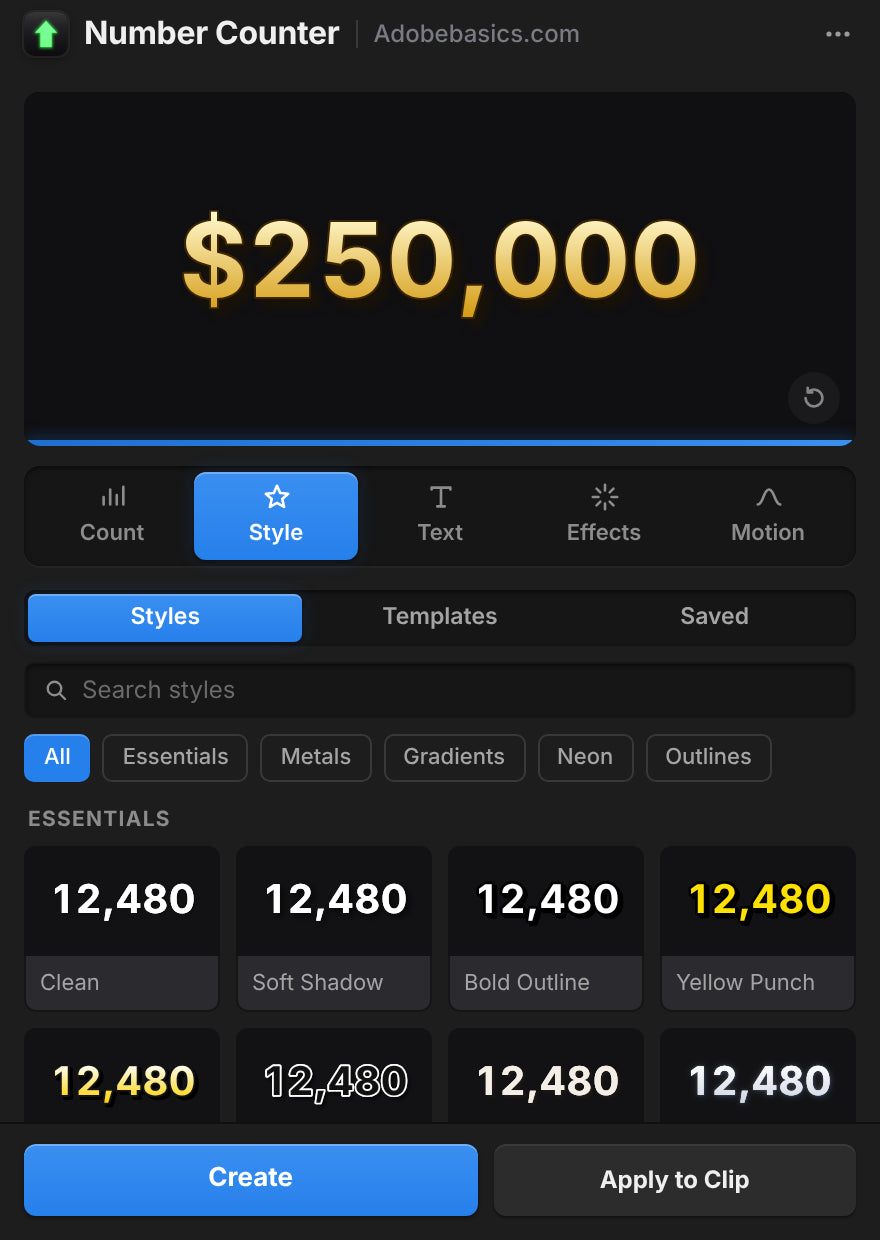
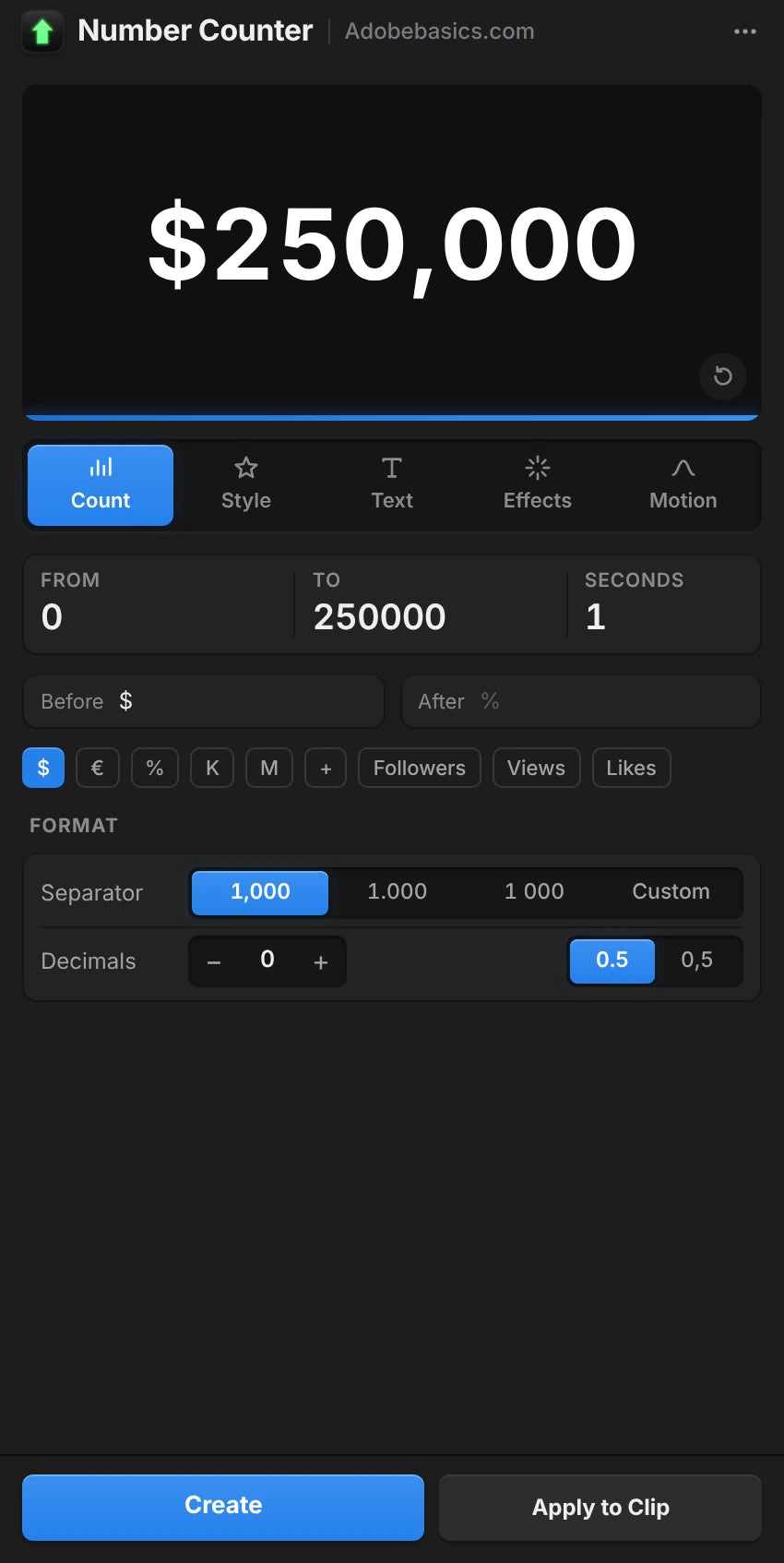
The Number Counter panel in Premiere Pro, on the Style tab with a gold $250,000 preview.

The panelIts own window

A panel that sets it up for you.

Build the counter with a live preview and add it in one click. Select a counter later and the panel loads it for editing.

  • Live preview with five tabs: Count, Style, Text, Effects and Motion
  • Create adds the counter on a new track
  • Apply to Clip puts it over your footage
  • Auto Apply updates the clip as you change things

दो वर्ज़न। एक बार पेमेंट।

दोनों वर्शन में इफ़ेक्ट और पैनल हैं। Pro 58 स्टाइल, कस्टम प्रीसेट और 72 टेम्पलेट अनलॉक करता है।

Number Counter Standard

इफ़ेक्ट और पैनल।

$29.99 one-time

  • नेटिव GPU इफ़ेक्ट और पैनल विंडो
  • लाइव प्रीव्यू, Create और Apply to Clip
  • हर सेटिंग: गिनती, फ़ॉर्मेट, टेक्स्ट, स्टाइलिंग और मोशन
  • 30 easing कर्व, wiggle और मोशन ब्लर
  • कोई भी इंस्टॉल फ़ॉन्ट, पहले और बाद में कोई भी टेक्स्ट
Standard चुनें
सबसे लोकप्रिय

Number Counter Pro

Number Counter की हर क्षमता अनलॉक करें।

130 स्टाइल और टेम्पलेट

$34.99 one-time

Standard से सिर्फ़ $5 ज़्यादा।

  • Standard की हर चीज़
  • 58 स्टाइल अनलॉक करें 5 ग्रुप में, गोल्ड से नियॉन तक
  • कस्टम प्रीसेट अनलॉक करें और अपने काउंटर सेव करें
  • 72 टेम्पलेट अनलॉक करें फ़ॉलोअर, कीमतों, आंकड़ों और ज़्यादा के लिए
  • सर्च ग्रुप फ़िल्टर के साथ
Pro चुनें

आपका डाउनलोड और लाइसेंस की चेकआउट के तुरंत बाद तैयार होते हैं। हम इन्हें ईमेल भी करते हैं।

काउंटर दोबारा बनाना बंद करें।

हाथ से, 2 सेकंड की स्मूद गिनती का मतलब है 30 fps पर 60 टेक्स्ट क्लिप। Number Counter के साथ, आप बस दो नंबर टाइप करते हैं।

फ़ीचर्स Number Counter (सुझाया गया) Premiere में हाथ से
किसी भी फ़ॉन्ट में अपने आप गिनता है
कॉमा, दशमलव और $ एक बार सेट
Easing और मोशन ब्लर बिल्ट-इन
स्टाइल और टेम्पलेट, एक क्लिक में 130
आपके ग्राफ़िक्स कार्ड पर रेंडर होता है
Premiere Pro में ही रहता है

हर सेटिंग। एक इफ़ेक्ट।

काउंटर और फ़ॉर्मेट

  • शुरुआती और आख़िरी वैल्यू. कोई भी दो नंबर, ऊपर या नीचे।
  • अवधि. गिनती कितने सेकंड चले।
  • स्टार्ट डिले. गिनने से पहले पहला नंबर रोके रखता है।
  • 30 easing कर्व. Linear से Expo, Back, Elastic और Bounce तक।
  • दशमलव. शून्य से 10 अंक तक।
  • हज़ार विभाजक. कॉमा, पीरियड, स्पेस, एपॉस्ट्रॉफ़ी, कोई नहीं या आपका अपना।
  • दशमलव चिह्न. पीरियड या कॉमा।
  • एक-सी अंक चौड़ाई. गिनते समय अंक एक ही चौड़ाई रखते हैं।

टेक्स्ट और स्टाइलिंग

  • फ़ॉन्ट और स्टाइल. कोई भी इंस्टॉल फ़ॉन्ट।
  • पहले और बाद का टेक्स्ट. कोई भी टेक्स्ट, किसी भी भाषा में।
  • साइज़, रंग और अलाइनमेंट. अपनी टेक्स्ट पोज़िशन के साथ।
  • ट्रैकिंग और कैप्स. ऑल कैप्स, स्मॉल कैप्स, फ़ॉक्स बोल्ड और फ़ॉक्स इटैलिक।
  • स्ट्रोक. रंग, चौड़ाई और क्रम।
  • शैडो. रंग, ओपेसिटी, दिशा, दूरी और सॉफ़्टनेस।
  • ग्लो. थ्रेशोल्ड, रेडियस और इंटेंसिटी।
  • ग्रेडिएंट. फ़िल पर, दो पॉइंट के बीच दो रंग।

मोशन और प्रीसेट

  • Wiggle. पूरा टेक्स्ट, शब्द या अक्षर, एंकर पॉइंट, स्पीड, कोरिलेशन और seed के साथ।
  • मोशन ब्लर. एडजस्ट होने वाला शटर एंगल।
  • ट्रांसफ़ॉर्म. पोज़िशन, एंकर पॉइंट, स्केल, रोटेशन और ओपेसिटी।
  • बैकग्राउंड. ट्रांसपेरेंट, या क्लिप के ऊपर।
  • 58 स्टाइल, Pro में. Essentials, Metals, Gradients, Neon और Outlines।
  • 72 टेम्पलेट, Pro में. Social, Money, Stats, Measurements, Time, Sports और Games।
  • सेव किए प्रीसेट, Pro में. अपने काउंटर सेव करें और किसी भी प्रोजेक्ट में लोड करें।

Specifications

Version
1.1.0 · November 21, 2026 What's new
Premiere Pro
2021–2027
Operating system
Mac macOS 11 or later, Apple silicon and IntelWindows 10 and 11, 64-bit
GPU accelerated
Metal on Mac, CUDA on NVIDIA graphics cards
Languages
English, Deutsch, Français, Español, Português (Brasil), 日本語, 한국어
Versions
Standard the effect, the panel and every settingPro adds 58 styles, 72 templates and your saved presets
Numbers
Any length, up to 10 decimals, any thousands separator, 30 easings
Fonts
Any font
Keyframeable
Every control, in Effect Controls
Text before and after
Any language, Arabic and Hebrew too
Resolution
Up to 8K
High bit depth
32-bit float and linear color
Works offline
Up to 7 days at a time
License
2 computers, one-time payment, commercial use
Updates
Free, from Check for Updates
Download

तीन स्टेप। फिर गिनती शुरू।

एक इंस्टॉलर Premiere Pro में इफ़ेक्ट और पैनल जोड़ देता है।

  1. 1Number Counter डाउनलोड करें

    आपका डाउनलोड और लाइसेंस की चेकआउट के तुरंत बाद दिखते हैं। हम इन्हें ईमेल भी करते हैं।

  2. 2इंस्टॉलर चलाएं

    Premiere Pro बंद करें और इसे चलाएँ। यह इफ़ेक्ट और पैनल जोड़ देता है।

  3. 3पैनल खोलें

    Window › Extensions › Number Counter चुनें, अपने नंबर टाइप करें और Create दबाएँ।

Premiere Pro 2021 और नया · Windows 10 और 11 · macOS 11 और नया

सवाल? जवाब यहां हैं।

कोई और सवाल? Contact us पेज पर हमें मैसेज भेजें। हम 24 घंटे में जवाब देते हैं।

पूरे FAQ देखें

या हमारे Discord में 37K एडिटर्स से पूछें

सवाल

10 items
  • मुझे क्या मिलता है?

    एक इंस्टॉल में दो चीज़ें: Number Counter नाम का एक नेटिव Premiere Pro इफ़ेक्ट, और एक पैनल विंडो जो लाइव प्रीव्यू के साथ आपके लिए काउंटर बनाती है। पैनल, इफ़ेक्ट या दोनों इस्तेमाल करें।

  • क्या मुझे After Effects चाहिए?

    नहीं। Number Counter एक नेटिव Premiere Pro इफ़ेक्ट है। आप Windows और Mac पर सब कुछ Premiere Pro के अंदर सेट करते हैं।

  • Standard और Pro में क्या फ़र्क है?

    दोनों में इफ़ेक्ट और पैनल हैं। Pro 58 स्टाइल, कस्टम प्रीसेट और 72 टेम्पलेट अनलॉक करता है।

  • क्या यह उल्टी गिनती भी कर सकता है?

    हाँ। आख़िरी वैल्यू से बड़ी शुरुआती वैल्यू टाइप करें, जैसे 2,400 से 0। उल्टी गिनती वाली घड़ी के लिए Countdown Timer देखें।

  • Premiere Pro के कौन-से वर्शन सपोर्टेड हैं?

    Adobe Premiere Pro 2021–2027, Windows 10 और 11 पर और macOS 11 या नए पर।

  • मैं इसे कैसे इंस्टॉल करूँ?

    अपने ऑर्डर पेज से अपने कंप्यूटर का इंस्टॉलर डाउनलोड करें और खोलें। Premiere Pro रीस्टार्ट करें, और Number Counter Effects पैनल में और Window › Extensions में मिल जाएगा।

  • मैं इसे कितने कंप्यूटर पर इस्तेमाल कर सकता हूँ?

    दो। इसे दूसरे कंप्यूटर पर ले जाने के लिए, Manage License में एक हटा दें।

  • क्या आगे के अपडेट शामिल हैं?

    हाँ। अपडेट मुफ़्त हैं, और नया इंस्टॉलर आपके ऑर्डर पेज पर है।

  • क्या मैं इसे क्लाइंट और मोनेटाइज़्ड वीडियो में इस्तेमाल कर सकता हूँ?

    हाँ। असीमित निजी और कमर्शियल वीडियो में इस्तेमाल करें, जिसमें क्लाइंट का काम, मोनेटाइज़्ड चैनल और विज्ञापन शामिल हैं। एक खरीद एक यूज़र के लिए है।

  • क्या मनी-बैक गारंटी है?

    हाँ। अगर यह इस पेज पर लिस्टेड किसी Premiere Pro वर्ज़न में काम न करे, तो खरीदने के 14 दिन के अंदर हमसे संपर्क करें। हम 24 घंटे में जवाब देते हैं और इसे ठीक करने में मदद करते हैं, और अगर हम ठीक न कर पाएँ, तो आपको आपके पैसे वापस मिलते हैं। Premiere Pro के पुराने वर्ज़न शामिल नहीं हैं, इसलिए पहले अपना वर्ज़न देख लें। Premiere Pro, आपके कंप्यूटर या आपके सेटअप की वजह से होने वाली समस्याएँ भी शामिल नहीं हैं। इससे उपभोक्ता कानून के तहत आपके अधिकारों पर कोई असर नहीं पड़ता। पूरी रिफ़ंड पॉलिसी पढ़ें।

स्मूद keyframe. बस एक क्लिक दूर।

हर काउंटर, कीमत और आंकड़ा, सीधे Premiere Pro में। एक बार पेमेंट, हमेशा के लिए आपका।

Standard

इफ़ेक्ट और पैनल

$29.99

Pro सबसे लोकप्रिय

58 स्टाइल, कस्टम प्रीसेट और 72 टेम्पलेट अनलॉक करें

$34.99

  • Premiere Pro 2021–2027
  • Windows और Mac

मनी-बैक गारंटी अगर यह न चले

ख़रीद के 14 दिनों के अंदर हमसे संपर्क करें। ठीक करने के लिए 24 घंटों के अंदर मदद। अगर हम इसे ठीक न कर पाएँ, तो आपको पैसे वापस मिलेंगे।