






The QuickPaste panel, inside Premiere Pro


QuickPaste
이미지를 Premiere Pro에 바로 붙여넣으세요.
키 한 번으로 어떤 이미지든 편집에 넣으세요. 웹 이미지, 스크린샷 또는 파일을 복사한 뒤 Premiere Pro에서 ⌘V 또는 Ctrl+V를 누르세요. 선택한 빈이나 재생 헤드 위치에 바로 들어가며, 먼저 저장하거나 가져올 필요가 없습니다.
 Premiere Pro 2021–2027
- Windows 및 Mac
- 무료 업데이트

On your phone? Get the link on your computer.
환불 보장 사용 중인 Premiere Pro에서 작동하지 않나요? 14일 이내에 문의해 주세요.
QuickPaste
만든 사람은 Premiere Pro를 가르치는 저희입니다.
700개가 넘는 튜토리얼과 수천 개의 댓글이 편집자를 느리게 만드는 게 뭔지 알려줬어요. 그래서 편집자로서 원했던 도구를 만들었어요. 간단하고 번거롭지 않게.
튜토리얼 보기- 200K+명의 편집자가 사용 중
- 30M+회 YouTube 튜토리얼 조회수
- 90K+명의 SNS 팔로워
- 37K+명의 편집자가 Discord 커뮤니티에
복사. 붙여넣기. 계속 편집.
평소 쓰던 붙여넣기 그대로.
Premiere Pro에 바로.
Adobe 파일도 붙여넣을 수 있어요.
색상 붙여넣기
HEX, RGB, HSL, CMYK 또는 OKLCH.
어떤 이미지든
HEIC, AVIF, RAW까지.

Premiere Pro 2021–2027
핵심 기능.
-
붙여넣기
복사해서. Premiere에 붙여넣기.
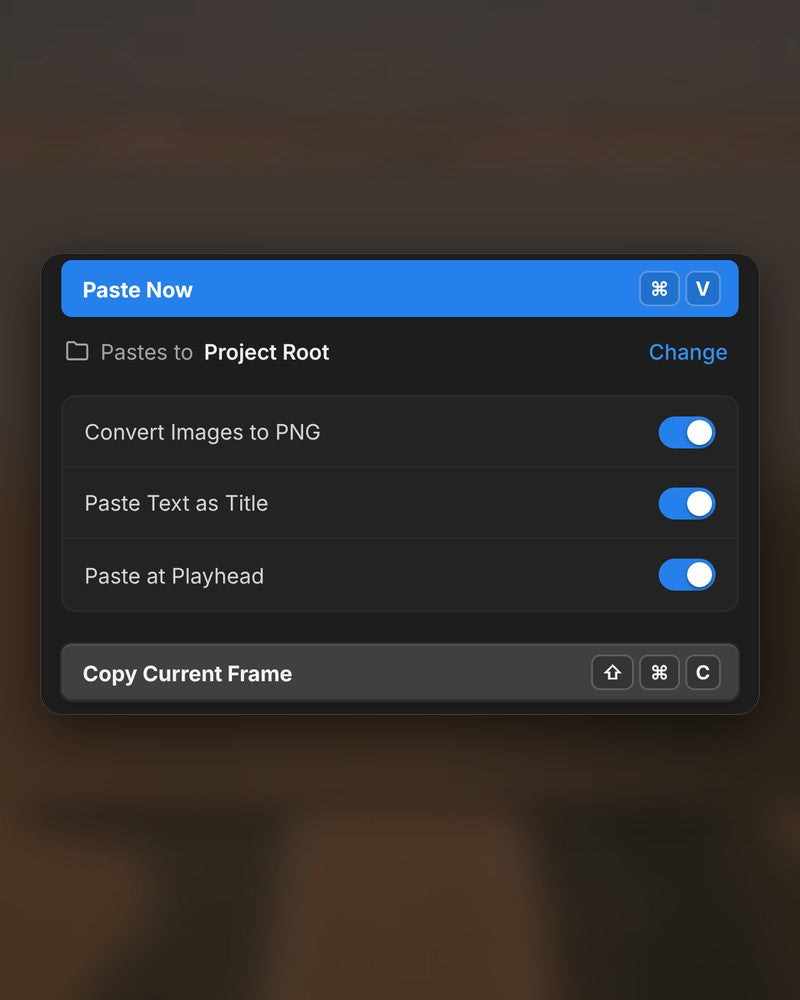
어디서든 이미지를 복사하고 ⌘V를 누르세요. 빈에 들어가거나, Paste at Playhead를 켜면 타임라인에 들어가요.
-
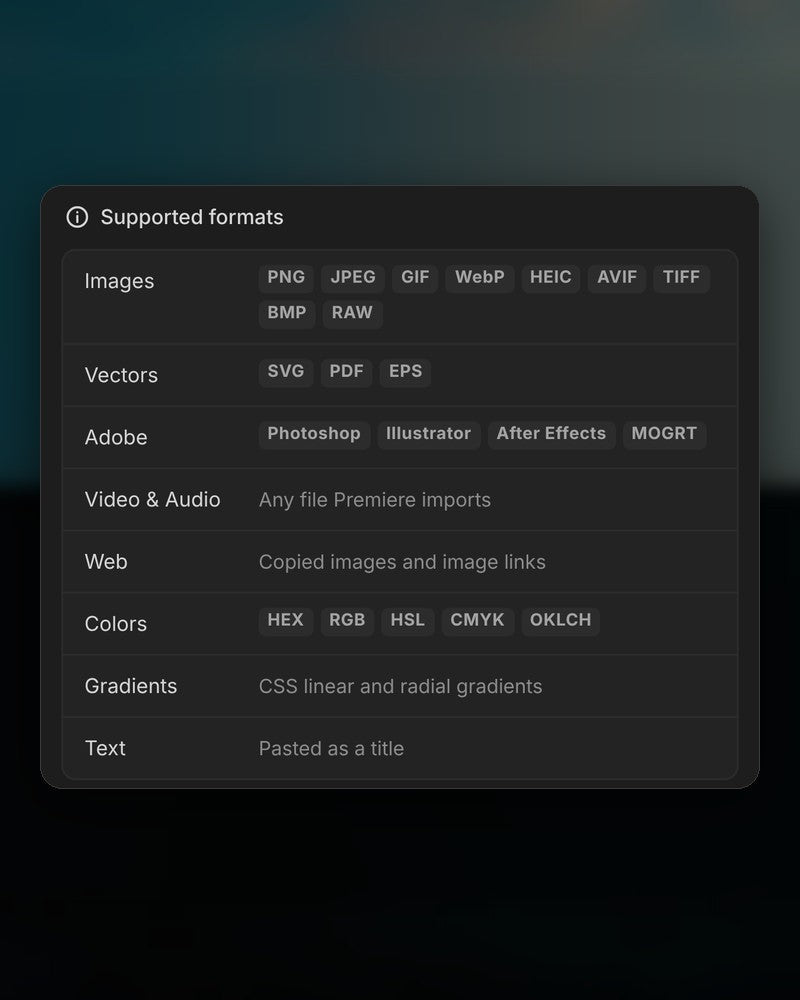
형식
이미지, 파일, 색상, 텍스트.
이미지는 WebP나 HEIC도 PNG로 들어가요. Photoshop, Illustrator, After Effects 파일도 붙여넣을 수 있어요.
-
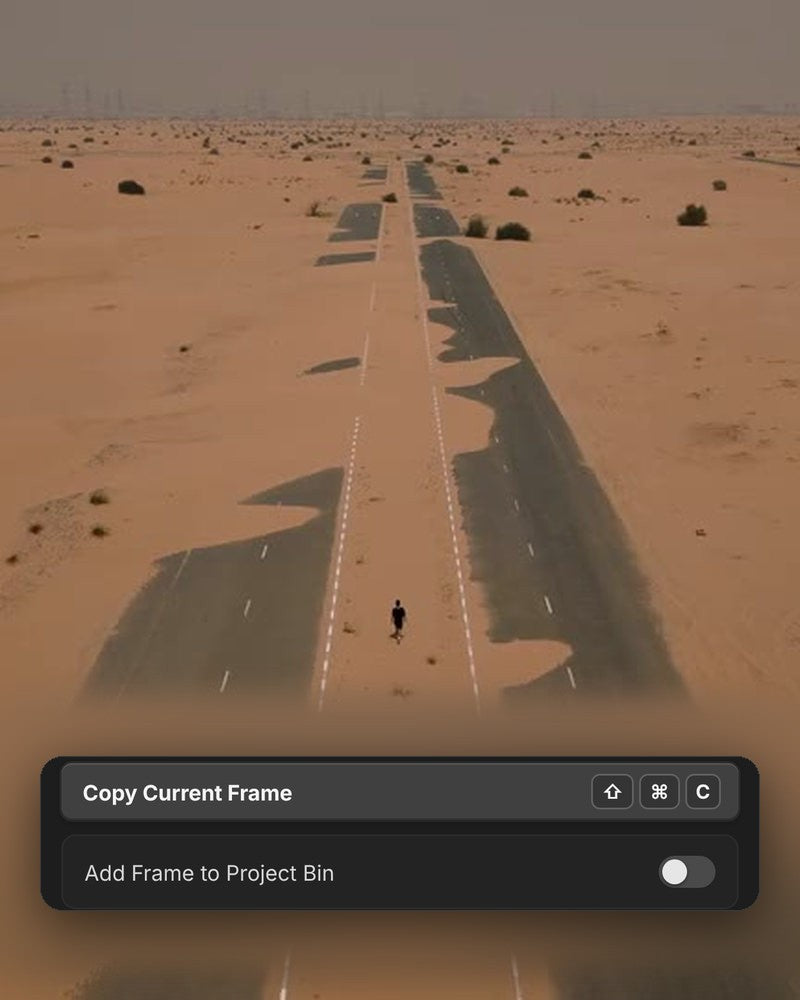
프레임 복사
프레임을 복사해서. 어디든 붙여넣기.
재생 헤드 아래 프레임을 원본 크기 PNG로, 채팅이나 이메일에 바로.
다운로드 구성
-
QuickPaste 앱
-
라이선스 키
-
Premiere Pro 플러그인
설치 프로그램과 라이선스 키. 둘 다 결제 시 바로 받고, 설치 프로그램이 QuickPaste 앱과 Premiere Pro 플러그인을 설치해 줘요.
-

Paste
Just paste. Nothing else to press.
Copy an image anywhere and press ⌘V in Premiere Pro. It lands on the timeline at the playhead, with no save and no import.
- From anywhereA browser, a screenshot, a chat or a design app.
- At the playheadOn a track that is free, so nothing moves.
- On WindowsCtrl+C and Ctrl+V work the same way.
Convert
Any image in. A clean PNG out.
Every copied image becomes a PNG before it reaches Premiere Pro. No converting by hand.
- Every image formatWebP, HEIC, AVIF, JPEG, GIF, TIFF, BMP and RAW.
- Nothing to download firstCopy an image on a web page and paste.
- Ready in your projectThe PNG lands in the bin you choose.
Colors
Copy a color. Get a matte.
Copy a color code from anywhere and press ⌘V. A color matte the size of your frame lands at the playhead.
- Every formatHEX, rgb(), hsl(), oklch(), cmyk() and more.
- Your frame sizeThe matte matches your sequence.
- Named by colorEach matte is named after its HEX value.
Gradients
Copy a gradient. Paste a gradient.
Paste a CSS linear or radial gradient. It becomes a gradient matte, sized to your sequence.
- Linear and radialRepeating gradients too.
- Same colorsEvery color stop, in its place.
- Easy to findEach one is named after its colors.
Text
Copy text. Get a title.
Copy any text, from a browser, a script or a chat, and press ⌘V. With Paste Text as Title on, it lands at the playhead as a title you can edit.
- Named for youThe clip takes the first line of your text.
- A real titleEdit it in Premiere Pro like any other.
- Your choiceOne switch in the panel turns it off.
PDFs and vectors
Paste a PDF. Get every page.
PDFs and SVGs are drawn sharp at your frame size. A PDF with several pages becomes one still per page, end to end.
- Up to 50 pagesOne after another from the playhead.
- Always sharpDrawn at your sequence’s frame size.
- Odd formats tooHEIC, AVIF, camera RAW and more become PNG.
Motion Graphics templates
A template? Paste it in.
Copy a .mogrt file and press ⌘V. It lands at the playhead, ready to edit.
- Its full lengthPlaced for the template’s whole duration.
- Never on your editIt goes on the lowest track that is free.
- Edit as usualChange its text and colors in Premiere Pro.
Several files
Copy a few. Paste them in order.
Copy files in Finder or File Explorer and press ⌘V. They land end to end at the playhead, on a track that is free.
- Nothing movesClips after the playhead are never pushed along.
- Lowest free trackPicked for the clips’ whole length.
- Anything Premiere importsVideo, audio, PSD, AI, AEP and more.
Bins
Every paste. In its bin.
Choose a bin in the panel, or make a new one. Everything you paste lands there.
- Your pickAny bin in your project, or the project root.
- New binName it in the panel and QuickPaste makes it.
- Files kept safeSaved in QuickPaste’s own folder, never a temp folder.
Copy frame
Need a still? Copy the frame.
Press ⇧⌘C in Premiere Pro. The frame under the playhead is on your clipboard, ready to paste anywhere.
- Full sizeA PNG at your sequence’s frame size.
- In your project tooTurn on Add Frame to Project Bin to keep a copy.
- On WindowsShift+Ctrl+C, and Ctrl+V to paste.
세 단계. 그다음 붙여넣기.
안내형 설치 프로그램 하나가 앱과 Premiere Pro 플러그인을 알아서 설치해 줘요.
1QuickPaste 다운로드
다운로드는 결제 직후 바로 표시돼요. 이메일로도 보내 드려요.
2설치 프로그램 실행
설치 프로그램을 열고 단계를 따르세요. 앱과 Premiere Pro 플러그인을 알아서 설치해 줘요.
3복사하고 붙여넣기
어디서든 이미지를 복사해서 Premiere Pro에 바로 붙여 넣으세요.

QuickPaste가 더해 주는 것.
대부분의 붙여넣기 플러그인은 버튼, 메뉴, 새 단축키를 추가해요. QuickPaste는 이미 누르고 있는 ⌘V나 Ctrl+V를 그대로 써요.


번들로 15% 할인
Premiere 키트를 한 번에.
- Asteria Pro부드러운 텍스트 애니메이션
- EaseFlow Pro부드러운 이징
- BetterFX모든 효과를, 단축키 하나로
- SuperGlow프리미엄 글로우
- QuickPaste이미지와 파일 붙여넣기
- Number Counter Pro움직이는 숫자
- ClearFrame ProSafe zones for every app
Specifications
- Version
- 1.5.6 · November 23, 2026 What's new
- Premiere Pro
- 2021–2027 and Premiere Pro (Beta)
- Operating system
- Mac macOS 11 or later, Apple silicon and IntelWindows 10 and 11, 64-bit
- Languages
- English, Deutsch, Français, Español, Português (Brasil), 日本語, 한국어
- Pastes
- Images, SVG, PDF, Illustrator artwork, styled text, MOGRTs, gradients and image links
- Keyboard shortcuts
- Colors
- HEX, RGB, HSL, CMYK and OKLCH
- Gradients
- CSS linear and radial
- Works offline
- Up to 7 days at a time
- License
- 2 computers, one-time payment
- Updates
- Free and automatic
- Download
- Mac 10.3 MB · Windows 4.8 MB
복사하세요. ⌘V 또는 Ctrl+V를 누르세요.
한 번 결제로 평생 소장.
- Premiere Pro 2021–2027
- Windows 및 Mac
환불 보장 작동하지 않으면
- 구매 후 14일 이내에 문의해 주세요.
- 24시간 이내에 해결을 도와드립니다.
- 해결하지 못하면 환불해 드립니다.