Stworzone przez ludzi, którzy uczą Premiere Pro.

Ponad 700 tutoriali i tysiące komentarzy pokazały nam, co spowalnia montażystów. Więc zbudowaliśmy narzędzia, jakich sami chcieliśmy jako montażyści: proste i bez kłopotów.

Obejrzyj tutoriale

Animowane liczby. Jednym kliknięciem.

Number Counter

Licz cokolwiek

58

Style

72

Szablony

Efekt + panel

Natywny efekt i okno panelu w jednej instalacji.

2

Komputery na licencję

30

Krzywych easingu

$99.99

Ceny, procenty i liczba obserwujących

Rozmycie ruchu

Dowolna czcionka

Poświata

Stworzony do szybkości

Akceleracja GPU. Szybko na każdym komputerze.

Premiere Pro 2021–2027

Płacisz raz. Masz na zawsze.

macOS Windows

Osobny instalator dla każdego.

Counting

Type two numbers. It counts.

Type a From and a To value in the panel. The counter runs from one to the other, up or down, and the preview plays it before you add it.

  • Any two numbersLike 0 to 250,000, or 2,400 down to 0.
  • SecondsSet how long the count takes.
  • Quick textOne click adds $, €, %, K, M, Followers, Views or Likes.

TemplatesPro

72 templates. Ready to count.

Followers, prices, percentages, speeds, scores and countdowns. Click one and the numbers, the text and the format are set.

  • 6 groupsSocial, Money, Stats, Measurements, Time, Sports and Games.
  • SearchFind one by name, or filter by group.
  • A starting pointChange any value after you click.

StylesPro

58 styles. One click each.

Gold, chrome, neon, gradients and bold outlines, in five groups with search. A style sets the color, stroke, shadow, glow and gradient, and leaves your numbers, text and font alone. The same 58 styles are in the effect's Style menu.

  • Essentials 8
  • Metals 10
  • Gradients 18
  • Neon 12
  • Outlines 10

Number format

Prices, percentages, big numbers.

Up to 10 decimals, with a comma, a period or a space between the thousands, your own separator, or none.

  • Decimals0 to 10 places. They count along with the number.
  • Separators1,000, 1.000, 1 000, or any text you type.
  • Steady digitsEvery digit takes the same width, so the number doesn't shift.

Text

Your font. Any text around it.

Pick any font installed on your computer. Put any text before and after the number, in any language.

  • FontsEvery installed font, with search and styles.
  • Size, tracking and capsPlus alignment, faux bold and faux italic.
  • Before and after$, %, km/h, Followers or a whole phrase.

Styling

Stroke, shadow, glow, gradient. Built in.

Each one is a switch with its own settings, so there are no extra effects to stack on the clip.

  • StrokeColor, width and order.
  • Shadow and glowDirection, distance and softness. Radius and intensity.
  • GradientTwo colors, down, across or diagonal, on the fill.

Motion

30 easing curves. Motion blur built in.

The easing sets how the count moves. Expo slows into the final number. Back and Bounce overshoot and settle.

  • Start delayHold the first number for up to 10 seconds.
  • Motion blurWith an adjustable shutter angle.
  • TransformPosition, scale, rotation and opacity built in.

Wiggle

Wiggle the whole text. Or every letter.

A handheld drift in position and rotation. Move the whole counter, each word or each letter on its own.

  • 3 modesWhole Text, Words or Letters.
  • Anchor pointChoose the point each piece rotates around.
  • Your own feelSpeed, sideways, up and down, rotation and seed.

Saved presetsPro

Save your own. Use them in every project.

Set up a counter you like and press Save as Preset. It keeps everything: the numbers, the text, the format and the style.

  • One clickYour presets load like the built-in ones.
  • In the effect tooSave Preset and Load Preset sit in Effect Controls.
  • Yours to keepEach preset is a file on your computer.

What you get

A native effect. And a panel that builds it for you.

Number Counter installs two things: an effect in your Effects panel and its own panel window. Build the counter in the panel, then fine-tune it in Effect Controls.

Number Counter in Premiere Pro's Effect Controls, with the effect name and its Presets, Counter and Number Format groups open.

The effectIn your Effects panel

A real Premiere Pro effect.

It renders on your graphics card like Premiere Pro's own effects, so the count plays back smoothly and exports fast.

  • GPU accelerated: Metal on Mac, CUDA on Windows
  • Every setting in Effect Controls, in 12 clear groups
  • Transparent, or drawn over the clip
  • Position, scale, rotation and opacity built in
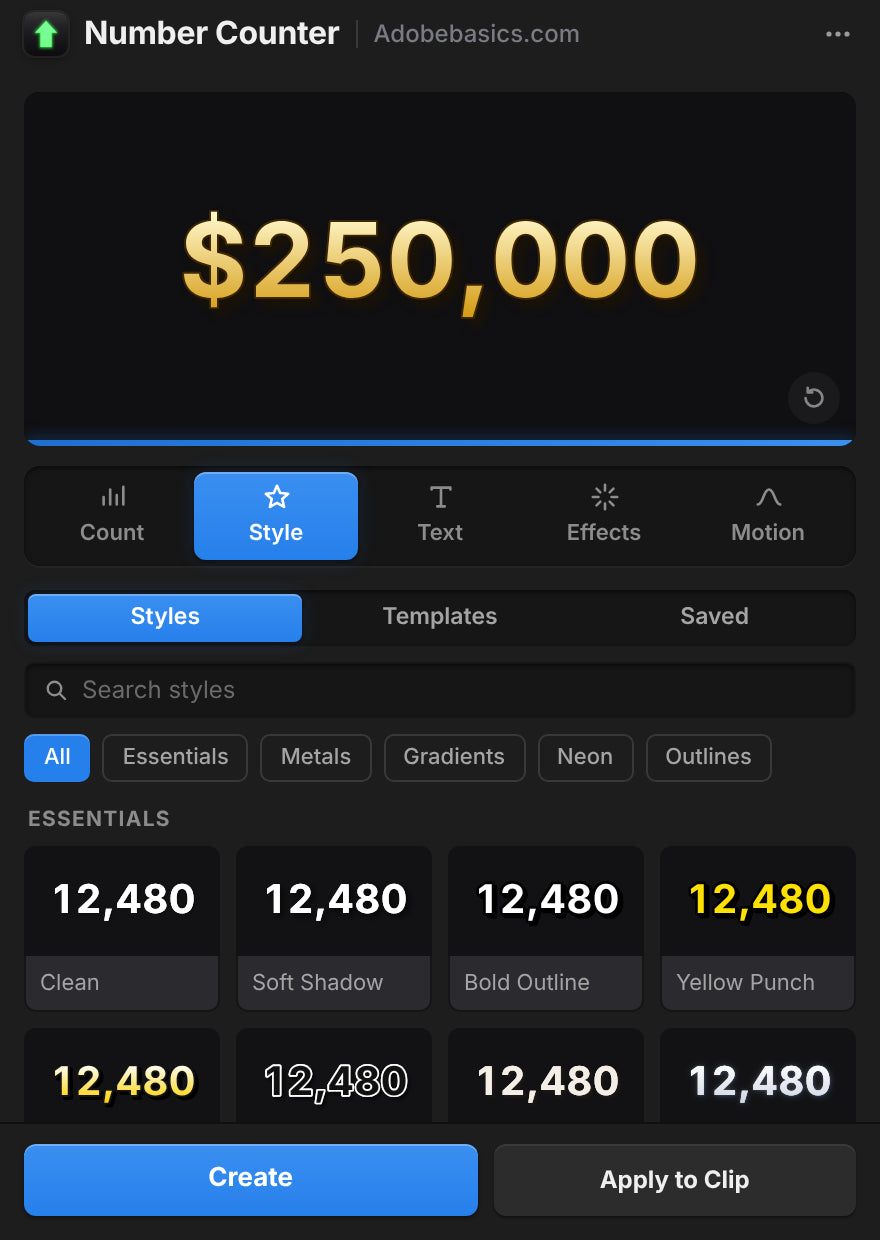
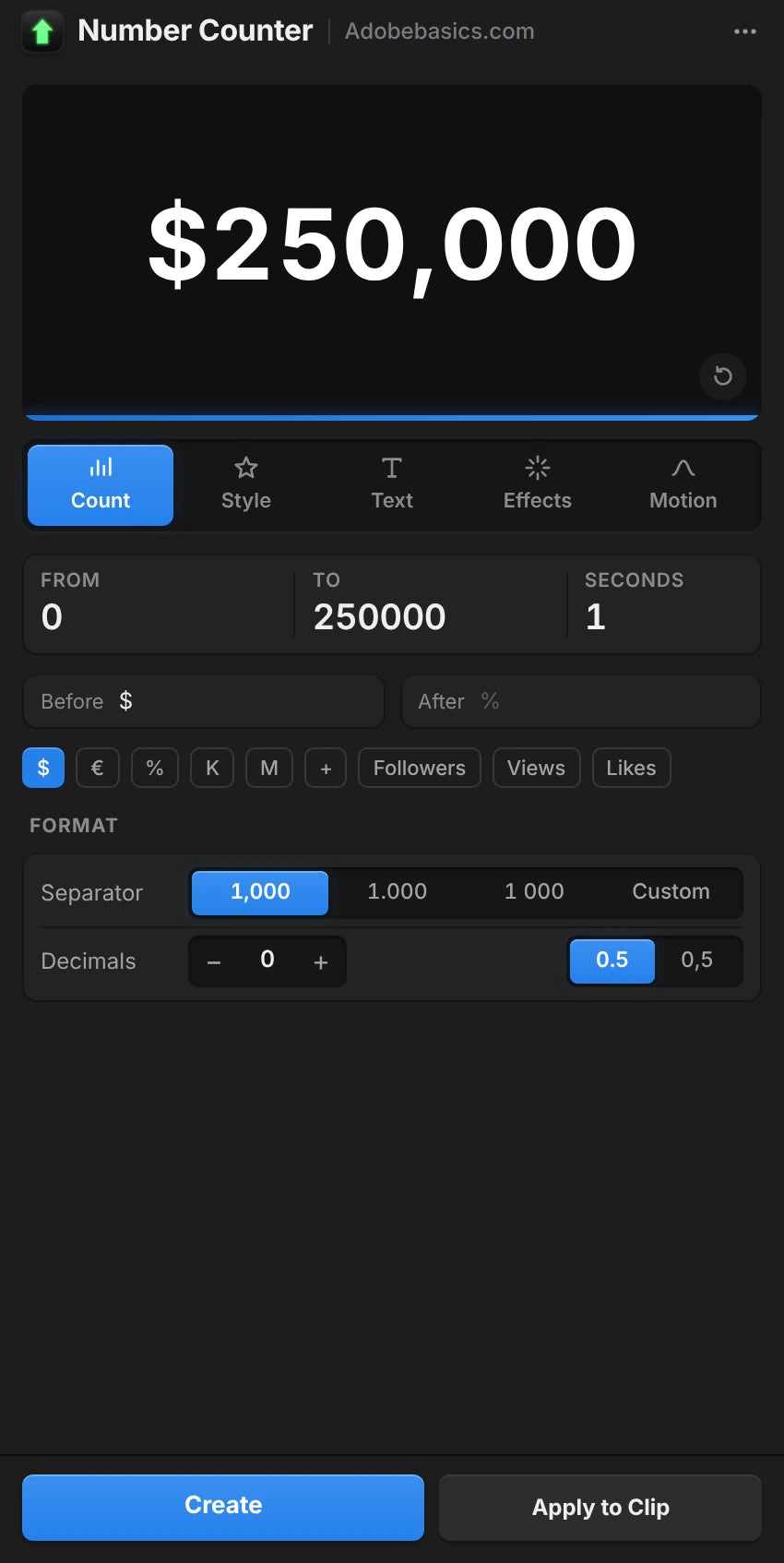
The Number Counter panel in Premiere Pro, on the Style tab with a gold $250,000 preview.

The panelIts own window

A panel that sets it up for you.

Build the counter with a live preview and add it in one click. Select a counter later and the panel loads it for editing.

  • Live preview with five tabs: Count, Style, Text, Effects and Motion
  • Create adds the counter on a new track
  • Apply to Clip puts it over your footage
  • Auto Apply updates the clip as you change things

Dwie wersje. Płacisz raz.

Obie wersje mają efekt i panel. Pro odblokowuje 58 stylów, własne presety i 72 szablony.

Number Counter Standard

Efekt i panel.

$29.99 one-time

  • Natywny efekt GPU i okno panelu
  • Podgląd na żywo, Create i Apply to Clip
  • Każde ustawienie: liczenie, format, tekst, styl i ruch
  • 30 krzywych easingu, wiggle i rozmycie ruchu
  • Dowolna zainstalowana czcionka, dowolny tekst przed i po
Wybierz Standard
Najpopularniejsza

Number Counter Pro

Odblokuj wszystko, co potrafi Number Counter.

130 stylów i szablonów

$34.99 one-time

Tylko $5 więcej niż Standard.

  • Wszystko ze Standard
  • Odblokuj 58 stylów w 5 grupach, od złota po neon
  • Odblokuj własne presety, by zapisywać swoje liczniki
  • Odblokuj 72 szablony dla obserwujących, cen, statystyk i nie tylko
  • Wyszukiwanie z filtrami grup
Wybierz Pro

Plik do pobrania i klucz licencyjny są gotowe zaraz po zakupie. Wysyłamy je też e-mailem.

Przestań budować liczniki od nowa.

Ręcznie płynne 2-sekundowe odliczanie to 60 klipów tekstowych przy 30 kl./s. Z Number Counter wpisujesz dwie liczby.

Funkcje Number Counter (polecany) Ręcznie w Premiere
Liczy sam, w dowolnej czcionce
Przecinki, miejsca dziesiętne i $ ustawione raz
Wbudowany easing i rozmycie ruchu
Style i szablony jednym kliknięciem 130
Renderuje na Twojej karcie graficznej
Zostaje w Premiere Pro

Każde ustawienie. Jeden efekt.

Licznik i format

  • Wartość początkowa i końcowa. Dowolne dwie liczby, w górę lub w dół.
  • Czas trwania. Jak długo trwa liczenie, w sekundach.
  • Opóźnienie startu. Trzyma pierwszą liczbę przed liczeniem.
  • 30 krzywych easingu. Od Linear po Expo, Back, Elastic i Bounce.
  • Miejsca dziesiętne. Od zera do 10.
  • Separator tysięcy. Przecinek, kropka, spacja, apostrof, brak lub własny.
  • Znak dziesiętny. Kropka lub przecinek.
  • Stała szerokość cyfr. Cyfry zachowują tę samą szerokość podczas liczenia.

Tekst i styl

  • Czcionka i styl. Dowolna zainstalowana czcionka.
  • Tekst przed i po. Dowolny tekst, w dowolnym języku.
  • Rozmiar, kolor i wyrównanie. Z własną pozycją tekstu.
  • Światło i wielkie litery. Wersaliki, kapitaliki, sztuczne pogrubienie i kursywa.
  • Obrys. Kolor, grubość i kolejność.
  • Cień. Kolor, krycie, kierunek, odległość i miękkość.
  • Poświata. Próg, promień i intensywność.
  • Gradient. Dwa kolory między dwoma punktami, na wypełnieniu.

Ruch i presety

  • Wiggle. Cały tekst, słowa lub litery, z punktem zakotwiczenia, prędkością, korelacją i ziarnem.
  • Rozmycie ruchu. Regulowany kąt migawki.
  • Transformacja. Pozycja, punkt zakotwiczenia, skala, obrót i krycie.
  • Tło. Przezroczyste lub nad klipem.
  • 58 stylów, w Pro. Essentials, Metals, Gradients, Neon i Outlines.
  • 72 szablony, w Pro. Social, Money, Stats, Measurements, Time, Sports i Games.
  • Zapisane presety, w Pro. Zapisuj własne liczniki i wczytuj je w dowolnym projekcie.

Specifications

Version
1.1.0 · November 21, 2026 What's new
Premiere Pro
2021–2027
Operating system
Mac macOS 11 or later, Apple silicon and IntelWindows 10 and 11, 64-bit
GPU accelerated
Metal on Mac, CUDA on NVIDIA graphics cards
Languages
English, Deutsch, Français, Español, Português (Brasil), 日本語, 한국어
Versions
Standard the effect, the panel and every settingPro adds 58 styles, 72 templates and your saved presets
Numbers
Any length, up to 10 decimals, any thousands separator, 30 easings
Fonts
Any font
Keyframeable
Every control, in Effect Controls
Text before and after
Any language, Arabic and Hebrew too
Resolution
Up to 8K
High bit depth
32-bit float and linear color
Works offline
Up to 7 days at a time
License
2 computers, one-time payment, commercial use
Updates
Free, from Check for Updates
Download

Trzy kroki. I liczy.

Jeden instalator dodaje efekt i panel do Premiere Pro.

  1. 1Pobierz Number Counter

    Plik do pobrania i klucz licencyjny pojawiają się zaraz po zakupie. Wysyłamy je też e-mailem.

  2. 2Uruchom instalator

    Zamknij Premiere Pro i uruchom go. Dodaje efekt i panel.

  3. 3Otwórz panel

    Wybierz Window › Extensions › Number Counter, wpisz liczby i kliknij Create.

Premiere Pro 2021 i nowsze · Windows 10 i 11 · macOS 11 i nowsze

Masz pytania?

Masz inne pytanie? Napisz do nas przez stronę kontaktową. Odpowiadamy w ciągu 24 godzin.

Zobacz pełne FAQ

Albo zapytaj 37K montażystów na naszym Discordzie

Pytania

10 items
  • Co dostaję?

    Dwie rzeczy w jednej instalacji: natywny efekt Premiere Pro o nazwie Number Counter i okno panelu, które buduje liczniki za Ciebie z podglądem na żywo. Używaj panelu, efektu albo obu.

  • Czy potrzebuję After Effects?

    Nie. Number Counter to natywny efekt Premiere Pro. Wszystko ustawiasz w Premiere Pro, na Windows i Macu.

  • Czym różni się Standard od Pro?

    Obie mają efekt i panel. Pro odblokowuje 58 stylów, własne presety i 72 szablony.

  • Czy może też odliczać w dół?

    Tak. Wpisz wartość początkową wyższą niż końcowa, np. 2400 do 0. Zegar odliczający znajdziesz w Countdown Timer.

  • Które wersje Premiere Pro są obsługiwane?

    Adobe Premiere Pro 2021–2027, na Windows 10 i 11 oraz na macOS 11 lub nowszym.

  • Jak go zainstalować?

    Pobierz instalator dla swojego komputera ze strony zamówienia i otwórz go. Uruchom ponownie Premiere Pro, a Number Counter pojawi się w panelu Effects i w Window › Extensions.

  • Na ilu komputerach mogę go używać?

    Na dwóch. Aby przenieść go na inny komputer, usuń jeden w Manage License.

  • Czy przyszłe aktualizacje są wliczone?

    Tak. Aktualizacje są bezpłatne, a nowy instalator jest na stronie zamówienia.

  • Czy mogę go używać w filmach dla klientów i monetyzowanych?

    Tak. Używaj go w nieograniczonej liczbie filmów prywatnych i komercyjnych, także w pracy dla klientów, na monetyzowanych kanałach i w reklamach. Jeden zakup to jeden użytkownik.

  • Czy jest gwarancja zwrotu pieniędzy?

    Tak. Jeśli nie działa w wersji Premiere Pro wymienionej na tej stronie, napisz do nas w ciągu 14 dni od zakupu. Odpowiadamy w ciągu 24 godzin i pomagamy to naprawić, a jeśli nie damy rady, oddajemy pieniądze. Starsze wersje Premiere Pro nie są objęte gwarancją, więc najpierw sprawdź swoją. Problemy spowodowane przez Premiere Pro, Twój komputer lub konfigurację też nie są objęte. Nie wpływa to na Twoje prawa konsumenckie. Przeczytaj pełną politykę zwrotów.

Płynne klatki kluczowe. O jedno kliknięcie stąd.

Każdy licznik, cena i statystyka, prosto w Premiere Pro. Płacisz raz, masz na zawsze.

Standard

Efekt i panel

$29.99

Pro Najpopularniejsza

Odblokuj 58 stylów, własne presety i 72 szablony

$34.99

  • Premiere Pro 2021–2027
  • Windows i Mac

Gwarancja zwrotu pieniędzy jeśli nie zadziała

Napisz do nas w ciągu 14 dni od zakupu. Pomoc w ciągu 24 godzin, by to naprawić. Jeśli nie uda się tego naprawić, oddamy Ci pieniądze.