






The QuickPaste panel, inside Premiere Pro


QuickPaste
Cole imagens direto no Premiere Pro.
Leve qualquer imagem para a sua edição com uma única tecla. Copie uma imagem da web, uma captura de tela ou um arquivo e pressione ⌘V ou Ctrl+V no Premiere Pro. Ela cai no bin que você escolher ou direto no indicador de reprodução, sem salvar nem importar nada antes.
 Premiere Pro 2021–2027
- Windows e Mac
- Atualizações grátis

On your phone? Get the link on your computer.
Garantia de reembolso Não funciona no seu Premiere Pro? Fale com a gente em até 14 dias.
QuickPaste
Feito por quem ensina Premiere Pro.
Mais de 700 tutoriais e milhares de comentários mostraram o que atrasa os editores. Então criamos as ferramentas que a gente queria como editores: simples e sem dor de cabeça.
Ver os tutoriais- 200K+editores usam nossas ferramentas
- 30M+visualizações nos nossos tutoriais do YouTube
- 90K+seguidores nas redes
- 37K+editores na nossa comunidade do Discord
Copie. Cole. Continue editando.
O seu colar de sempre.
Direto no Premiere Pro.
Arquivos da Adobe também.
Cole uma cor
HEX, RGB, HSL, CMYK ou OKLCH.
Qualquer imagem
Até HEIC, AVIF e RAW.

Premiere Pro 2021–2027
O essencial.
-
Colar
Copie. Cole no Premiere.
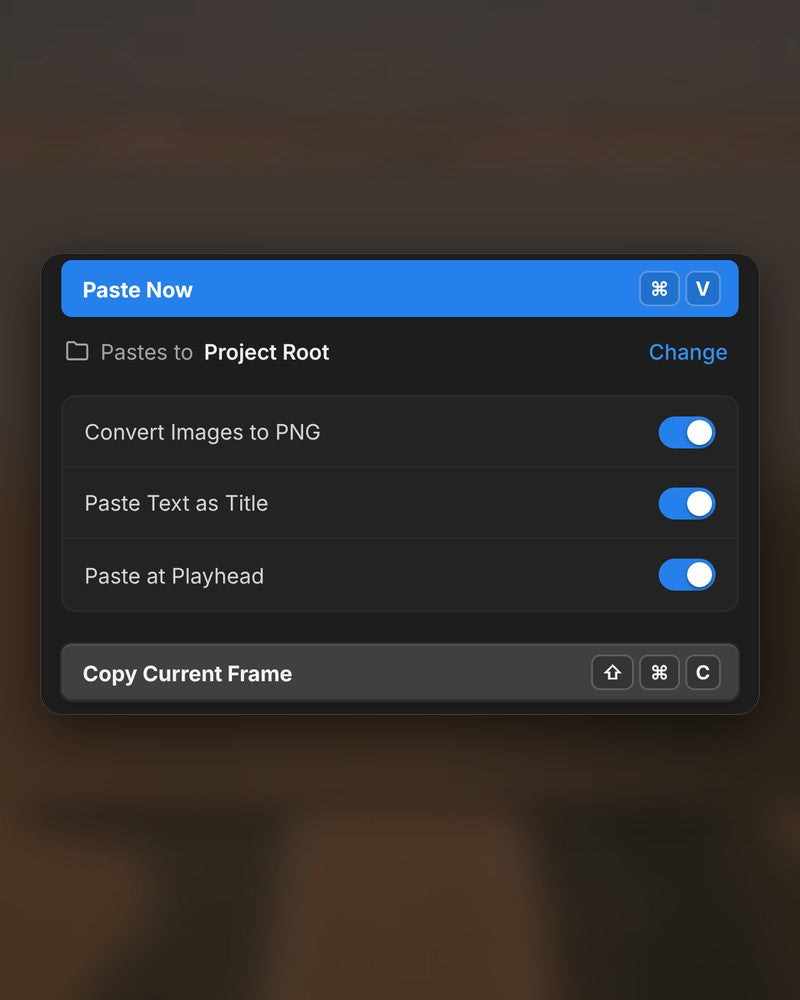
Copie uma imagem de qualquer lugar e aperte ⌘V. Ela vai para o seu bin, ou para a timeline com Paste at Playhead.
-
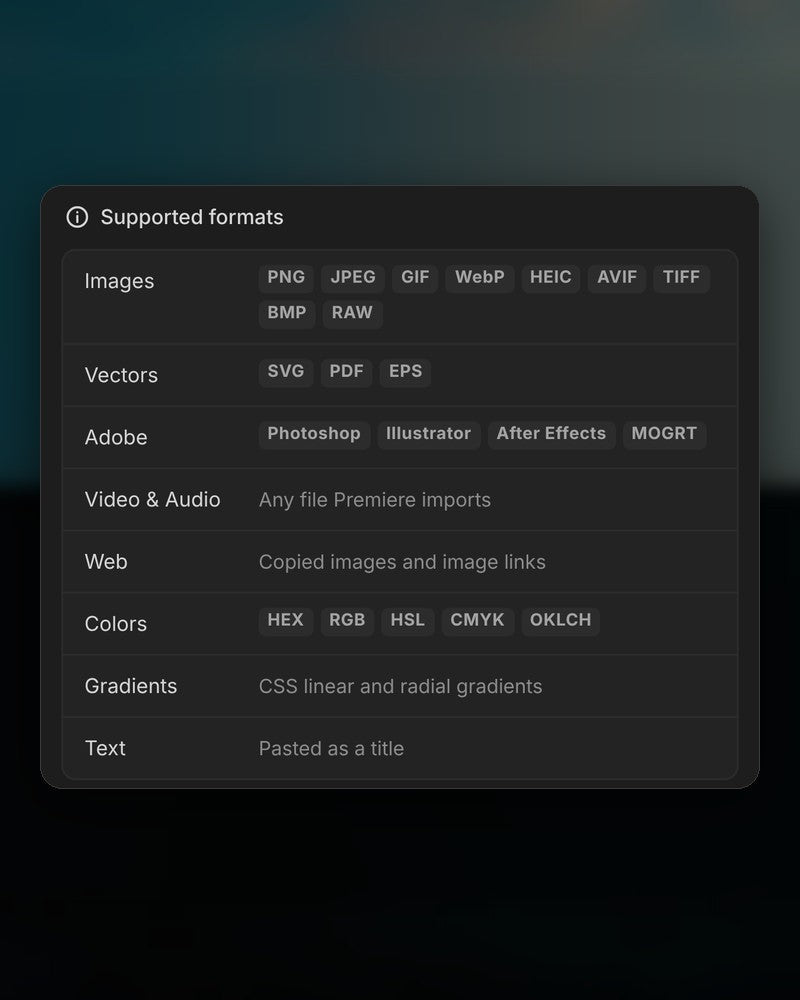
Formatos
Imagens, arquivos, cores e texto.
Imagens chegam como PNG, até WebP e HEIC. Arquivos do Photoshop, Illustrator e After Effects também podem ser colados.
-
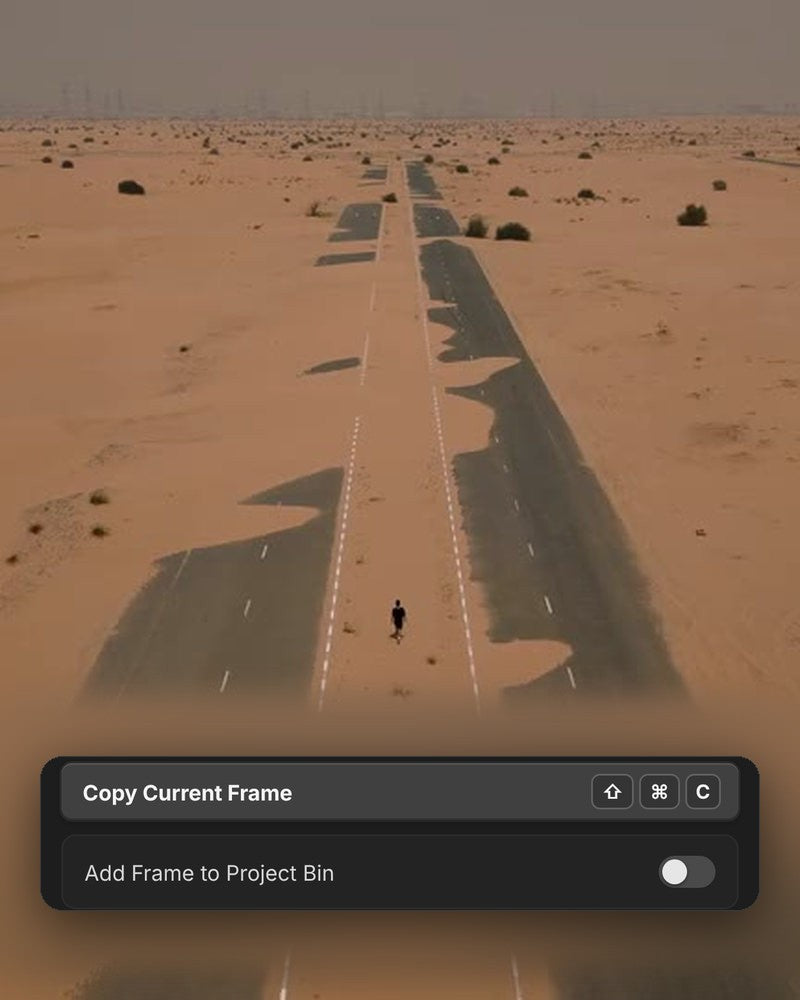
Copiar quadro
Copie o quadro. Cole onde quiser.
O quadro sob o indicador de reprodução, como PNG em tamanho real, pronto para um chat ou e-mail.
No download
-
App QuickPaste
-
Chave de licença
-
Plugin para Premiere Pro
O instalador e sua chave de licença. Os dois chegam na compra, e o instalador instala o app QuickPaste e o plugin do Premiere Pro para você.
-

Paste
Just paste. Nothing else to press.
Copy an image anywhere and press ⌘V in Premiere Pro. It lands on the timeline at the playhead, with no save and no import.
- From anywhereA browser, a screenshot, a chat or a design app.
- At the playheadOn a track that is free, so nothing moves.
- On WindowsCtrl+C and Ctrl+V work the same way.
Convert
Any image in. A clean PNG out.
Every copied image becomes a PNG before it reaches Premiere Pro. No converting by hand.
- Every image formatWebP, HEIC, AVIF, JPEG, GIF, TIFF, BMP and RAW.
- Nothing to download firstCopy an image on a web page and paste.
- Ready in your projectThe PNG lands in the bin you choose.
Colors
Copy a color. Get a matte.
Copy a color code from anywhere and press ⌘V. A color matte the size of your frame lands at the playhead.
- Every formatHEX, rgb(), hsl(), oklch(), cmyk() and more.
- Your frame sizeThe matte matches your sequence.
- Named by colorEach matte is named after its HEX value.
Gradients
Copy a gradient. Paste a gradient.
Paste a CSS linear or radial gradient. It becomes a gradient matte, sized to your sequence.
- Linear and radialRepeating gradients too.
- Same colorsEvery color stop, in its place.
- Easy to findEach one is named after its colors.
Text
Copy text. Get a title.
Copy any text, from a browser, a script or a chat, and press ⌘V. With Paste Text as Title on, it lands at the playhead as a title you can edit.
- Named for youThe clip takes the first line of your text.
- A real titleEdit it in Premiere Pro like any other.
- Your choiceOne switch in the panel turns it off.
PDFs and vectors
Paste a PDF. Get every page.
PDFs and SVGs are drawn sharp at your frame size. A PDF with several pages becomes one still per page, end to end.
- Up to 50 pagesOne after another from the playhead.
- Always sharpDrawn at your sequence’s frame size.
- Odd formats tooHEIC, AVIF, camera RAW and more become PNG.
Motion Graphics templates
A template? Paste it in.
Copy a .mogrt file and press ⌘V. It lands at the playhead, ready to edit.
- Its full lengthPlaced for the template’s whole duration.
- Never on your editIt goes on the lowest track that is free.
- Edit as usualChange its text and colors in Premiere Pro.
Several files
Copy a few. Paste them in order.
Copy files in Finder or File Explorer and press ⌘V. They land end to end at the playhead, on a track that is free.
- Nothing movesClips after the playhead are never pushed along.
- Lowest free trackPicked for the clips’ whole length.
- Anything Premiere importsVideo, audio, PSD, AI, AEP and more.
Bins
Every paste. In its bin.
Choose a bin in the panel, or make a new one. Everything you paste lands there.
- Your pickAny bin in your project, or the project root.
- New binName it in the panel and QuickPaste makes it.
- Files kept safeSaved in QuickPaste’s own folder, never a temp folder.
Copy frame
Need a still? Copy the frame.
Press ⇧⌘C in Premiere Pro. The frame under the playhead is on your clipboard, ready to paste anywhere.
- Full sizeA PNG at your sequence’s frame size.
- In your project tooTurn on Add Frame to Project Bin to keep a copy.
- On WindowsShift+Ctrl+C, and Ctrl+V to paste.
Três passos. Depois, cole.
Um instalador guiado configura o app e o plugin do Premiere Pro para você.
1Baixar QuickPaste
Seu download aparece logo depois da compra. Também enviamos por e-mail.
2Execute o instalador
Abra o instalador e siga os passos. Ele instala o app e o plugin do Premiere Pro para você.
3Copie e cole
Copie uma imagem de qualquer lugar e cole direto no Premiere Pro.

O que o QuickPaste acrescenta.
A maioria dos plugins de colar adiciona um botão, um menu ou um atalho novo. O QuickPaste usa o ⌘V ou Ctrl+V que você já aperta.


Leve o combo e economize 15%
O kit completo do Premiere.
- Asteria ProAnimações de texto suaves
- EaseFlow ProEasing suave
- BetterFXTodos os efeitos, um só atalho
- SuperGlowBrilho premium
- QuickPasteColar imagens e arquivos
- Number Counter ProNúmeros animados
- ClearFrame ProSafe zones for every app
Specifications
- Version
- 1.5.6 · 23 de novembro de 2026 What's new
- Premiere Pro
- 2021–2027 and Premiere Pro (Beta)
- Operating system
- Mac macOS 11 or later, Apple silicon and IntelWindows 10 and 11, 64-bit
- Languages
- English, Deutsch, Français, Español, Português (Brasil), 日本語, 한국어
- Pastes
- Images, SVG, PDF, Illustrator artwork, styled text, MOGRTs, gradients and image links
- Keyboard shortcuts
- Colors
- HEX, RGB, HSL, CMYK and OKLCH
- Gradients
- CSS linear and radial
- Works offline
- Up to 7 days at a time
- License
- 2 computers, one-time payment
- Updates
- Free and automatic
- Download
- Mac 10.3 MB · Windows 4.8 MB
Copie. Aperte ⌘V ou Ctrl+V.
Pague uma vez, use para sempre.
- Premiere Pro 2021–2027
- Windows e Mac
Garantia de reembolso se não funcionar
- Fale com a gente em até 14 dias após a compra.
- Ajuda em até 24 horas para resolver.
- Se não conseguirmos resolver, você recebe seu dinheiro de volta.