






The QuickPaste panel, inside Premiere Pro


QuickPaste
วางรูปภาพลงใน Premiere Pro โดยตรง
นำรูปภาพใดก็ได้เข้าสู่งานตัดต่อด้วยการกดปุ่มเดียว คัดลอกรูปจากเว็บ ภาพหน้าจอ หรือไฟล์ แล้วกด ⌘V หรือ Ctrl+V ใน Premiere Pro รูปจะไปอยู่ใน bin ที่คุณเลือกหรือที่หัวอ่านทันที โดยไม่ต้องบันทึกหรือนำเข้าก่อน
 Premiere Pro 2021–2027
- Windows และ Mac
- อัปเดตฟรี

On your phone? Get the link on your computer.
รับประกันคืนเงิน ใช้งานใน Premiere Pro ของคุณไม่ได้ใช่ไหม? ติดต่อเราภายใน 14 วัน
QuickPaste
สร้างโดยคนที่ สอน Premiere Pro
บทเรียนกว่า 700 ตอนและความคิดเห็นนับพันทำให้เรารู้ว่าอะไรทำให้นักตัดต่อทำงานช้าลง เราจึงสร้างเครื่องมือที่เราอยากได้ในฐานะนักตัดต่อ: เรียบง่ายและไม่ยุ่งยาก
ดูบทเรียน- 200K+นักตัดต่อใช้เครื่องมือของเรา
- 30M+ยอดวิวบนบทเรียน YouTube ของเรา
- 90K+ผู้ติดตามบนโซเชียลมีเดีย
- 37K+นักตัดต่อในชุมชน Discord ของเรา
คัดลอก วาง ตัดต่อต่อ
การวางแบบปกติของคุณ
ลงใน Premiere Pro โดยตรง
วางไฟล์ Adobe ได้ด้วย
วางสี
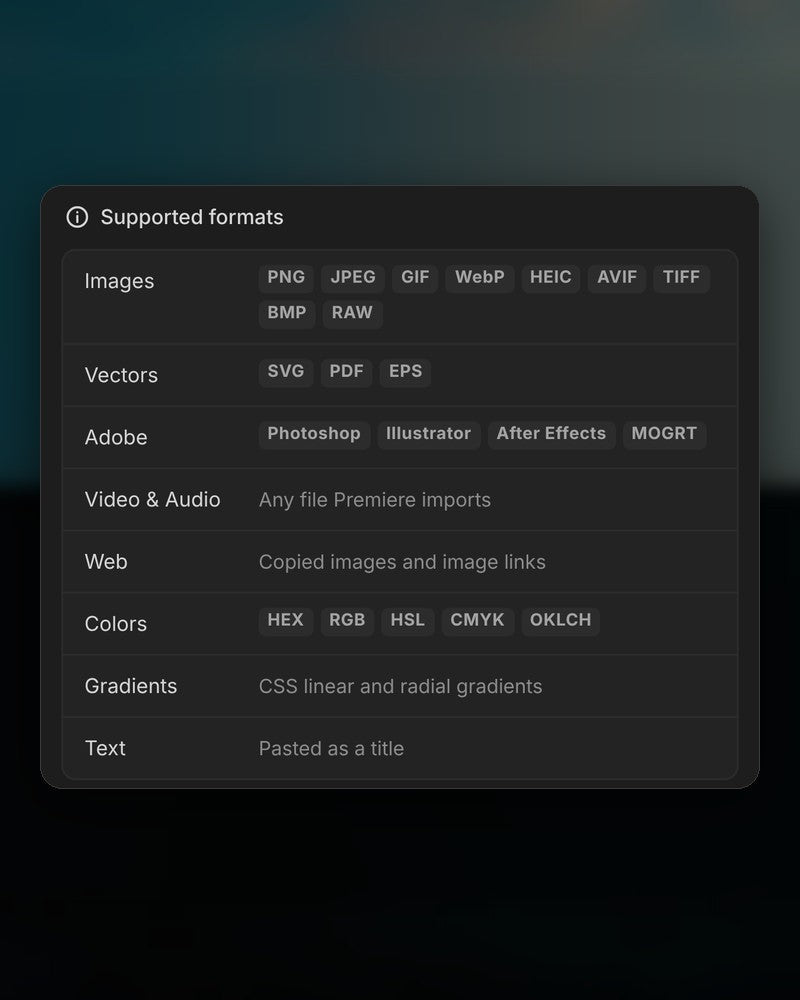
HEX, RGB, HSL, CMYK หรือ OKLCH
รูปภาพใดก็ได้
แม้แต่ HEIC, AVIF และ RAW

Premiere Pro 2021–2027
ดูไฮไลต์
-
วาง
คัดลอก แล้ววางลงใน Premiere
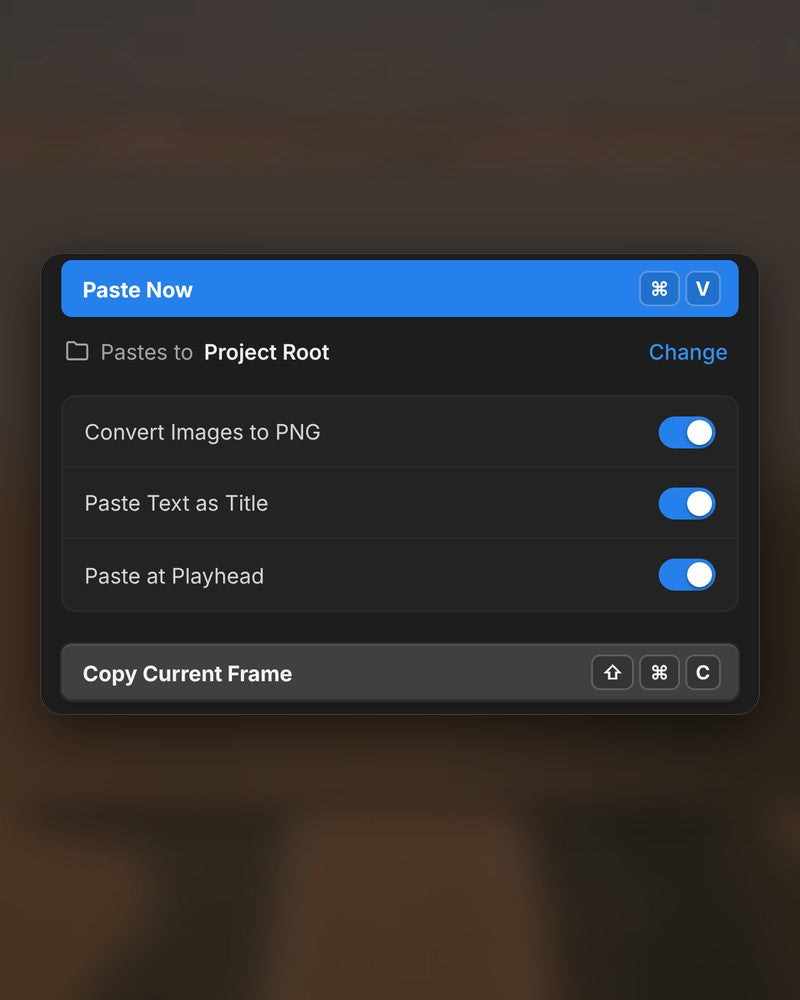
คัดลอกรูปภาพจากที่ไหนก็ได้แล้วกด ⌘V รูปจะไปอยู่ใน bin หรือบนไทม์ไลน์เมื่อเปิด Paste at Playhead
-
รูปแบบ
รูปภาพ ไฟล์ สี และข้อความ
รูปภาพมาเป็น PNG แม้แต่ WebP และ HEIC ไฟล์ Photoshop, Illustrator และ After Effects ก็วางได้ด้วย
-
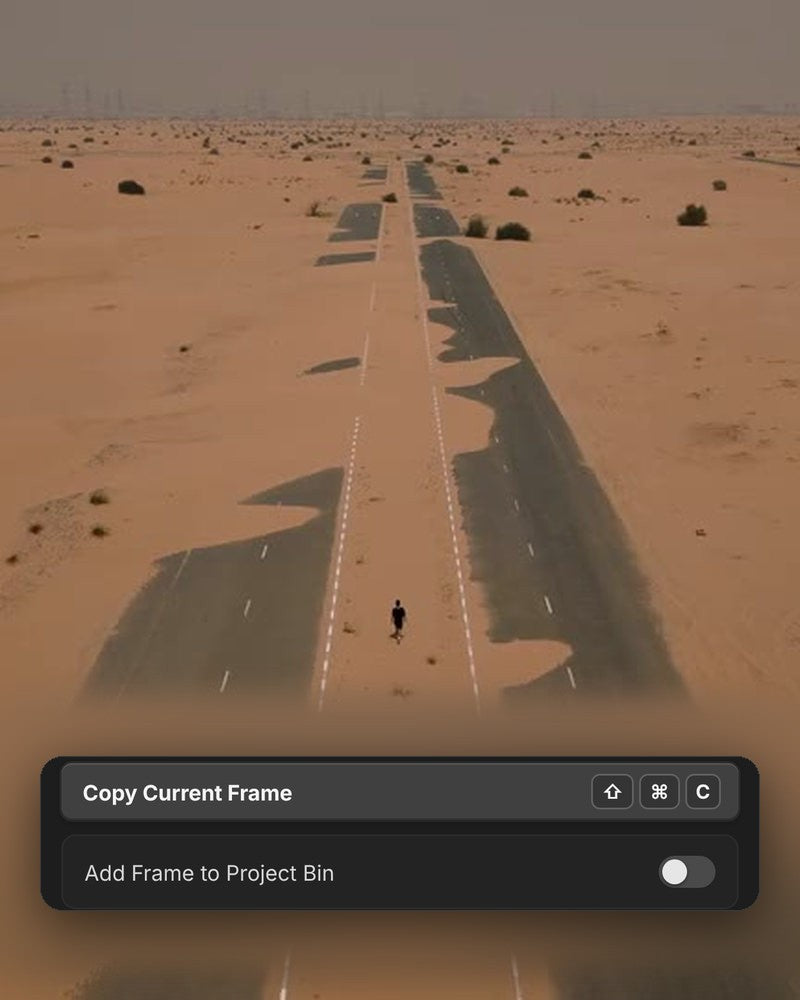
คัดลอกเฟรม
คัดลอกเฟรม วางได้ทุกที่
เฟรมใต้หัวอ่าน เป็น PNG ขนาดเต็ม พร้อมสำหรับแชตหรืออีเมล
ในไฟล์ดาวน์โหลด
-
แอป QuickPaste
-
คีย์ไลเซนส์
-
ปลั๊กอิน Premiere Pro
ตัวติดตั้งและคีย์ไลเซนส์ของคุณ ทั้งสองมาถึงตอนชำระเงิน และตัวติดตั้งจะตั้งค่าแอป QuickPaste และปลั๊กอิน Premiere Pro ให้คุณ
-

Paste
Just paste. Nothing else to press.
Copy an image anywhere and press ⌘V in Premiere Pro. It lands on the timeline at the playhead, with no save and no import.
- From anywhereA browser, a screenshot, a chat or a design app.
- At the playheadOn a track that is free, so nothing moves.
- On WindowsCtrl+C and Ctrl+V work the same way.
Convert
Any image in. A clean PNG out.
Every copied image becomes a PNG before it reaches Premiere Pro. No converting by hand.
- Every image formatWebP, HEIC, AVIF, JPEG, GIF, TIFF, BMP and RAW.
- Nothing to download firstCopy an image on a web page and paste.
- Ready in your projectThe PNG lands in the bin you choose.
Colors
Copy a color. Get a matte.
Copy a color code from anywhere and press ⌘V. A color matte the size of your frame lands at the playhead.
- Every formatHEX, rgb(), hsl(), oklch(), cmyk() and more.
- Your frame sizeThe matte matches your sequence.
- Named by colorEach matte is named after its HEX value.
Gradients
Copy a gradient. Paste a gradient.
Paste a CSS linear or radial gradient. It becomes a gradient matte, sized to your sequence.
- Linear and radialRepeating gradients too.
- Same colorsEvery color stop, in its place.
- Easy to findEach one is named after its colors.
Text
Copy text. Get a title.
Copy any text, from a browser, a script or a chat, and press ⌘V. With Paste Text as Title on, it lands at the playhead as a title you can edit.
- Named for youThe clip takes the first line of your text.
- A real titleEdit it in Premiere Pro like any other.
- Your choiceOne switch in the panel turns it off.
PDFs and vectors
Paste a PDF. Get every page.
PDFs and SVGs are drawn sharp at your frame size. A PDF with several pages becomes one still per page, end to end.
- Up to 50 pagesOne after another from the playhead.
- Always sharpDrawn at your sequence’s frame size.
- Odd formats tooHEIC, AVIF, camera RAW and more become PNG.
Motion Graphics templates
A template? Paste it in.
Copy a .mogrt file and press ⌘V. It lands at the playhead, ready to edit.
- Its full lengthPlaced for the template’s whole duration.
- Never on your editIt goes on the lowest track that is free.
- Edit as usualChange its text and colors in Premiere Pro.
Several files
Copy a few. Paste them in order.
Copy files in Finder or File Explorer and press ⌘V. They land end to end at the playhead, on a track that is free.
- Nothing movesClips after the playhead are never pushed along.
- Lowest free trackPicked for the clips’ whole length.
- Anything Premiere importsVideo, audio, PSD, AI, AEP and more.
Bins
Every paste. In its bin.
Choose a bin in the panel, or make a new one. Everything you paste lands there.
- Your pickAny bin in your project, or the project root.
- New binName it in the panel and QuickPaste makes it.
- Files kept safeSaved in QuickPaste’s own folder, never a temp folder.
Copy frame
Need a still? Copy the frame.
Press ⇧⌘C in Premiere Pro. The frame under the playhead is on your clipboard, ready to paste anywhere.
- Full sizeA PNG at your sequence’s frame size.
- In your project tooTurn on Add Frame to Project Bin to keep a copy.
- On WindowsShift+Ctrl+C, and Ctrl+V to paste.
สามขั้นตอน แล้ววาง
ตัวติดตั้งแบบมีคำแนะนำตัวเดียวจะตั้งค่าแอปและปลั๊กอิน Premiere Pro ให้คุณ
1ดาวน์โหลด QuickPaste
ไฟล์ดาวน์โหลดจะแสดงทันทีหลังชำระเงิน เราส่งอีเมลให้คุณด้วย
2เรียกใช้ตัวติดตั้ง
เปิดตัวติดตั้งแล้วทำตามขั้นตอน ตัวติดตั้งจะตั้งค่าแอปและปลั๊กอิน Premiere Pro ให้คุณ
3คัดลอก แล้ววาง
คัดลอกรูปภาพจากที่ไหนก็ได้ แล้ววางลงใน Premiere Pro โดยตรง

สิ่งที่ QuickPaste เพิ่มให้
ปลั๊กอินวางส่วนใหญ่เพิ่มปุ่ม เมนู หรือช็อตคัตใหม่ QuickPaste ใช้ ⌘V หรือ Ctrl+V ที่คุณกดอยู่แล้ว


ซื้อเป็นชุดประหยัด 15%
รับชุด Premiere ครบเซ็ต
- Asteria ProSmooth text animations
- EaseFlow Proeasing ที่ลื่นไหล
- BetterFXทุกเอฟเฟกต์ ช็อตคัตเดียว
- SuperGlowแสงเรืองระดับพรีเมียม
- QuickPasteวางรูปภาพและไฟล์
- Number Counter ProAnimated numbers
- ClearFrame ProSafe zones for every app
Specifications
- Version
- 1.5.3 · 21 พฤศจิกายน 2026 What's new
- Premiere Pro
- 2021–2027 and Premiere Pro (Beta)
- Operating system
- Mac macOS 11 or later, Apple silicon and IntelWindows 10 and 11, 64-bit
- Languages
- English, Deutsch, Français, Español, Português (Brasil), 日本語, 한국어
- Pastes
- Images, SVG, PDF, Illustrator artwork, styled text, MOGRTs, gradients and image links
- Keyboard shortcuts
- Colors
- HEX, RGB, HSL, CMYK and OKLCH
- Gradients
- CSS linear and radial
- Works offline
- Up to 7 days at a time
- License
- 2 computers, one-time payment
- Updates
- Free and automatic
- Download
- Mac 10.3 MB · Windows 4.8 MB
คัดลอก กด ⌘V หรือ Ctrl+V
จ่ายครั้งเดียว ใช้ได้ตลอดไป
- Premiere Pro 2021–2027
- Windows และ Mac
รับประกันคืนเงิน หากใช้งานไม่ได้
- ติดต่อเราภายใน 14 วันหลังจากซื้อ
- เราช่วยแก้ไขภายใน 24 ชั่วโมง
- หากเราแก้ไขไม่ได้ คุณจะได้รับเงินคืน