





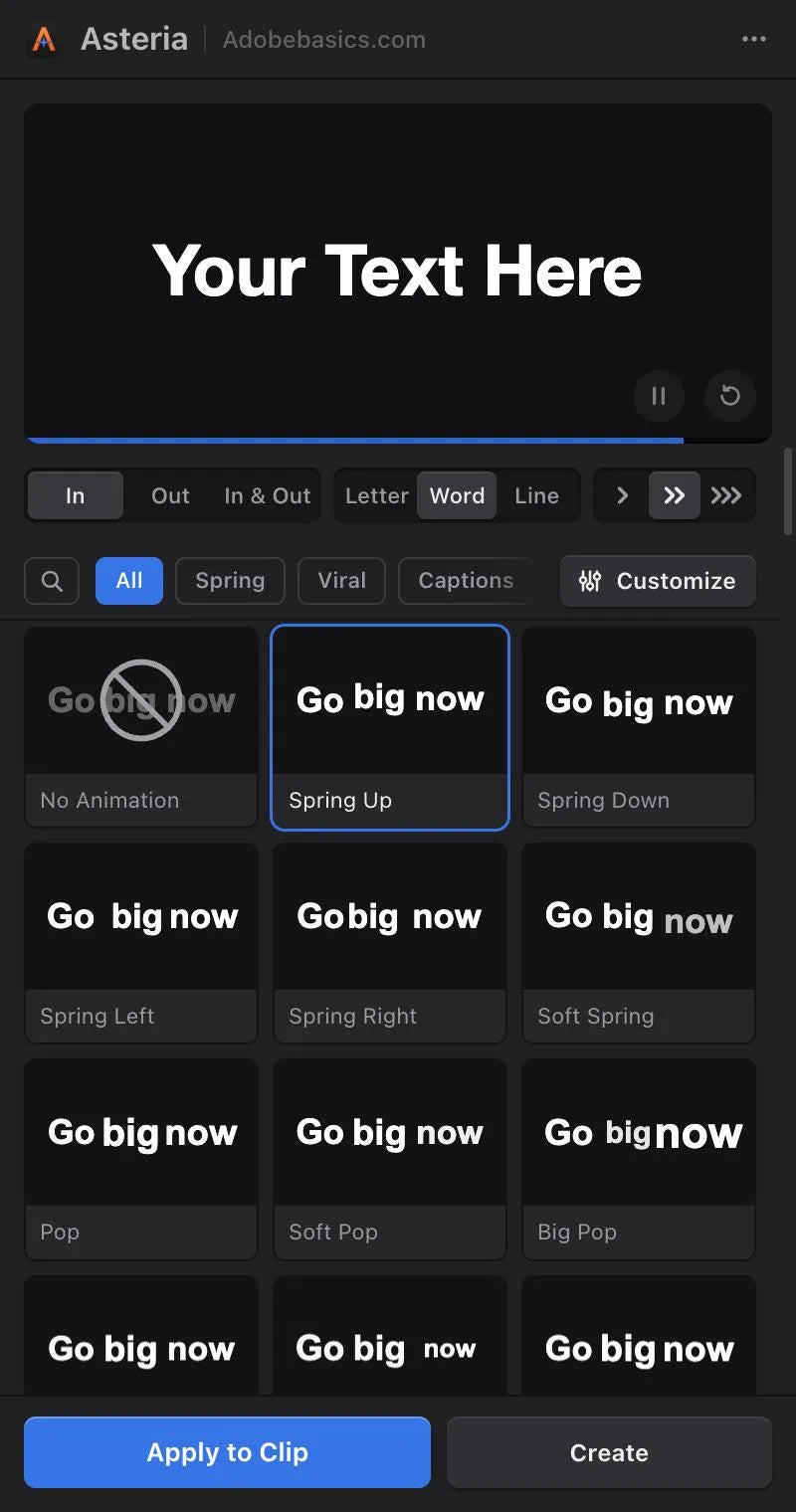
The Asteria panel, inside Premiere Pro


Asteria
Smooth text animations in one click.
Plain text gets scrolled past. Asteria animates any title or caption by letter, word or line, with springs, pops and reveals that feel hand-animated. Click an animation and it's on your clip. No keyframes, no After Effects.
 Premiere Pro 2021–2027
- Windows and Mac
- Free updates

退款保證 在你的 Premiere Pro 中無法使用?請在 14 天內與我們聯絡。
Asteria
- 200K+位剪輯師使用我們的工具
- 30M+次 YouTube 教學觀看
- 90K+位社群追蹤者
- 37K+位剪輯師在我們的 Discord 社群
Works on your text.
Select your Premiere text clip and click. Your words, font and position stay.
Animations in Pro
GPU accelerated on Mac and Windows, so playback stays smooth.
Springs you can feel
Words overshoot, bounce and settle, like the big channels.
By letter, word or line
Speed, bounce, stagger and order. In Asteria Pro.

Premiere Pro 2021–2027
A menu-bar app keeps it up to date.
Click. It's animated.
Pick an animation in the panel and it's on your clip, with your words and your font.
-
The panel
Browse, click, done.
Every tile plays as you hover. Click one and the preview shows it, then Apply puts it on your clip.
Springs you can feel.
The look of the big channels: words and letters that overshoot, settle and land. From a soft glide to a big bounce.
-
Bouncy by letter. -
Soft spring by letter. -
Pop by word. -
Smooth spring by line. -
Drop by letter. -
Squash and stretch by word.
206 animations
Titles that grab the first second.
Pops, springs and drops for hooks, intros and punchlines.
- Spring and Viral groupsPop, Big Pop, Spring Up, Drop and more.
- By letter, word or lineThe same animation, three ways.
- In and OutAn entrance and an exit for every title.
Captions
Captions for Reels, TikTok and Shorts.
Word-by-word highlights that keep viewers reading.
- Highlight boxMoves from word to word, any color.
- Highlight wordsPut *stars* around a word to color it.
- Caption timingWord by word, at the pace you set.
Cinematic
Reveals for cinematic edits.
Masks and wipes for quiet, precise titles.
- Mask revealRises out of an invisible edge.
- WipesRight, left, up or down.
- Blur and fadeSoft entrances for slow edits.
Tech and gamingPro
Glitch and decode.
Scrambled letters and glitch hits for tech, gaming and trailers.
- DecodeRandom letters settle into your words.
- GlitchJitter, dropouts and a color split.
- TypewriterOne letter at a time.
Animation settingsPro
Make every animation yours.
Every animation is a starting point. Drag a value and the preview follows.
- Speed and bounceHow fast it moves, how much it overshoots.
- Stagger and orderFirst, last, center, edges or random.
- Duration and timingWhen it starts and how long it takes.
Custom animationsPro
Save it once. Use it on every video.
Save your settings as a custom animation and it's in your library for the next video, with favorites a click away.
- Your custom animationsSaved with a name, in every project.
- FavoritesStar the ones you use most.
- One style per channelThe same look on every video.
Basic or Pro.
Basic has 40 essentials, with no animation settings. Pro unlocks everything, including custom animations.
-
Asteria Basic
Pro animations, shown with a lock.
Basic users see every Pro animation in the gallery. Upgrade any time to unlock them.
Two versions. Pay once.
Both apply in one click, by letter, word or line. Pro adds every animation, animation settings and custom animations.
Asteria Basic
40 essentials for everyday titles.
40 animations
$69.99 one-time
- One click puts it on your clip
- By letter, word or line
- 25 In and 15 Out animations
- Any font, outline and shadow
- Performance optimized, Windows and Mac
- No animation settings or custom animations
Asteria Pro
Every animation, every setting, your custom animations.
206 animations
$79.99$99.99
省 20%
Only $10 more than Basic.
- Everything in Basic
- All 206 animations: springs, captions, reveals, glitch
- Animation settings: speed, bounce, stagger, order, timing
- Save custom animations and favorites
- Every new animation we add later
Already own Basic? 升級到 Pro
Your license key and download links arrive by email right after checkout.
Premiere Pro, or Asteria.
Animating a title word by word in Premiere means a layer and keyframes for every word. With Asteria, you click once.


In the download
-
Asteria plugin
-
License key
-
Asteria effect
Yours the moment you pay. Your license key and installer arrive at checkout and by email. The installer adds the Asteria effect, the panel and the menu-bar app to Premiere Pro.
-


Three steps. One click.
One installer sets up the effect, the panel and the menu-bar app.
1Download Asteria
Your installer and license key show up right after checkout. We also email them to you.
2Run the installer
It adds Asteria to Premiere Pro and activates it for you.
3Click an animation
Open Window › Extensions › Asteria, select a clip, click a tile.

流暢的關鍵影格。 一鍵完成。
Pick a version. Pay once, keep it forever.
- Premiere Pro 2021–2027
- Windows and Mac
退款保證 無法使用時
購買後 14 天內與我們聯絡。 24 小時內協助你解決問題。 如果無法解決,我們會退款給你。