由教 Premiere Pro 的人 親手打造。

700 多支教學影片和數千則留言,讓我們看見拖慢剪輯師的是什麼。 所以我們做出了身為剪輯師想要的工具:簡單、不麻煩。

觀看教學

動態數字。一鍵完成。

Number Counter

什麼都能數

58

樣式

72

範本

效果 + 面板

原生效果加面板視窗,一次安裝。

2

每份授權可用電腦數

30

緩動曲線

$99.99

價格、百分比和追蹤人數

動態模糊

任何字型

光暈

為速度而生

GPU 加速。每台電腦都快。

Premiere Pro 2021–2027

一次付費,永久使用。

macOS Windows

各有專屬安裝程式。

Counting

Type two numbers. It counts.

Type a From and a To value in the panel. The counter runs from one to the other, up or down, and the preview plays it before you add it.

  • Any two numbersLike 0 to 250,000, or 2,400 down to 0.
  • SecondsSet how long the count takes.
  • Quick textOne click adds $, €, %, K, M, Followers, Views or Likes.

TemplatesPro

72 templates. Ready to count.

Followers, prices, percentages, speeds, scores and countdowns. Click one and the numbers, the text and the format are set.

  • 6 groupsSocial, Money, Stats, Measurements, Time, Sports and Games.
  • SearchFind one by name, or filter by group.
  • A starting pointChange any value after you click.

StylesPro

58 styles. One click each.

Gold, chrome, neon, gradients and bold outlines, in five groups with search. A style sets the color, stroke, shadow, glow and gradient, and leaves your numbers, text and font alone. The same 58 styles are in the effect's Style menu.

  • Essentials 8
  • Metals 10
  • Gradients 18
  • Neon 12
  • Outlines 10

Number format

Prices, percentages, big numbers.

Up to 10 decimals, with a comma, a period or a space between the thousands, your own separator, or none.

  • Decimals0 to 10 places. They count along with the number.
  • Separators1,000, 1.000, 1 000, or any text you type.
  • Steady digitsEvery digit takes the same width, so the number doesn't shift.

Text

Your font. Any text around it.

Pick any font installed on your computer. Put any text before and after the number, in any language.

  • FontsEvery installed font, with search and styles.
  • Size, tracking and capsPlus alignment, faux bold and faux italic.
  • Before and after$, %, km/h, Followers or a whole phrase.

Styling

Stroke, shadow, glow, gradient. Built in.

Each one is a switch with its own settings, so there are no extra effects to stack on the clip.

  • StrokeColor, width and order.
  • Shadow and glowDirection, distance and softness. Radius and intensity.
  • GradientTwo colors, down, across or diagonal, on the fill.

Motion

30 easing curves. Motion blur built in.

The easing sets how the count moves. Expo slows into the final number. Back and Bounce overshoot and settle.

  • Start delayHold the first number for up to 10 seconds.
  • Motion blurWith an adjustable shutter angle.
  • TransformPosition, scale, rotation and opacity built in.

Wiggle

Wiggle the whole text. Or every letter.

A handheld drift in position and rotation. Move the whole counter, each word or each letter on its own.

  • 3 modesWhole Text, Words or Letters.
  • Anchor pointChoose the point each piece rotates around.
  • Your own feelSpeed, sideways, up and down, rotation and seed.

Saved presetsPro

Save your own. Use them in every project.

Set up a counter you like and press Save as Preset. It keeps everything: the numbers, the text, the format and the style.

  • One clickYour presets load like the built-in ones.
  • In the effect tooSave Preset and Load Preset sit in Effect Controls.
  • Yours to keepEach preset is a file on your computer.

What you get

A native effect. And a panel that builds it for you.

Number Counter installs two things: an effect in your Effects panel and its own panel window. Build the counter in the panel, then fine-tune it in Effect Controls.

Number Counter in Premiere Pro's Effect Controls, with the effect name and its Presets, Counter and Number Format groups open.

The effectIn your Effects panel

A real Premiere Pro effect.

It renders on your graphics card like Premiere Pro's own effects, so the count plays back smoothly and exports fast.

  • GPU accelerated: Metal on Mac, CUDA on Windows
  • Every setting in Effect Controls, in 12 clear groups
  • Transparent, or drawn over the clip
  • Position, scale, rotation and opacity built in
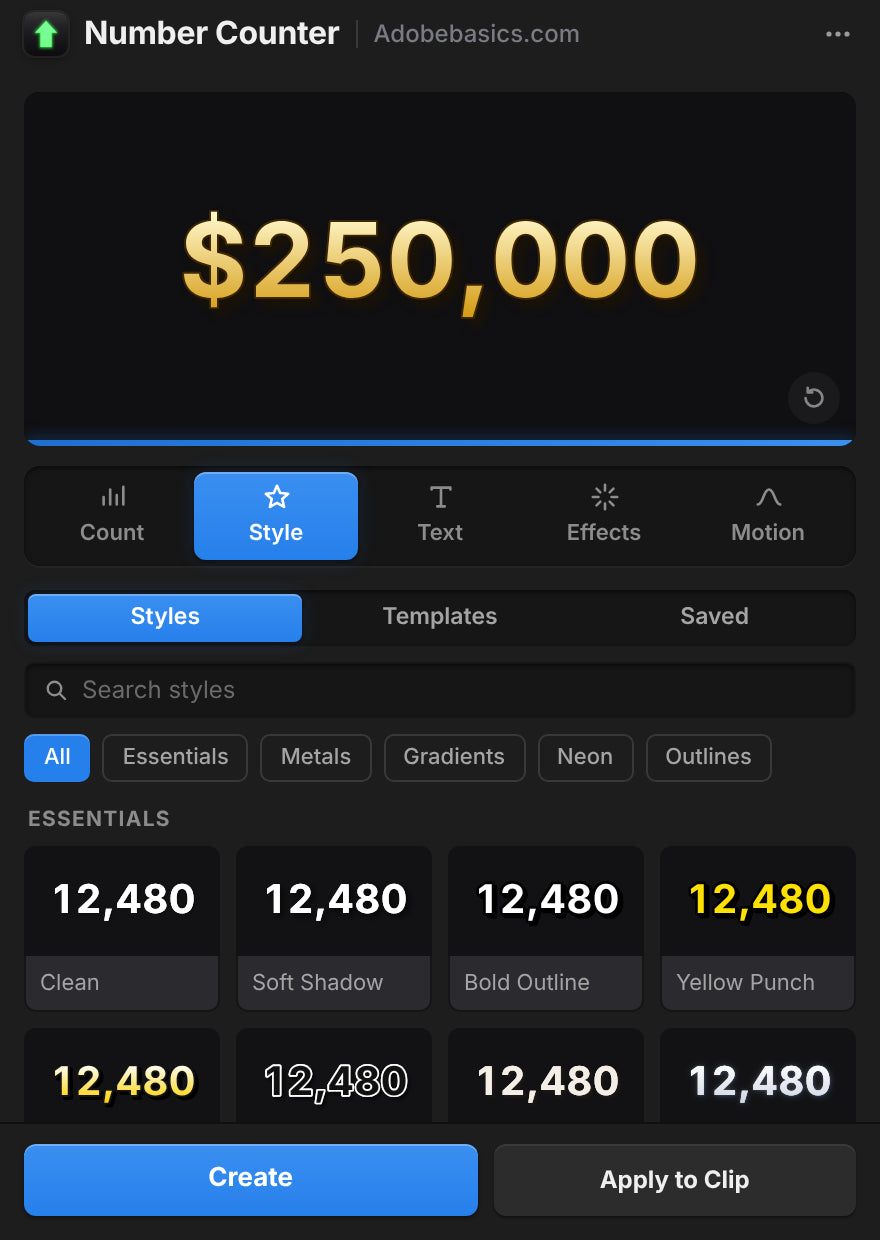
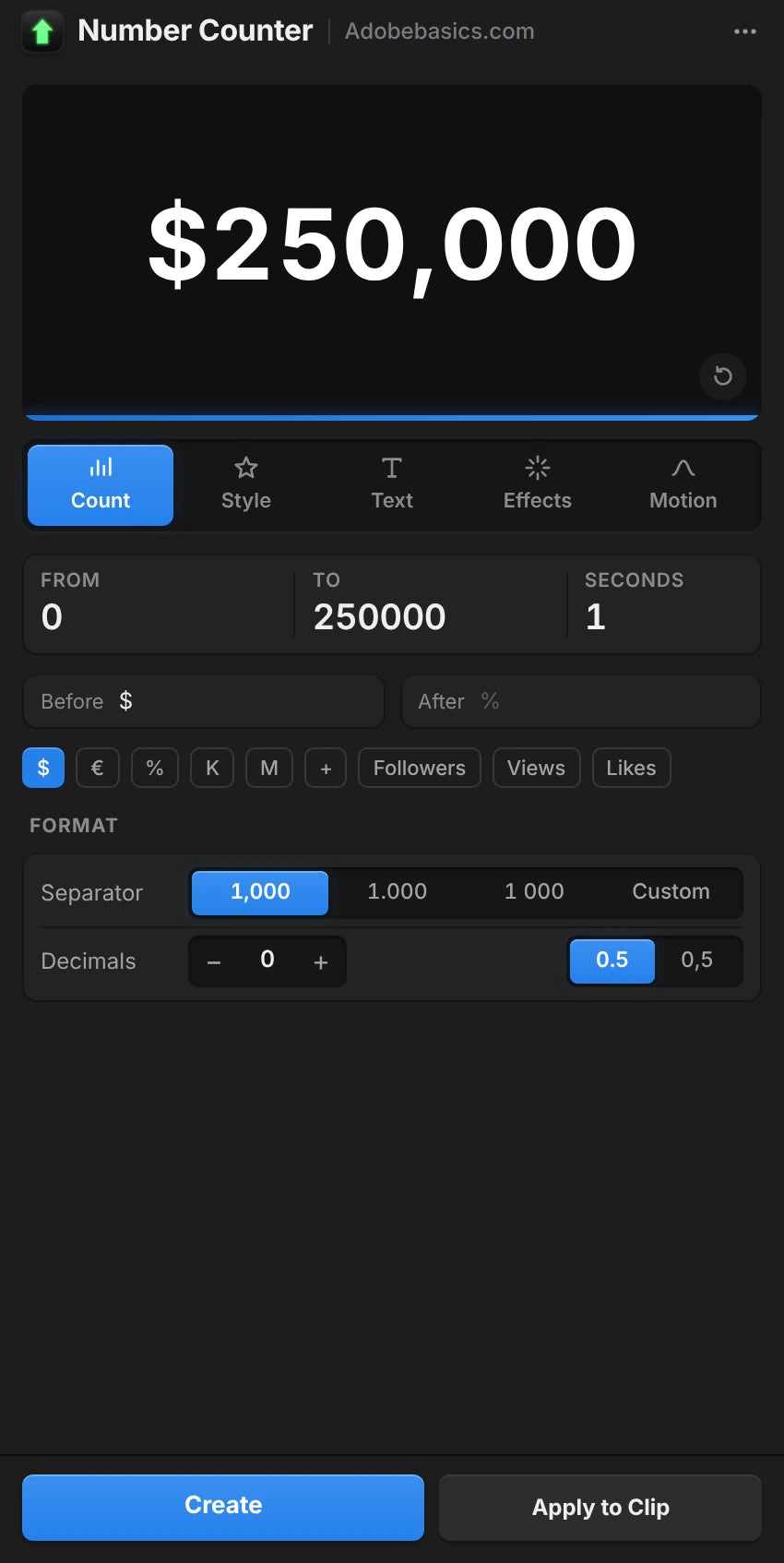
The Number Counter panel in Premiere Pro, on the Style tab with a gold $250,000 preview.

The panelIts own window

A panel that sets it up for you.

Build the counter with a live preview and add it in one click. Select a counter later and the panel loads it for editing.

  • Live preview with five tabs: Count, Style, Text, Effects and Motion
  • Create adds the counter on a new track
  • Apply to Clip puts it over your footage
  • Auto Apply updates the clip as you change things

兩種版本。一次付費。

兩個版本都有效果和面板。Pro 解鎖 58 種樣式、自訂預設集和 72 個範本。

Number Counter Standard

效果和面板。

$29.99 one-time

  • 原生 GPU 效果和面板視窗
  • 即時預覽、Create 和 Apply to Clip
  • 所有設定:計數、格式、文字、樣式和動態
  • 30 種緩動曲線、抖動和動態模糊
  • 任何已安裝字型,數字前後可加任何文字
選擇 Standard
最受歡迎

Number Counter Pro

解鎖 Number Counter 的全部功能。

130 樣式和範本

$34.99 one-time

只比 Standard 多 $5。

  • Standard 的全部功能
  • 解鎖 58 種樣式,分 5 組,從金色到霓虹
  • 解鎖自訂預設集,儲存你的計數器
  • 解鎖 72 個範本,追蹤人數、價格、統計等
  • 搜尋,附群組篩選
選擇 Pro

結帳後立即提供下載和授權金鑰,也會用電子郵件寄給你。

不用再重做計數器。

手動做一段流暢的 2 秒計數,在 30 fps 下就是 60 個文字片段。用 Number Counter,你只要輸入兩個數字。

功能 Number Counter (推薦) 在 Premiere 手動製作
自動計數,任何字型都行
逗號、小數和 $ 設定一次就好
內建緩動和動態模糊
樣式和範本一鍵套用 130
用你的顯示卡算圖
全程留在 Premiere Pro

所有設定。一個效果。

計數器和格式

  • 起始值和結束值. 任意兩個數字,往上或往下。
  • 持續時間. 計數要花幾秒。
  • 開始延遲. 開始計數前先停在第一個數字。
  • 30 種緩動曲線. 從 Linear 到 Expo、Back、Elastic 和 Bounce。
  • 小數位數. 從 0 到 10 位。
  • 千分位符號. 逗號、句點、空格、撇號、無,或自訂。
  • 小數點符號. 句點或逗號。
  • 等寬數字. 計數時每個數字寬度不變。

文字和樣式

  • 字型和樣式. 任何已安裝字型。
  • 前後文字. 任何語言的任何文字。
  • 大小、顏色和對齊. 有自己的文字位置。
  • 字距和大寫. 全部大寫、小型大寫、仿粗體和仿斜體。
  • 筆畫. 顏色、寬度和順序。
  • 陰影. 顏色、不透明度、方向、距離和柔和度。
  • 光暈. 臨界值、半徑和強度。
  • 漸層. 在填色上,兩點之間的兩種顏色。

動態和預設集

  • 抖動. 整段文字、單字或字母,可設定錨點、速度、關聯度和種子。
  • 動態模糊. 可調整快門角度。
  • 變形. 位置、錨點、縮放、旋轉和不透明度。
  • 背景. 透明,或疊在片段上。
  • 58 種樣式(Pro). Essentials、Metals、Gradients、Neon 和 Outlines。
  • 72 個範本(Pro). Social、Money、Stats、Measurements、Time、Sports 和 Games。
  • 已儲存的預設集(Pro). 儲存你的計數器,在任何專案中載入。

Specifications

Version
1.1.2 · November 22, 2026 What's new
Premiere Pro
2021–2027
Operating system
Mac macOS 11 or later, Apple silicon and IntelWindows 10 and 11, 64-bit
GPU accelerated
Metal on Mac, CUDA on NVIDIA graphics cards
Languages
English, Deutsch, Français, Español, Português (Brasil), 日本語, 한국어
Versions
Standard the effect, the panel and every settingPro adds 58 styles, 72 templates and your saved presets
Numbers
Any length, up to 10 decimals, any thousands separator, 30 easings
Fonts
Any font
Keyframeable
Every control, in Effect Controls
Text before and after
Any language, Arabic and Hebrew too
Resolution
Up to 8K
High bit depth
32-bit float and linear color
Works offline
Up to 7 days at a time
License
2 computers, one-time payment, commercial use
Updates
Free, from Check for Updates
Download
Mac 3.5 MB · Windows 1.6 MB

三個步驟,開始計數。

一個安裝程式就能把效果和面板加入 Premiere Pro。

  1. 1下載 Number Counter

    下載與授權金鑰會在結帳後立即顯示,我們也會寄到你的電子郵件。

  2. 2執行安裝程式

    結束 Premiere Pro 後執行安裝程式,它會加入效果和面板。

  3. 3開啟面板

    選擇「視窗 › 擴充功能 › Number Counter」,輸入數字後按 Create。

Premiere Pro 2021 及以上 · Windows 10 和 11 · macOS 11 及以上

有疑問?這裡有解答。

還有其他問題?請透過聯絡我們頁面傳訊息給我們。我們會在 24 小時內回覆。

查看完整常見問題

或到我們的 Discord 問問 37K 位剪輯師

常見問題

10 items
  • 我會得到什麼?

    一次安裝兩樣東西:一個名為 Number Counter 的原生 Premiere Pro 效果,以及一個用即時預覽幫你建立計數器的面板視窗。可以用面板、用效果,或兩者都用。

  • 需要 After Effects 嗎?

    不需要。Number Counter 是原生 Premiere Pro 效果,在 Windows 和 Mac 上都直接在 Premiere Pro 裡設定。

  • Standard 和 Pro 有什麼不同?

    兩者都有效果和面板。Pro 解鎖 58 種樣式、自訂預設集和 72 個範本。

  • 也可以倒數嗎?

    可以。輸入比結束值大的起始值即可,例如 2,400 到 0。如果需要倒數時鐘,請看 Countdown Timer。

  • 支援哪些 Premiere Pro 版本?

    Adobe Premiere Pro 2021–2027,支援 Windows 10 和 11,以及 macOS 11 或更新版本。

  • 要怎麼安裝?

    從訂單頁面下載適合你電腦的安裝程式並開啟。重新啟動 Premiere Pro 後,Number Counter 就會出現在效果面板和「視窗 › 擴充功能」中。

  • 可以在幾台電腦上使用?

    兩台。若要換到另一台電腦,請在 Manage License 中移除一台。

  • 包含未來的更新嗎?

    包含。更新免費,新的安裝程式會放在你的訂單頁面。

  • 可以用在客戶案和營利影片嗎?

    可以。個人和商業影片都能不限數量使用,包括客戶案、營利頻道和廣告。一次購買限一位使用者。

  • 有退款保證嗎?

    有。如果在本頁列出的 Premiere Pro 版本中無法使用,請在購買後 14 天內聯絡我們。我們會在 24 小時內回覆並協助你解決,如果無法解決,就退款給你。較舊的 Premiere Pro 版本不在保證範圍內,請先確認你的版本。由 Premiere Pro、你的電腦或你的設定造成的問題也不在範圍內。這不影響你依消費者保護法享有的權利。請閱讀完整的退款政策。

流暢的關鍵影格。 一鍵完成。

每個計數器、價格和統計,都在 Premiere Pro 裡完成。一次付費,永久使用。

Standard

效果和面板

$29.99

Pro 最受歡迎

解鎖 58 種樣式、自訂預設集和 72 個範本

$34.99

  • Premiere Pro 2021–2027
  • Windows 與 Mac

退款保證 無法使用時

購買後 14 天內與我們聯絡。 24 小時內協助你解決問題。 如果無法解決,我們會退款給你。