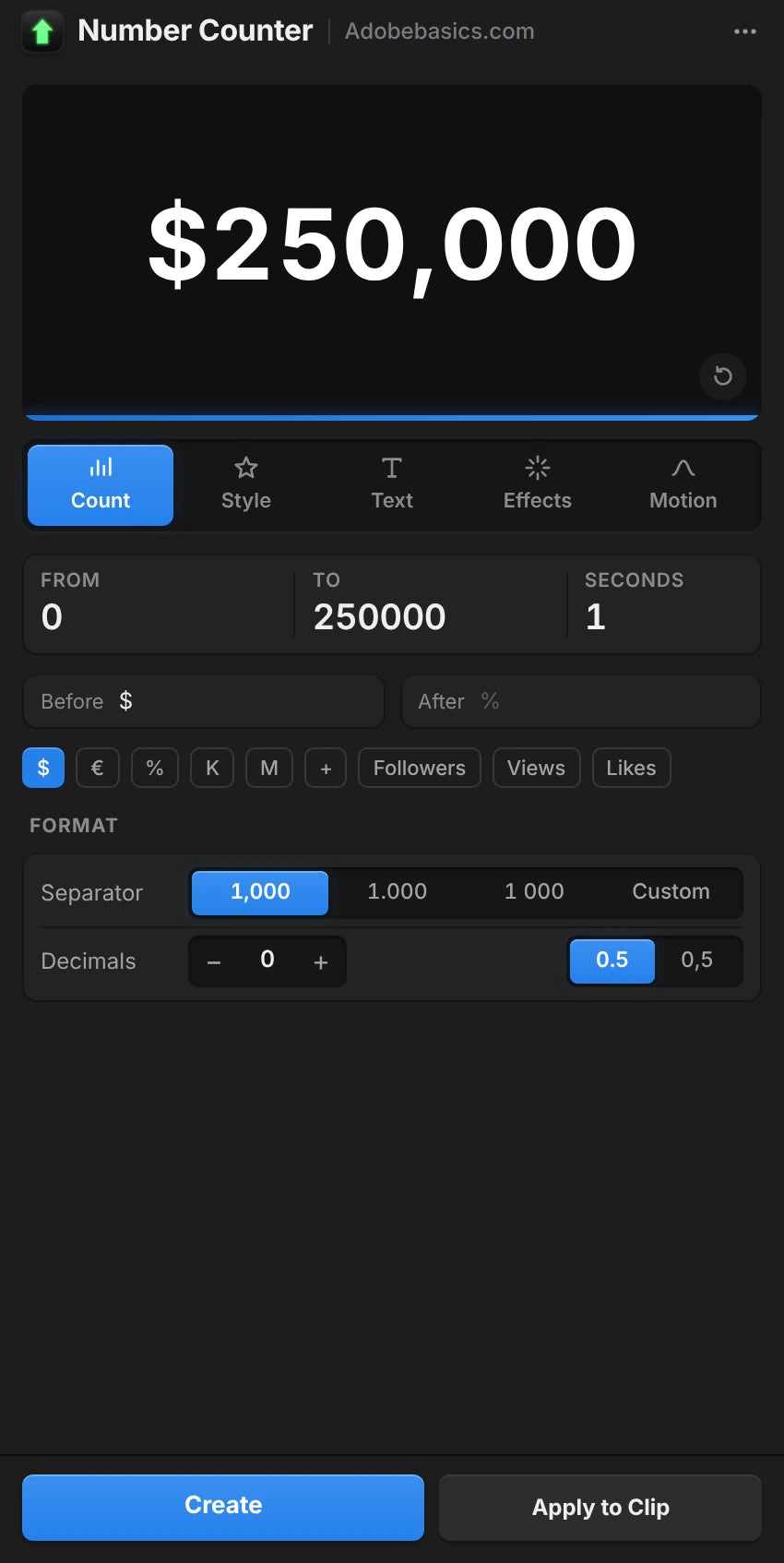

لوحة Number Counter داخل Premiere Pro
Number Counter
حرّك الأرقام بنقرة واحدة.
حوّل أي رقم إلى عدّ سلس يشدّ الانتباه. اكتب رقمين، وستتصاعد الإيرادات وأعداد المشتركين والأسعار والإحصائيات من تلقاء نفسها.
Premiere Pro 2021–2027
- Windows وMac
- تحديثات مجانية
On your phone? Get the link on your computer.
ضمان استرداد الأموال لا يعمل على Premiere Pro لديك؟ تواصل معنا خلال 14 يومًا.

Number Counter
صنعها الأشخاص الذين يعلّمون Premiere Pro.
أكثر من 700 درس وآلاف التعليقات أرتنا ما يبطئ المحررين. لذلك صنعنا الأدوات التي أردناها كمحررين: بسيطة وبلا متاعب.
شاهد الدروس- 200K+محرر فيديو يستخدمون أدواتنا
- 30M+مشاهدة لدروسنا على YouTube
- 90K+متابع على مواقع التواصل
- 37K+محرر في مجتمعنا على Discord
أرقام متحركة. بنقرة واحدة.

اعدّ أي شيء
الأنماط
القوالب
تأثير أصلي ونافذة لوحة، في تثبيت واحد.
أجهزة لكل ترخيص
منحنى easing
الأسعار والنسب المئوية وأعداد المتابعين
تسريع GPU. سريع على كل جهاز.
Premiere Pro 2021–2027
مثبّت لكل نظام.
Counting
Type two numbers. It counts.
Type a From and a To value in the panel. The counter runs from one to the other, up or down, and the preview plays it before you add it.
- Any two numbersLike 0 to 250,000, or 2,400 down to 0.
- SecondsSet how long the count takes.
- Quick textOne click adds $, €, %, K, M, Followers, Views or Likes.
TemplatesPro
72 templates. Ready to count.
Followers, prices, percentages, speeds, scores and countdowns. Click one and the numbers, the text and the format are set.
- 6 groupsSocial, Money, Stats, Measurements, Time, Sports and Games.
- SearchFind one by name, or filter by group.
- A starting pointChange any value after you click.
StylesPro
58 styles. One click each.
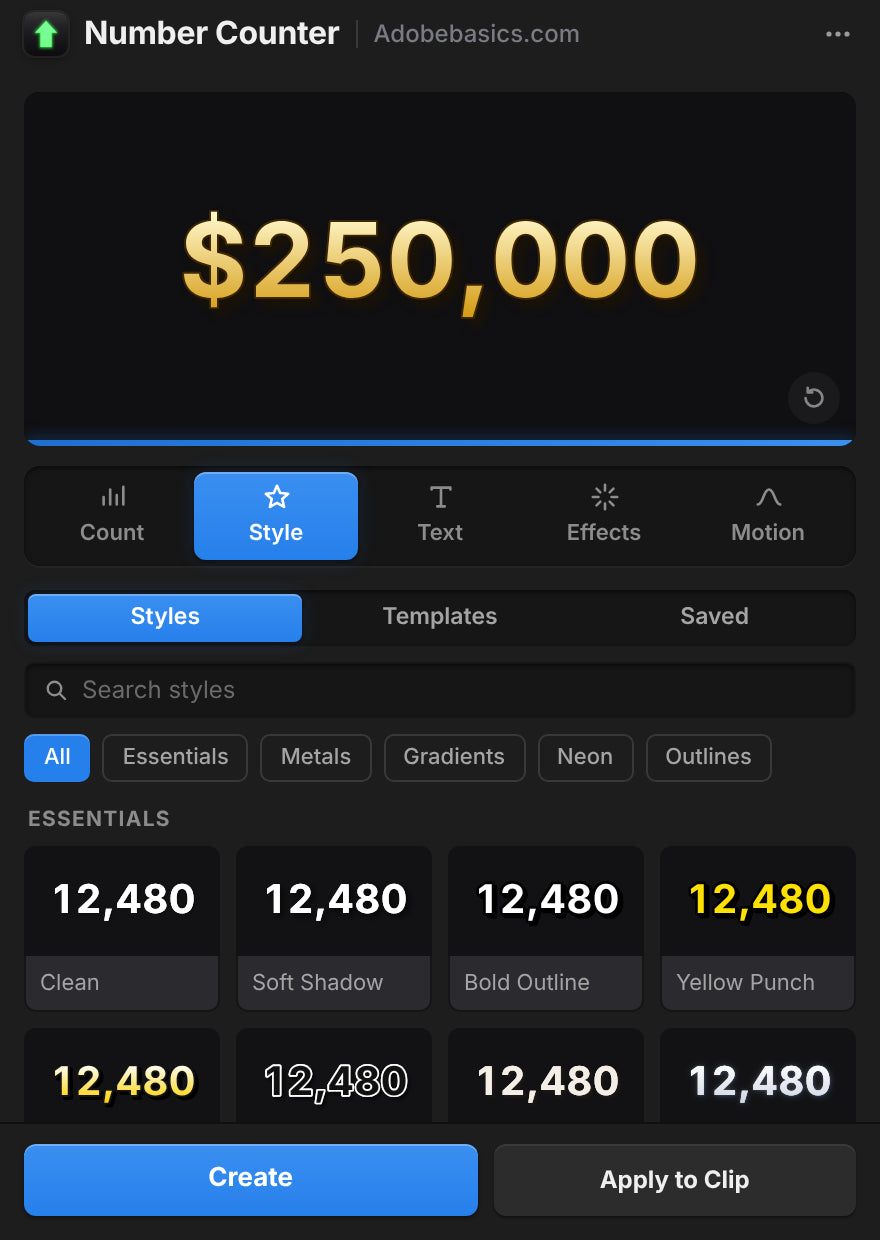
Gold, chrome, neon, gradients and bold outlines, in five groups with search. A style sets the color, stroke, shadow, glow and gradient, and leaves your numbers, text and font alone. The same 58 styles are in the effect's Style menu.
- Essentials 8
- Metals 10
- Gradients 18
- Neon 12
- Outlines 10
Number format
Prices, percentages, big numbers.
Up to 10 decimals, with a comma, a period or a space between the thousands, your own separator, or none.
- Decimals0 to 10 places. They count along with the number.
- Separators1,000, 1.000, 1 000, or any text you type.
- Steady digitsEvery digit takes the same width, so the number doesn't shift.
Text
Your font. Any text around it.
Pick any font installed on your computer. Put any text before and after the number, in any language.
- FontsEvery installed font, with search and styles.
- Size, tracking and capsPlus alignment, faux bold and faux italic.
- Before and after$, %, km/h, Followers or a whole phrase.
Styling
Stroke, shadow, glow, gradient. Built in.
Each one is a switch with its own settings, so there are no extra effects to stack on the clip.
- StrokeColor, width and order.
- Shadow and glowDirection, distance and softness. Radius and intensity.
- GradientTwo colors, down, across or diagonal, on the fill.
Motion
30 easing curves. Motion blur built in.
The easing sets how the count moves. Expo slows into the final number. Back and Bounce overshoot and settle.
- Start delayHold the first number for up to 10 seconds.
- Motion blurWith an adjustable shutter angle.
- TransformPosition, scale, rotation and opacity built in.
Wiggle
Wiggle the whole text. Or every letter.
A handheld drift in position and rotation. Move the whole counter, each word or each letter on its own.
- 3 modesWhole Text, Words or Letters.
- Anchor pointChoose the point each piece rotates around.
- Your own feelSpeed, sideways, up and down, rotation and seed.
Saved presetsPro
Save your own. Use them in every project.
Set up a counter you like and press Save as Preset. It keeps everything: the numbers, the text, the format and the style.
- One clickYour presets load like the built-in ones.
- In the effect tooSave Preset and Load Preset sit in Effect Controls.
- Yours to keepEach preset is a file on your computer.
What you get
A native effect. And a panel that builds it for you.
Number Counter installs two things: an effect in your Effects panel and its own panel window. Build the counter in the panel, then fine-tune it in Effect Controls.

The effectIn your Effects panel
A real Premiere Pro effect.
It renders on your graphics card like Premiere Pro's own effects, so the count plays back smoothly and exports fast.
- GPU accelerated: Metal on Mac, CUDA on Windows
- Every setting in Effect Controls, in 12 clear groups
- Transparent, or drawn over the clip
- Position, scale, rotation and opacity built in

The panelIts own window
A panel that sets it up for you.
Build the counter with a live preview and add it in one click. Select a counter later and the panel loads it for editing.
- Live preview with five tabs: Count, Style, Text, Effects and Motion
- Create adds the counter on a new track
- Apply to Clip puts it over your footage
- Auto Apply updates the clip as you change things
إصداران. ادفع مرة واحدة.
يتضمن الإصداران التأثير واللوحة. يفتح Pro 58 نمطًا وإعدادات مسبقة مخصصة و72 قالبًا.
Number Counter Standard
التأثير واللوحة.
$29.99 one-time
- تأثير GPU أصلي ونافذة اللوحة
- معاينة مباشرة وCreate وApply to Clip
- كل الإعدادات: العدّ والتنسيق والنص والتصميم والحركة
- 30 منحنى easing وwiggle وضبابية الحركة
- أي خط مثبّت، وأي نص قبل الرقم وبعده
Number Counter Pro
افتح كل ما يستطيع Number Counter فعله.
130 نمطًا وقالبًا
$34.99 one-time
أكثر من Standard بـ $5 فقط.
- كل ما في Standard
- افتح 58 نمطًا في 5 مجموعات، من الذهبي إلى النيون
- افتح الإعدادات المسبقة المخصصة لحفظ عدّاداتك
- افتح 72 قالبًا للمتابعين والأسعار والإحصائيات والمزيد
- البحث مع مرشّحات المجموعات
التنزيل ومفتاح الترخيص جاهزان مباشرة بعد الدفع. ونرسلهما إليك أيضًا بالبريد الإلكتروني.
كل إعداد. تأثير واحد.
العدّاد والتنسيق
- قيمة البداية والنهاية. أي رقمين، تصاعديًا أو تنازليًا.
- المدة. كم يستغرق العدّ بالثواني.
- تأخير البداية. يثبّت الرقم الأول قبل أن يبدأ العدّ.
- 30 منحنى easing. من Linear إلى Expo وBack وElastic وBounce.
- الكسور العشرية. من صفر إلى 10 خانات.
- فاصل الآلاف. فاصلة أو نقطة أو مسافة أو فاصلة عليا أو بلا فاصل أو فاصلك الخاص.
- العلامة العشرية. نقطة أو فاصلة.
- عرض ثابت للأرقام. تحتفظ الأرقام بالعرض نفسه أثناء العدّ.
النص والتصميم
- الخط والنمط. أي خط مثبّت.
- نص قبل الرقم وبعده. أي نص، بأي لغة.
- الحجم واللون والمحاذاة. مع موضع نص خاص به.
- التباعد والأحرف الكبيرة. أحرف كبيرة، أحرف كبيرة صغيرة، غامق وزائف ومائل زائف.
- الحدّ. اللون والعرض والترتيب.
- الظل. اللون والعتامة والاتجاه والمسافة والنعومة.
- التوهج. العتبة ونصف القطر والشدة.
- التدرّج. لونان بين نقطتين، على التعبئة.
الحركة والإعدادات المسبقة
- Wiggle. النص كله أو الكلمات أو الأحرف، مع نقطة ارتكاز وسرعة وارتباط وبذرة.
- ضبابية الحركة. زاوية غالق قابلة للضبط.
- التحويل. الموضع ونقطة الارتكاز والحجم والدوران والعتامة.
- الخلفية. شفافة، أو فوق المقطع.
- 58 نمطًا، في Pro. Essentials وMetals وGradients وNeon وOutlines.
- 72 قالبًا، في Pro. Social وMoney وStats وMeasurements وTime وSports وGames.
- إعدادات محفوظة، في Pro. احفظ عدّاداتك وحمّلها في أي مشروع.
Specifications
- Version
- 1.1.2 · November 22, 2026 What's new
- Premiere Pro
- 2021–2027
- Operating system
- Mac macOS 11 or later, Apple silicon and IntelWindows 10 and 11, 64-bit
- GPU accelerated
- Metal on Mac, CUDA on NVIDIA graphics cards
- Languages
- English, Deutsch, Français, Español, Português (Brasil), 日本語, 한국어
- Versions
- Standard the effect, the panel and every settingPro adds 58 styles, 72 templates and your saved presets
- Numbers
- Any length, up to 10 decimals, any thousands separator, 30 easings
- Fonts
- Any font
- Keyframeable
- Every control, in Effect Controls
- Text before and after
- Any language, Arabic and Hebrew too
- Resolution
- Up to 8K
- High bit depth
- 32-bit float and linear color
- Works offline
- Up to 7 days at a time
- License
- 2 computers, one-time payment, commercial use
- Updates
- Free, from Check for Updates
- Download
- Mac 3.5 MB · Windows 1.6 MB
ثلاث خطوات. ثم يبدأ العدّ.
مثبّت واحد يضيف التأثير واللوحة إلى Premiere Pro.
1نزّل Number Counter
يظهر رابط التنزيل ومفتاح الترخيص مباشرة بعد الدفع. ونرسلهما إليك بالبريد الإلكتروني أيضًا.
2شغّل المثبّت
أغلق Premiere Pro وشغّل المثبّت. سيضيف التأثير واللوحة.
3افتح اللوحة
اختر Window › Extensions › Number Counter، واكتب أرقامك، ثم اضغط Create.
Premiere Pro 2021 وأحدث · Windows 10 و11 · macOS 11 وأحدث
keyframes ناعمة. بنقرة واحدة.
كل عدّاد وسعر وإحصائية، داخل Premiere Pro مباشرة. ادفع مرة واحدة، واحتفظ به للأبد.
- Premiere Pro 2021–2027
- Windows وMac
ضمان استرداد الأموال إذا لم يعمل
تواصل معنا خلال 14 يومًا من الشراء. مساعدة خلال 24 ساعة لإصلاح المشكلة. إذا لم نتمكن من إصلاحها، تسترد أموالك.