





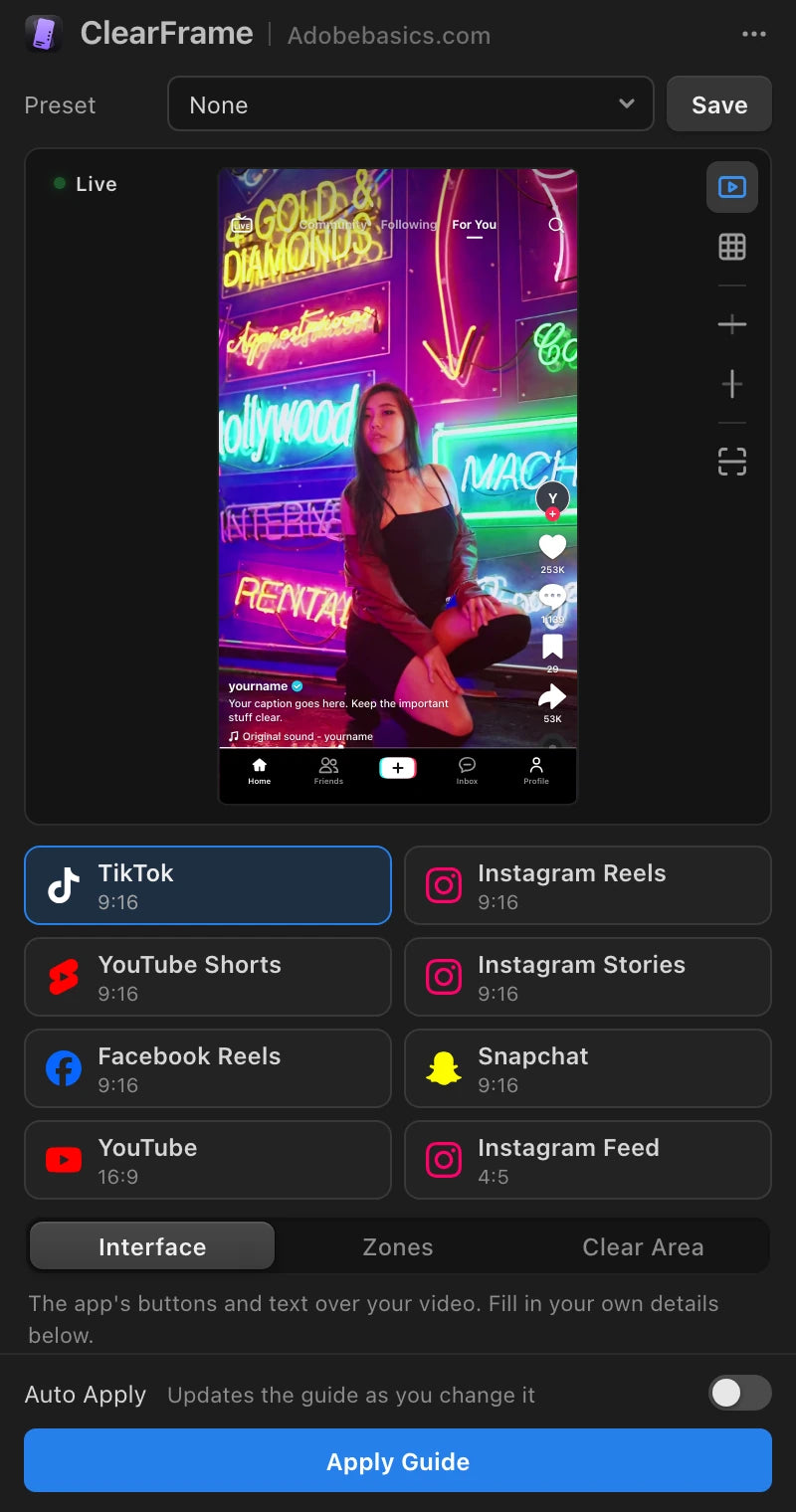
The ClearFrame panel, inside Premiere Pro


ClearFrame
Never lose a caption to the app again.
You spend hours on the edit. Then TikTok drops its buttons and caption right over your best line, and people swipe before they read it. ClearFrame puts the safe zones of TikTok, Reels, Shorts and more right on your Premiere Pro sequence, so your hooks, captions and faces land in the clear. Pick a platform, click Apply, and hide the guide with one click before you export.
 Premiere Pro 2021–2027
- Windows and Mac
- Free updates

On your phone? Get the link on your computer.
मनी-बैक गारंटी आपके Premiere Pro में नहीं चल रहा? 14 दिनों के अंदर हमसे संपर्क करें।
ClearFrame
उन लोगों ने बनाया जो Premiere Pro सिखाते हैं।
700+ ट्यूटोरियल और हज़ारों कमेंट्स ने हमें दिखाया कि एडिटर्स को क्या धीमा करता है। इसलिए हमने वे टूल बनाए जो हम एडिटर के तौर पर चाहते थे: आसान और बिना झंझट।
ट्यूटोरियल देखें- 200K+एडिटर हमारे टूल इस्तेमाल करते हैं
- 30M+हमारे YouTube ट्यूटोरियल पर व्यूज़
- 90K+सोशल मीडिया पर फ़ॉलोअर्स
- 37K+एडिटर हमारी Discord कम्युनिटी में
Made for vertical video.
TikTok, Reels, Stories, Shorts, Facebook Reels and Snapchat.
Views: Interface, Zones and Clear Area
Finds text and logos the app would cover. In Pro.
See it three ways
The app's buttons, the areas they cover, or the space that's left.
Compare platforms side by side. In Pro.
The guide updates while you change it. In Pro.

Premiere Pro 2021–2027
A menu-bar app keeps it up to date.
Your hook, under a like button.
The first second decides if people stay. A line hidden behind the app looks rushed, and they scroll on.
-
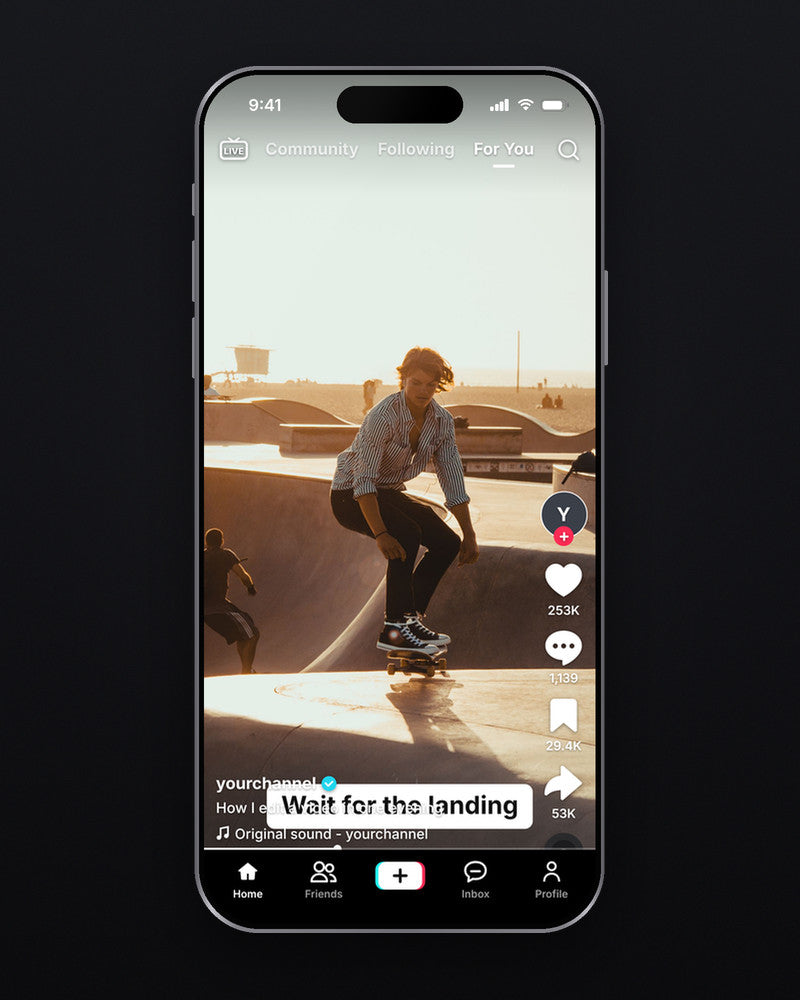
Without ClearFrame. Your text sits under TikTok's caption, so nobody reads it. -
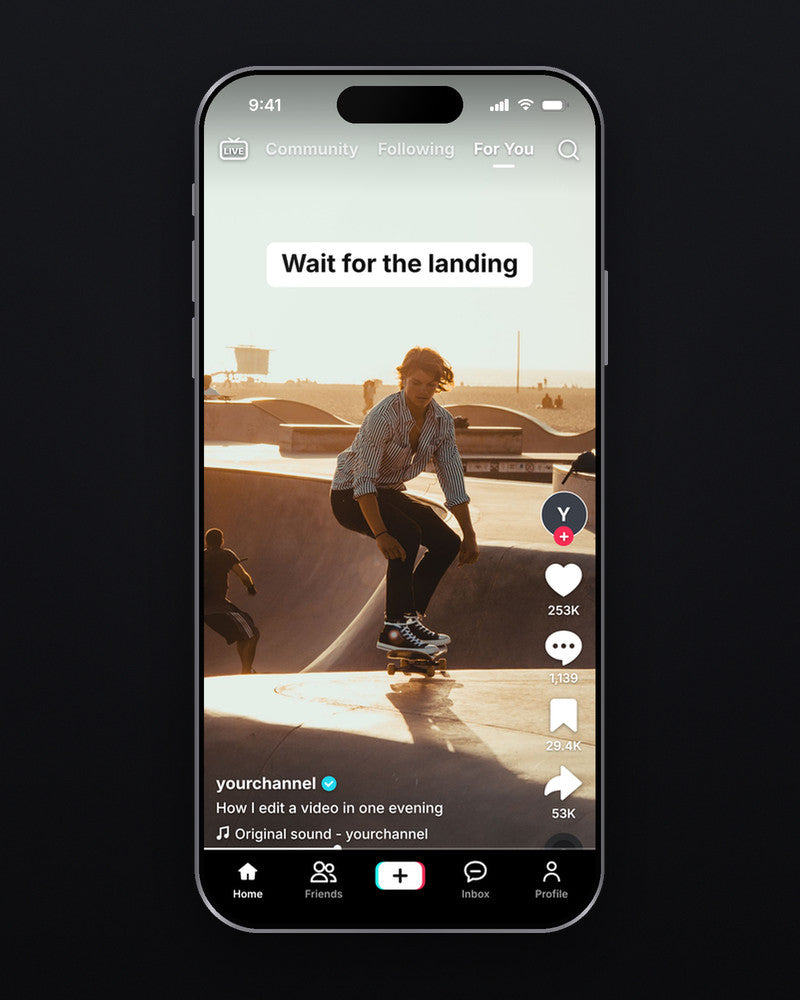
With ClearFrame. Same clip, moved into the clear area. Now it's the first thing people see.
Know exactly what the app covers.
Three ways to look at the same frame. Pick the one that helps you place the shot.
-
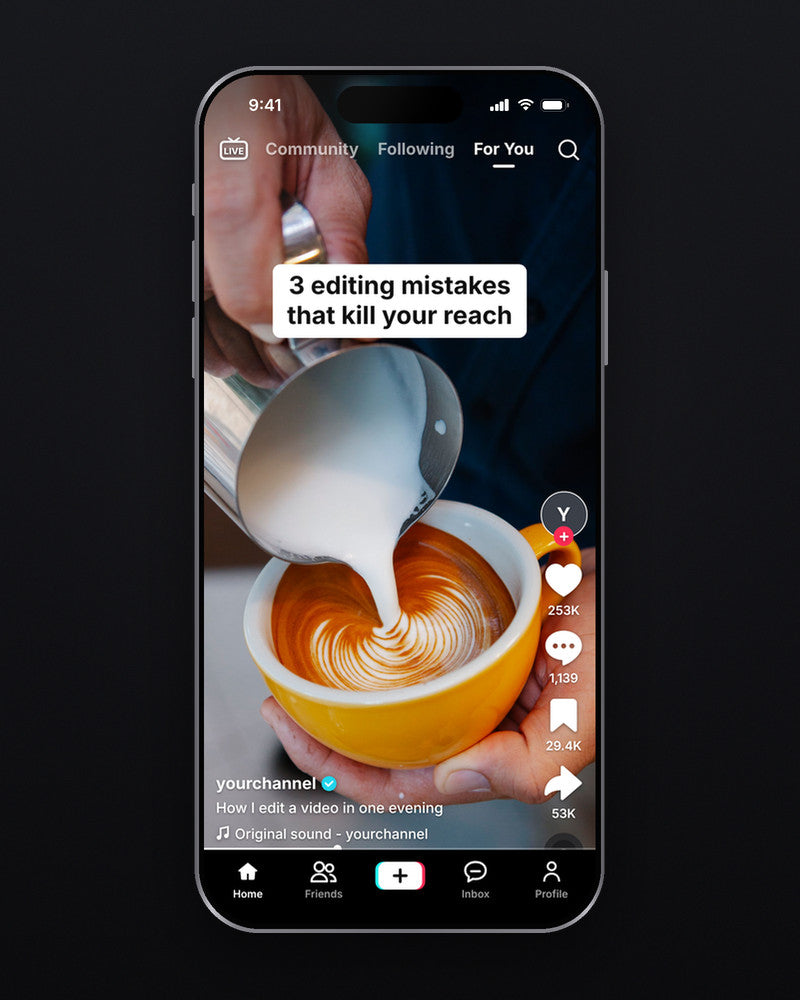
Interface: the app's real layout over your video. -
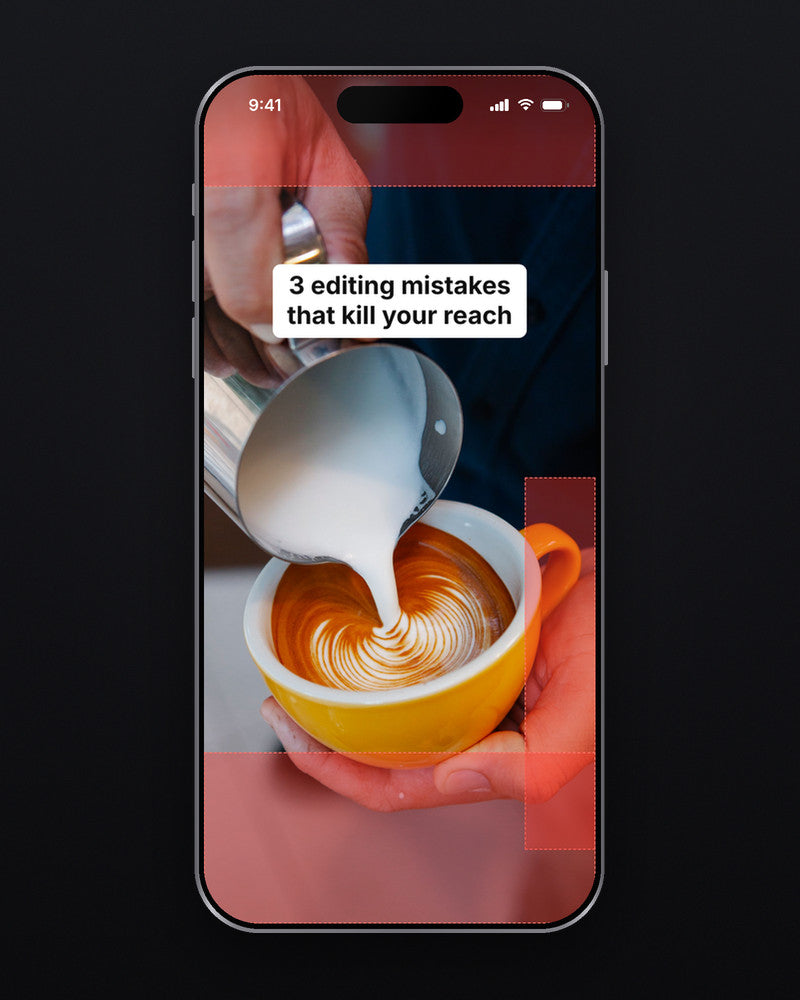
Zones: everything the app covers, in red. -
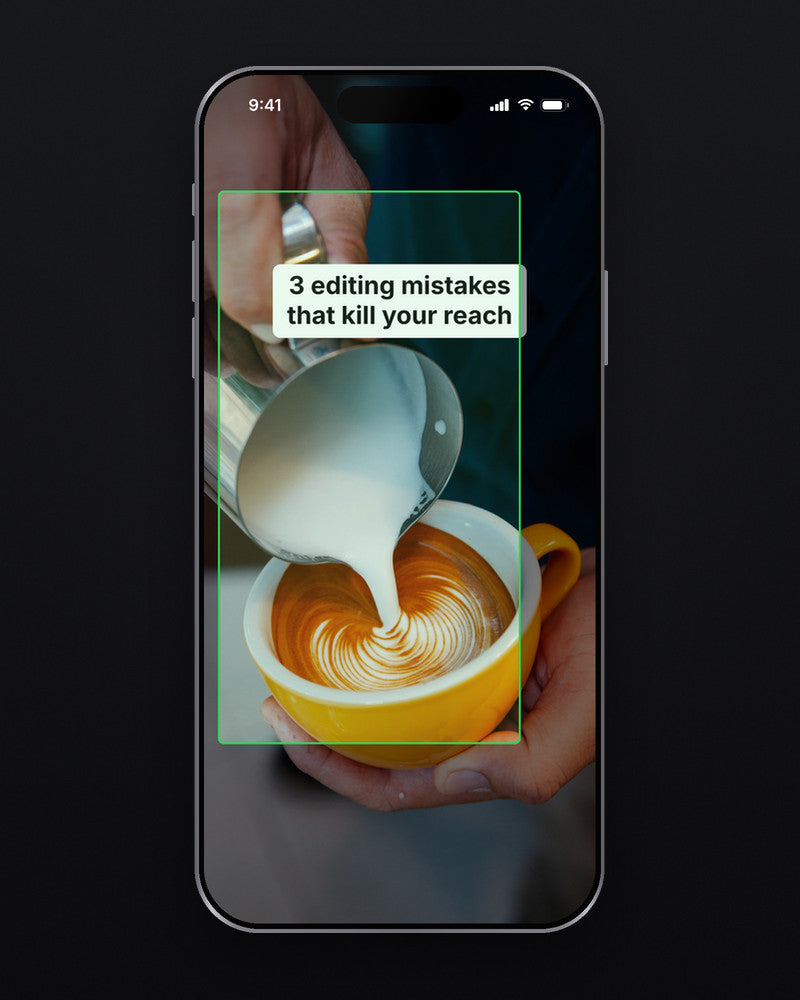
Clear Area: the space that's clear on every app you pick.
Blind Spot ScanPro
Catch it before your viewers do.
One pass through your whole sequence finds every title, logo and caption sitting under the app. Fix it in the edit, not in the comments.
- Your whole editStart to finish, in one pass.
- Under the appText and graphics in the covered areas.
- Any platformScan for the app you post to.
Every vertical platform
Six apps. One click each.
TikTok, Reels, Shorts, Stories, Facebook and Snapchat. Pick one, or put them side by side.
- Always currentEach app's real layout.
- Side by sideSee where they all overlap.
- Three viewsInterface, Zones or Clear Area.
Live previewPro
Your own video, under the guide.
The panel plays your sequence with the guide on top, and it follows the playhead while you edit.
- Plays alongIn step with Premiere.
- Three viewsInterface, Zones or Clear Area.
- Any platformSwitch with one click.
YouTube and Instagram FeedPro
Not just vertical.
Pro adds regular YouTube videos in 16:9 and Instagram Feed posts in 4:5, with the crop your profile grid shows.
- YouTube 16:9The title row and the player controls.
- Instagram Feed 4:5The full post and the grid crop.
- Same guidesThirds, lines and presets work here too.
Guides
Grids that line up the shot.
Rule of thirds and a center cross come with every version. Pro adds the rest, in your color.
- Title and action safe80 and 90 percent, like broadcast.
- Golden ratio and diagonalsFor framing faces and products.
- Rows and columnsWith margins and gutters.
Your LinesPro
Drag your own lines.
Add a line from the preview and drag it where you need it. It snaps to the edges, the thirds and the center.

- Snap or freeHold Shift to place it anywhere.
- Premiere guidesYour lines as Premiere's own guides.
- Guide templatesLoad and save Premiere's templates.
Your profilePro
Your name. Your caption.
Type in your own username, photo, caption and counts, and see the post the way your viewers will, before it's live.

- Profile photoChoose any picture.
- Verified badgeOn or off.
- Likes and commentsYour own numbers.
Animate InPro
Mockups that look like the real app.
Fade, slide or pop the app's interface in, part by part. Great for tutorials, ads and showing clients the final post.

- FadeA soft entrance.
- SlideEach part slides into place.
- PopA quick, springy entrance.
Auto Apply and presetsPro
Set it up once.
Turn on Auto Apply and the guide in your sequence changes as you do. Save the setup as a preset for the next video.

- Auto ApplyNo button to press.
- PresetsYour setups, one click away.
- Hide and showThe eye button, right in the panel.
Two versions. Pay once.
Both put every platform's safe zones on your sequence. Pro checks your whole video and adds every guide.
ClearFrame Standard
Every vertical platform.
$19.99 one-time
- All 6 vertical platforms: TikTok, Reels, Shorts, Stories, Facebook and Snapchat
- Compare platforms side by side
- Interface, Zones and Clear Area views
- Apply, hide and remove in one click
- Rule of thirds and center cross
ClearFrame Pro
Scan for blind spots, preview your own video and use every guide.
$24.99 one-time
Only $5 more than Standard.
- Everything in Standard
- Blind Spot Scan: see every spot the app would cover
- Live preview over your own video
- Your profile: name, photo, caption and counts
- YouTube and Instagram Feed: 16:9 and 4:5 guides
- Every guide: title safe, golden ratio, your color
- Auto Apply, presets and Animate In
- Your own lines and Premiere guide templates
Already own Standard? Pro में अपग्रेड करें
Your license key and download links arrive by email right after checkout.
Premiere Pro, or ClearFrame.
Premiere has no idea where TikTok puts its buttons, so most editors line things up by eye and hope. ClearFrame shows you in one click.


In the download
-
ClearFrame plugin
-
License key
Yours the moment you pay. Your license key and installer arrive at checkout and by email. The installer adds the ClearFrame panel to Premiere Pro, plus the menu-bar app that keeps it up to date.
-

Three steps. One click.
One installer sets up the panel and the menu-bar app.
1Download ClearFrame
Your installer and license key show up right after checkout. We also email them to you.
2Run the installer
It adds ClearFrame to Premiere Pro and activates it for you.
3Pick a platform
Open Window › Extensions › ClearFrame, pick a platform and click Apply Guide.

Specifications
- Version
- 1.0.1 · November 22, 2026 What's new
- Premiere Pro
- 2021–2027
- Operating system
- Mac macOS 11 or later, Apple silicon and IntelWindows 10 and 11, 64-bit
- Platforms
- TikTok, Instagram Reels, Instagram Stories, YouTube Shorts, Facebook Reels, Snapchat
- Views
- Interface, Zones and Clear Area
- Formats
- Standard vertical 9:16Pro also YouTube 16:9 and Instagram Feed 4:5, with the profile grid crop
- Versions
- Standard all six vertical platforms, side by side, and all three viewsPro Blind Spot Scan, the live preview, YouTube and Instagram Feed, your profile, every guide, Animate In, Auto Apply and presets
- Premiere guide templates
- Load and save (Pro)
- Languages
- English
- Works offline
- Up to 7 days at a time
- License
- 2 computers, one-time payment
- Updates
- Free, from Check for Updates
स्मूद keyframe. बस एक क्लिक दूर।
Pick a version. Pay once, keep it forever.
- Premiere Pro 2021–2027
- Windows and Mac
मनी-बैक गारंटी अगर यह न चले
ख़रीद के 14 दिनों के अंदर हमसे संपर्क करें। ठीक करने के लिए 24 घंटों के अंदर मदद। अगर हम इसे ठीक न कर पाएँ, तो आपको पैसे वापस मिलेंगे।