Dibuat oleh orang-orang yang mengajarkan Premiere Pro.

700+ tutorial dan ribuan komentar menunjukkan apa yang memperlambat editor. Jadi kami membuat tools yang kami inginkan sebagai editor: simpel dan tanpa ribet.

Tonton tutorialnya

Angka beranimasi. Sekali klik.

Number Counter

Hitung apa saja

58

Gaya

72

Template

Efek + panel

Efek native dan jendela panel, dalam satu instalasi.

2

Komputer per lisensi

30

Kurva easing

$99.99

Harga, persentase, dan jumlah pengikut

Motion blur

Font apa pun

Glow

Dibuat untuk kecepatan

Akselerasi GPU. Cepat di komputer mana pun.

Premiere Pro 2021–2027

Bayar sekali. Milik Anda selamanya.

macOS Windows

Satu installer untuk masing-masing.

Counting

Type two numbers. It counts.

Type a From and a To value in the panel. The counter runs from one to the other, up or down, and the preview plays it before you add it.

  • Any two numbersLike 0 to 250,000, or 2,400 down to 0.
  • SecondsSet how long the count takes.
  • Quick textOne click adds $, €, %, K, M, Followers, Views or Likes.

TemplatesPro

72 templates. Ready to count.

Followers, prices, percentages, speeds, scores and countdowns. Click one and the numbers, the text and the format are set.

  • 6 groupsSocial, Money, Stats, Measurements, Time, Sports and Games.
  • SearchFind one by name, or filter by group.
  • A starting pointChange any value after you click.

StylesPro

58 styles. One click each.

Gold, chrome, neon, gradients and bold outlines, in five groups with search. A style sets the color, stroke, shadow, glow and gradient, and leaves your numbers, text and font alone. The same 58 styles are in the effect's Style menu.

  • Essentials 8
  • Metals 10
  • Gradients 18
  • Neon 12
  • Outlines 10

Number format

Prices, percentages, big numbers.

Up to 10 decimals, with a comma, a period or a space between the thousands, your own separator, or none.

  • Decimals0 to 10 places. They count along with the number.
  • Separators1,000, 1.000, 1 000, or any text you type.
  • Steady digitsEvery digit takes the same width, so the number doesn't shift.

Text

Your font. Any text around it.

Pick any font installed on your computer. Put any text before and after the number, in any language.

  • FontsEvery installed font, with search and styles.
  • Size, tracking and capsPlus alignment, faux bold and faux italic.
  • Before and after$, %, km/h, Followers or a whole phrase.

Styling

Stroke, shadow, glow, gradient. Built in.

Each one is a switch with its own settings, so there are no extra effects to stack on the clip.

  • StrokeColor, width and order.
  • Shadow and glowDirection, distance and softness. Radius and intensity.
  • GradientTwo colors, down, across or diagonal, on the fill.

Motion

30 easing curves. Motion blur built in.

The easing sets how the count moves. Expo slows into the final number. Back and Bounce overshoot and settle.

  • Start delayHold the first number for up to 10 seconds.
  • Motion blurWith an adjustable shutter angle.
  • TransformPosition, scale, rotation and opacity built in.

Wiggle

Wiggle the whole text. Or every letter.

A handheld drift in position and rotation. Move the whole counter, each word or each letter on its own.

  • 3 modesWhole Text, Words or Letters.
  • Anchor pointChoose the point each piece rotates around.
  • Your own feelSpeed, sideways, up and down, rotation and seed.

Saved presetsPro

Save your own. Use them in every project.

Set up a counter you like and press Save as Preset. It keeps everything: the numbers, the text, the format and the style.

  • One clickYour presets load like the built-in ones.
  • In the effect tooSave Preset and Load Preset sit in Effect Controls.
  • Yours to keepEach preset is a file on your computer.

What you get

A native effect. And a panel that builds it for you.

Number Counter installs two things: an effect in your Effects panel and its own panel window. Build the counter in the panel, then fine-tune it in Effect Controls.

Number Counter in Premiere Pro's Effect Controls, with the effect name and its Presets, Counter and Number Format groups open.

The effectIn your Effects panel

A real Premiere Pro effect.

It renders on your graphics card like Premiere Pro's own effects, so the count plays back smoothly and exports fast.

  • GPU accelerated: Metal on Mac, CUDA on Windows
  • Every setting in Effect Controls, in 12 clear groups
  • Transparent, or drawn over the clip
  • Position, scale, rotation and opacity built in
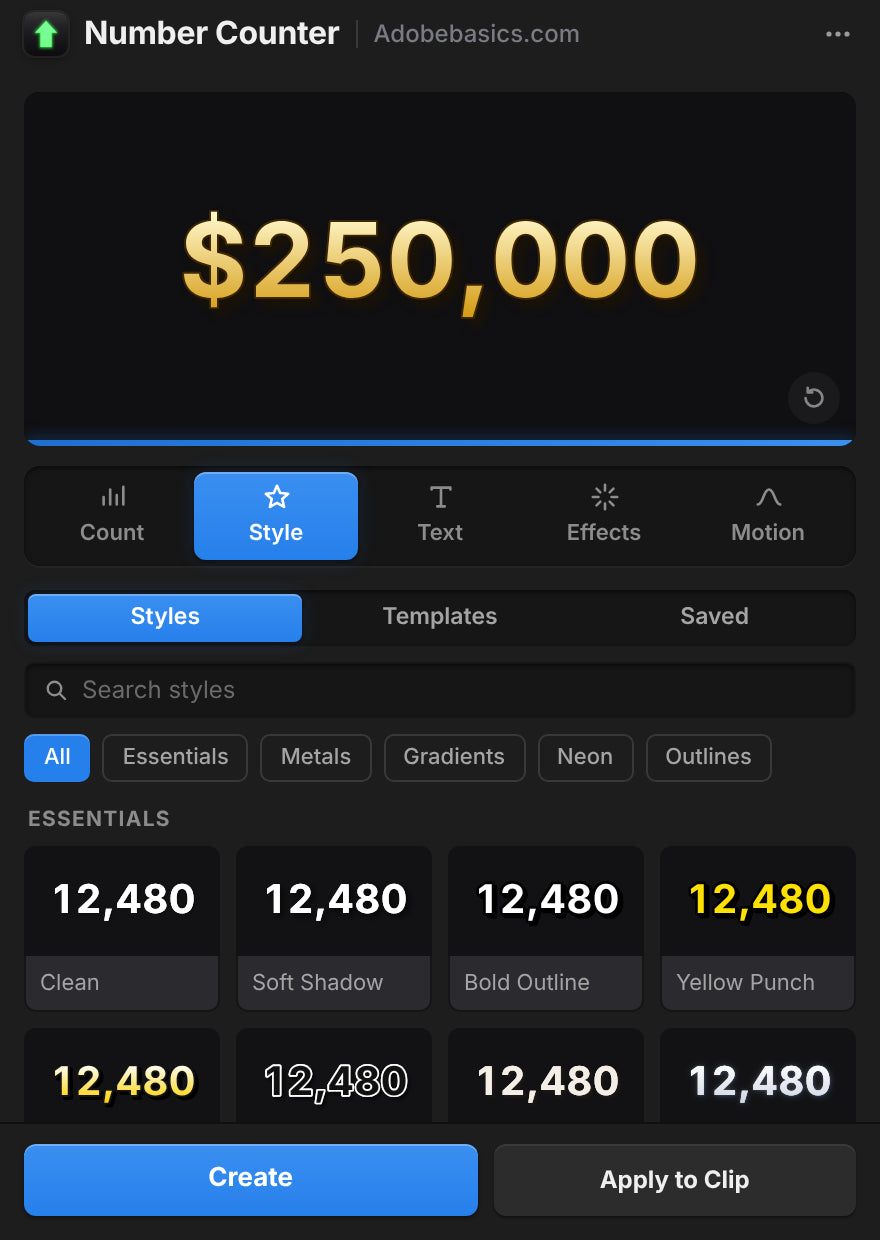
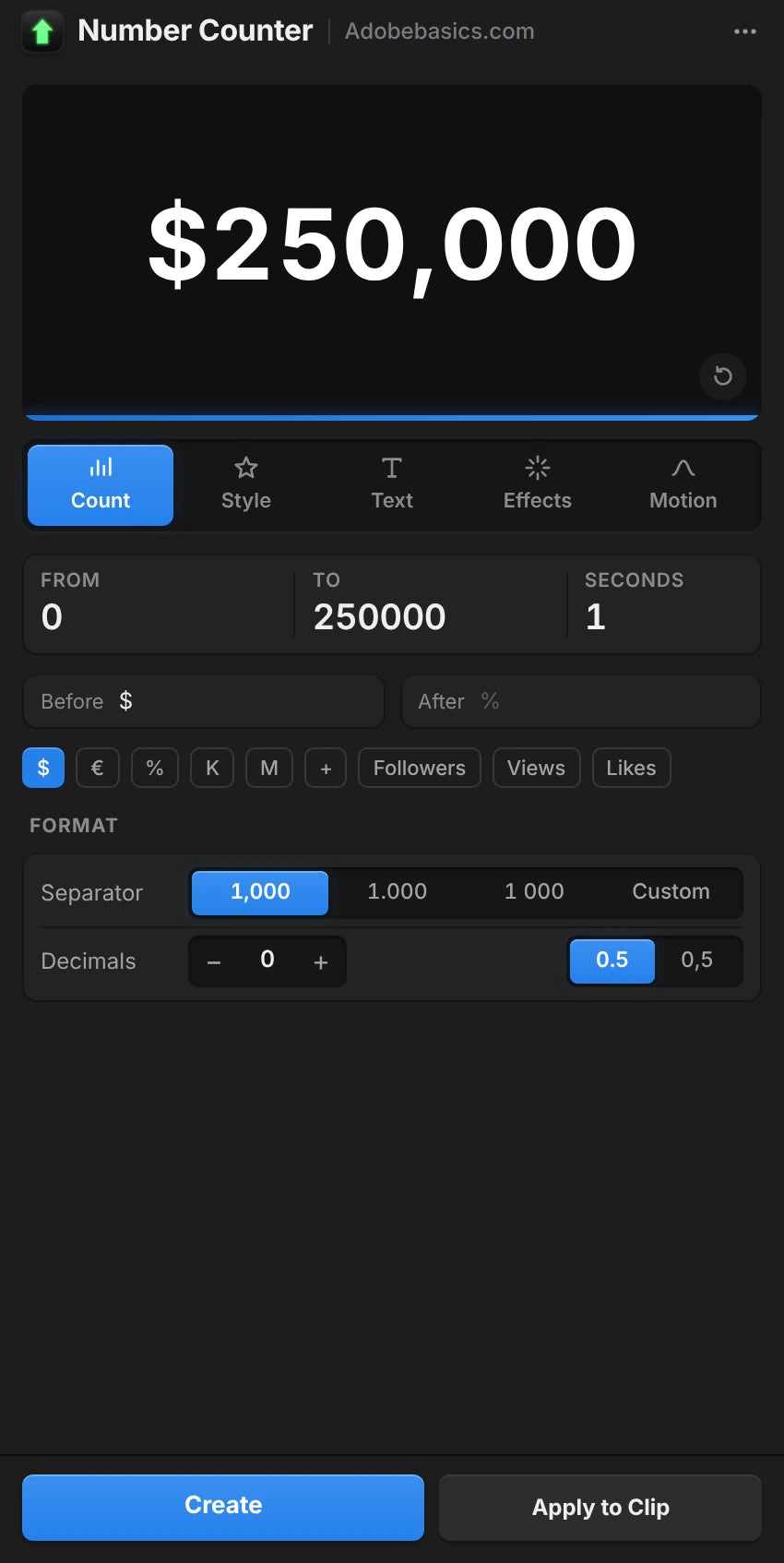
The Number Counter panel in Premiere Pro, on the Style tab with a gold $250,000 preview.

The panelIts own window

A panel that sets it up for you.

Build the counter with a live preview and add it in one click. Select a counter later and the panel loads it for editing.

  • Live preview with five tabs: Count, Style, Text, Effects and Motion
  • Create adds the counter on a new track
  • Apply to Clip puts it over your footage
  • Auto Apply updates the clip as you change things

Dua versi. Bayar sekali.

Kedua versi punya efek dan panel. Pro membuka 58 gaya, preset kustom, dan 72 template.

Number Counter Standard

Efek dan panel.

$29.99 one-time

  • Efek GPU native dan jendela panel
  • Pratinjau langsung, Create dan Apply to Clip
  • Semua pengaturan: hitungan, format, teks, gaya, dan gerakan
  • 30 kurva easing, wiggle, dan motion blur
  • Font terinstal apa pun, teks apa pun sebelum dan sesudah
Pilih Standard
Paling populer

Number Counter Pro

Buka semua yang bisa dilakukan Number Counter.

130 gaya dan template

$34.99 one-time

Hanya $5 lebih mahal dari Standard.

  • Semua yang ada di Standard
  • Buka 58 gaya dalam 5 grup, dari emas hingga neon
  • Buka preset kustom untuk menyimpan penghitung Anda
  • Buka 72 template untuk pengikut, harga, statistik, dan lainnya
  • Pencarian dengan filter grup
Pilih Pro

Unduhan dan kunci lisensi Anda siap tepat setelah checkout. Kami juga mengirimkannya lewat email.

Berhenti membuat ulang penghitung.

Secara manual, hitungan mulus 2 detik berarti 60 klip teks pada 30 fps. Dengan Number Counter, Anda cukup mengetik dua angka.

Fitur Number Counter (rekomendasi) Manual di Premiere
Menghitung sendiri, dengan font apa pun
Koma, desimal, dan $ diatur sekali
Easing dan motion blur bawaan
Gaya dan template sekali klik 130
Dirender di kartu grafis Anda
Tetap di Premiere Pro

Semua pengaturan. Satu efek.

Penghitung dan format

  • Nilai awal dan akhir. Dua angka apa pun, naik atau turun.
  • Durasi. Berapa lama hitungan berlangsung, dalam detik.
  • Jeda awal. Menahan angka pertama sebelum menghitung.
  • 30 kurva easing. Dari Linear hingga Expo, Back, Elastic, dan Bounce.
  • Desimal. Dari nol hingga 10 digit.
  • Pemisah ribuan. Koma, titik, spasi, apostrof, tanpa, atau milik Anda sendiri.
  • Tanda desimal. Titik atau koma.
  • Lebar digit tetap. Digit tetap selebar sama saat menghitung.

Teks dan gaya

  • Font dan gaya. Font terinstal apa pun.
  • Teks sebelum dan sesudah. Teks apa pun, dalam bahasa apa pun.
  • Ukuran, warna, dan perataan. Dengan posisi teks sendiri.
  • Tracking dan huruf kapital. Semua kapital, small caps, faux bold, dan faux italic.
  • Stroke. Warna, lebar, dan urutan.
  • Bayangan. Warna, opasitas, arah, jarak, dan kelembutan.
  • Glow. Ambang, radius, dan intensitas.
  • Gradien. Dua warna di antara dua titik, pada isian.

Gerakan dan preset

  • Wiggle. Seluruh teks, kata, atau huruf, dengan anchor point, kecepatan, korelasi, dan seed.
  • Motion blur. Sudut shutter yang bisa diatur.
  • Transform. Posisi, anchor point, skala, rotasi, dan opasitas.
  • Latar belakang. Transparan, atau di atas klip.
  • 58 gaya, di Pro. Essentials, Metals, Gradients, Neon, dan Outlines.
  • 72 template, di Pro. Social, Money, Stats, Measurements, Time, Sports, dan Games.
  • Preset tersimpan, di Pro. Simpan penghitung Anda dan muat di proyek mana pun.

Specifications

Version
1.1.0 · November 21, 2026 What's new
Premiere Pro
2021–2027
Operating system
Mac macOS 11 or later, Apple silicon and IntelWindows 10 and 11, 64-bit
GPU accelerated
Metal on Mac, CUDA on NVIDIA graphics cards
Languages
English, Deutsch, Français, Español, Português (Brasil), 日本語, 한국어
Versions
Standard the effect, the panel and every settingPro adds 58 styles, 72 templates and your saved presets
Numbers
Any length, up to 10 decimals, any thousands separator, 30 easings
Fonts
Any font
Keyframeable
Every control, in Effect Controls
Text before and after
Any language, Arabic and Hebrew too
Resolution
Up to 8K
High bit depth
32-bit float and linear color
Works offline
Up to 7 days at a time
License
2 computers, one-time payment, commercial use
Updates
Free, from Check for Updates
Download

Tiga langkah. Lalu menghitung.

Satu installer menambahkan efek dan panel ke Premiere Pro.

  1. 1Unduh Number Counter

    Unduhan dan kunci lisensimu muncul langsung setelah checkout. Kami juga mengirimkannya lewat email.

  2. 2Jalankan installer

    Tutup Premiere Pro dan jalankan installer. Efek dan panel akan ditambahkan.

  3. 3Buka panel

    Pilih Window › Extensions › Number Counter, ketik angka Anda, lalu tekan Create.

Premiere Pro 2021 dan yang lebih baru · Windows 10 dan 11 · macOS 11 dan yang lebih baru

Ada pertanyaan?

Ada pertanyaan lain? Kirim pesan lewat halaman Hubungi kami. Kami membalas dalam 24 jam.

Lihat FAQ lengkap

Atau tanya 37K editor di Discord kami

Pertanyaan

10 items
  • Apa yang saya dapatkan?

    Dua hal dalam satu instalasi: efek Premiere Pro native bernama Number Counter, dan jendela panel yang membuat penghitung untuk Anda dengan pratinjau langsung. Gunakan panel, efek, atau keduanya.

  • Apakah saya perlu After Effects?

    Tidak. Number Counter adalah efek Premiere Pro native. Semua diatur di dalam Premiere Pro, di Windows dan Mac.

  • Apa bedanya Standard dan Pro?

    Keduanya punya efek dan panel. Pro membuka 58 gaya, preset kustom, dan 72 template.

  • Bisakah menghitung mundur juga?

    Bisa. Ketik nilai awal yang lebih tinggi dari nilai akhir, misalnya 2.400 ke 0. Untuk jam hitung mundur, lihat Countdown Timer.

  • Versi Premiere Pro mana yang didukung?

    Adobe Premiere Pro 2021–2027, di Windows 10 dan 11 serta macOS 11 atau yang lebih baru.

  • Bagaimana cara menginstalnya?

    Unduh installer untuk komputer Anda dari halaman pesanan, lalu buka. Mulai ulang Premiere Pro, dan Number Counter ada di panel Effects dan di Window › Extensions.

  • Di berapa komputer saya bisa memakainya?

    Dua. Untuk memindahkannya ke komputer lain, hapus satu di Manage License.

  • Apakah pembaruan berikutnya sudah termasuk?

    Ya. Pembaruan gratis, dan installer baru ada di halaman pesanan Anda.

  • Bolehkah saya memakainya di video klien dan video yang dimonetisasi?

    Boleh. Gunakan di video pribadi dan komersial tanpa batas, termasuk pekerjaan klien, kanal yang dimonetisasi, dan iklan. Satu pembelian untuk satu pengguna.

  • Ada jaminan uang kembali?

    Ada. Jika tidak berfungsi di versi Premiere Pro yang tercantum di halaman ini, hubungi kami dalam 14 hari setelah membeli. Kami balas dalam 24 jam dan membantu memperbaikinya, dan jika kami tidak bisa, uangmu kembali. Versi Premiere Pro yang lebih lama tidak termasuk, jadi cek versimu dulu. Masalah yang disebabkan oleh Premiere Pro, komputermu, atau pengaturanmu juga tidak termasuk. Ini tidak memengaruhi hakmu menurut hukum perlindungan konsumen. Baca Kebijakan Pengembalian Dana lengkapnya.

Keyframe halus. Tinggal satu klik.

Setiap penghitung, harga, dan statistik, langsung di Premiere Pro. Bayar sekali, milik Anda selamanya.

Standard

Efek dan panel

$29.99

Pro Paling populer

Buka 58 gaya, preset kustom, dan 72 template

$34.99

  • Premiere Pro 2021–2027
  • Windows dan Mac

Garansi uang kembali jika tidak berfungsi

Hubungi kami dalam 14 hari setelah membeli. Bantuan dalam 24 jam untuk memperbaikinya. Jika tidak bisa kami perbaiki, uangmu kembali.