






The QuickPaste panel, inside Premiere Pro


QuickPaste
Incolla immagini direttamente in Premiere Pro.
Porta qualsiasi immagine nel tuo montaggio con un solo tasto. Copia un'immagine dal web, uno screenshot o un file, poi premi ⌘V o Ctrl+V in Premiere Pro. Arriva nel raccoglitore che scegli o direttamente sulla testina, senza salvare né importare nulla prima.
 Premiere Pro 2021–2027
- Windows e Mac
- Aggiornamenti gratuiti

On your phone? Get the link on your computer.
Garanzia di rimborso Non funziona nel tuo Premiere Pro? Scrivici entro 14 giorni.
QuickPaste
Fatto da chi insegna Premiere Pro.
Oltre 700 tutorial e migliaia di commenti ci hanno mostrato cosa rallenta gli editor. Così abbiamo creato gli strumenti che volevamo da editor: semplici e senza seccature.
Guarda i tutorial- 200K+editor usano i nostri strumenti
- 30M+visualizzazioni dei nostri tutorial su YouTube
- 90K+follower sui social
- 37K+editor nella nostra community Discord
Copia. Incolla. Continua a montare.
Il tuo solito incolla.
Dritto in Premiere Pro.
Si incollano anche i file Adobe.
Incolla un colore
HEX, RGB, HSL, CMYK o OKLCH.
Qualsiasi immagine
Anche HEIC, AVIF e RAW.

Premiere Pro 2021–2027
I punti salienti.
-
Incolla
Copiala. Incollala in Premiere.
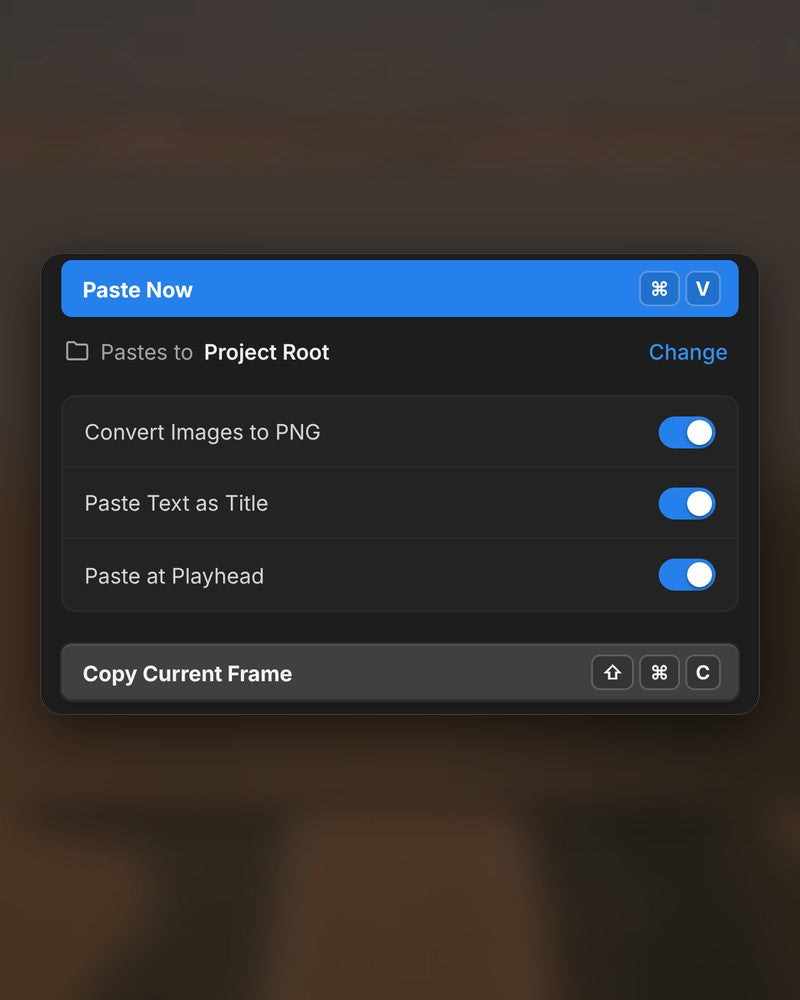
Copia un’immagine ovunque e premi ⌘V. Arriva nel contenitore, o sulla timeline con Paste at Playhead.
-
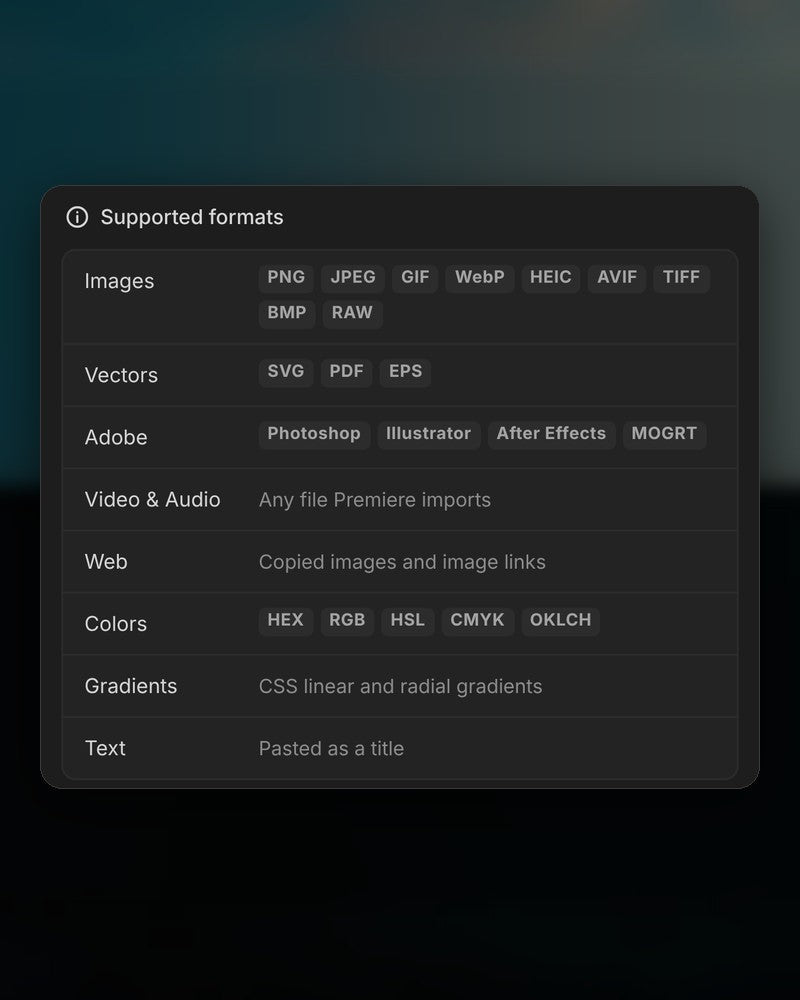
Formati
Immagini, file, colori e testo.
Le immagini arrivano come PNG, anche WebP e HEIC. Si incollano anche i file Photoshop, Illustrator e After Effects.
-
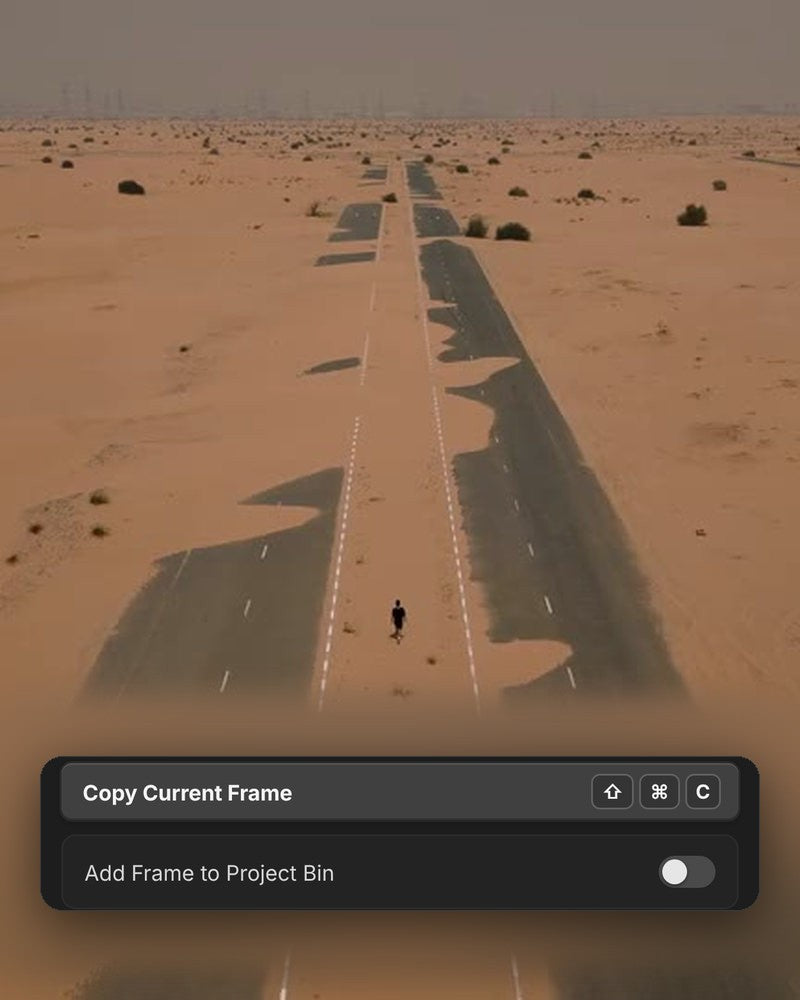
Copia fotogramma
Copia il fotogramma. Incollalo ovunque.
Il fotogramma sotto l’indicatore di riproduzione, come PNG a grandezza piena, pronto per una chat o un’email.
Nel download
-
App QuickPaste
-
Chiave di licenza
-
Plugin di Premiere Pro
Il programma di installazione e la tua chiave di licenza. Arrivano entrambi all’acquisto, e il programma di installazione installa l’app QuickPaste e il plugin di Premiere Pro per te.
-

Paste
Just paste. Nothing else to press.
Copy an image anywhere and press ⌘V in Premiere Pro. It lands on the timeline at the playhead, with no save and no import.
- From anywhereA browser, a screenshot, a chat or a design app.
- At the playheadOn a track that is free, so nothing moves.
- On WindowsCtrl+C and Ctrl+V work the same way.
Convert
Any image in. A clean PNG out.
Every copied image becomes a PNG before it reaches Premiere Pro. No converting by hand.
- Every image formatWebP, HEIC, AVIF, JPEG, GIF, TIFF, BMP and RAW.
- Nothing to download firstCopy an image on a web page and paste.
- Ready in your projectThe PNG lands in the bin you choose.
Colors
Copy a color. Get a matte.
Copy a color code from anywhere and press ⌘V. A color matte the size of your frame lands at the playhead.
- Every formatHEX, rgb(), hsl(), oklch(), cmyk() and more.
- Your frame sizeThe matte matches your sequence.
- Named by colorEach matte is named after its HEX value.
Gradients
Copy a gradient. Paste a gradient.
Paste a CSS linear or radial gradient. It becomes a gradient matte, sized to your sequence.
- Linear and radialRepeating gradients too.
- Same colorsEvery color stop, in its place.
- Easy to findEach one is named after its colors.
Text
Copy text. Get a title.
Copy any text, from a browser, a script or a chat, and press ⌘V. With Paste Text as Title on, it lands at the playhead as a title you can edit.
- Named for youThe clip takes the first line of your text.
- A real titleEdit it in Premiere Pro like any other.
- Your choiceOne switch in the panel turns it off.
PDFs and vectors
Paste a PDF. Get every page.
PDFs and SVGs are drawn sharp at your frame size. A PDF with several pages becomes one still per page, end to end.
- Up to 50 pagesOne after another from the playhead.
- Always sharpDrawn at your sequence’s frame size.
- Odd formats tooHEIC, AVIF, camera RAW and more become PNG.
Motion Graphics templates
A template? Paste it in.
Copy a .mogrt file and press ⌘V. It lands at the playhead, ready to edit.
- Its full lengthPlaced for the template’s whole duration.
- Never on your editIt goes on the lowest track that is free.
- Edit as usualChange its text and colors in Premiere Pro.
Several files
Copy a few. Paste them in order.
Copy files in Finder or File Explorer and press ⌘V. They land end to end at the playhead, on a track that is free.
- Nothing movesClips after the playhead are never pushed along.
- Lowest free trackPicked for the clips’ whole length.
- Anything Premiere importsVideo, audio, PSD, AI, AEP and more.
Bins
Every paste. In its bin.
Choose a bin in the panel, or make a new one. Everything you paste lands there.
- Your pickAny bin in your project, or the project root.
- New binName it in the panel and QuickPaste makes it.
- Files kept safeSaved in QuickPaste’s own folder, never a temp folder.
Copy frame
Need a still? Copy the frame.
Press ⇧⌘C in Premiere Pro. The frame under the playhead is on your clipboard, ready to paste anywhere.
- Full sizeA PNG at your sequence’s frame size.
- In your project tooTurn on Add Frame to Project Bin to keep a copy.
- On WindowsShift+Ctrl+C, and Ctrl+V to paste.
Tre passaggi. Poi incolla.
Un installer guidato configura l'app e il plugin di Premiere Pro per te.
1Scarica QuickPaste
Il download compare subito dopo l’acquisto. Te lo inviamo anche via email.
2Avvia l'installer
Apri il programma di installazione e segui i passaggi. Installa per te l’app e il plugin di Premiere Pro.
3Copia e incolla
Copia un’immagine da qualsiasi posto e incollala direttamente in Premiere Pro.

Cosa aggiunge QuickPaste.
La maggior parte dei plugin per incollare aggiunge un pulsante, un menu o una nuova scorciatoia. QuickPaste usa il ⌘V o Ctrl+V che premi già.

Acquista il bundle e risparmia il 15%
Tutto il kit per Premiere.
- Number Counter Pro Numeri animati
- SuperGlow Bagliore premium
- EaseFlow Pro Easing fluido
- Asteria Pro Animazioni di testo fluide
- BetterFX Ogni effetto, una scorciatoia
- QuickPaste Incolla immagini e file
- ClearFrame Pro Safe zones for every app



- Asteria ProAnimazioni di testo fluide
- EaseFlow ProEasing fluido
- BetterFXOgni effetto, una scorciatoia
- SuperGlowBagliore premium
- QuickPasteIncolla immagini e file
- Number Counter ProNumeri animati
- ClearFrame ProSafe zones for every app
Specifications
- Version
- 1.5.6 · 23 novembre 2026 What's new
- Premiere Pro
- 2021–2027 and Premiere Pro (Beta)
- Operating system
- Mac macOS 11 or later, Apple silicon and IntelWindows 10 and 11, 64-bit
- Languages
- English, Deutsch, Français, Español, Português (Brasil), 日本語, 한국어
- Pastes
- Images, SVG, PDF, Illustrator artwork, styled text, MOGRTs, gradients and image links
- Keyboard shortcuts
- Colors
- HEX, RGB, HSL, CMYK and OKLCH
- Gradients
- CSS linear and radial
- Works offline
- Up to 7 days at a time
- License
- 2 computers, one-time payment
- Updates
- Free and automatic
- Download
- Mac 10.3 MB · Windows 4.8 MB
Copialo. Premi ⌘V o Ctrl+V.
Paghi una volta, resta tuo per sempre.
- Premiere Pro 2021–2027
- Windows e Mac
Garanzia di rimborso se non funziona
- Scrivici entro 14 giorni dall’acquisto.
- Aiuto entro 24 ore per sistemarlo.
- Se non riusciamo a sistemarlo, ti rimborsiamo.