






The QuickPaste panel, inside Premiere Pro


QuickPaste
画像をPremiere Proに直接貼り付け。
どんな画像もキー1つで編集に取り込めます。ウェブの画像、スクリーンショット、ファイルをコピーして、Premiere Proで⌘VまたはCtrl+Vを押すだけ。選んだビンか再生ヘッドの位置にそのまま入り、先に保存や読み込みをする必要はありません。
 Premiere Pro 2021–2027
- WindowsとMac
- 無料アップデート

On your phone? Get the link on your computer.
返金保証 お使いのPremiere Proで動作しない場合は、14日以内にご連絡ください。
QuickPaste
作ったのは、 Premiere Proを教えている私たち。
700本以上のチュートリアルと数千件のコメントから、編集者の作業を遅くするものが見えてきました。 だから、編集者として欲しかったツールを作りました。シンプルで、手間いらず。
チュートリアルを見る- 200K+人の編集者が使用中
- 30M+回のYouTubeチュートリアル再生
- 90K+人のSNSフォロワー
- 37K+人の編集者がDiscordコミュニティに参加
コピー。ペースト。そのままカット。
いつものペーストで、
Premiere Proに直接。
Adobeのファイルもペーストできます。
色をペースト
HEX、RGB、HSL、CMYK、OKLCHに対応。
どんな画像でも
HEIC、AVIF、RAWにも対応。

Premiere Pro 2021–2027
主な特長。
-
ペースト
コピーして、Premiereにペースト。
どこかで画像をコピーして⌘V。ビンに入るか、Paste at Playheadならタイムラインに。
-
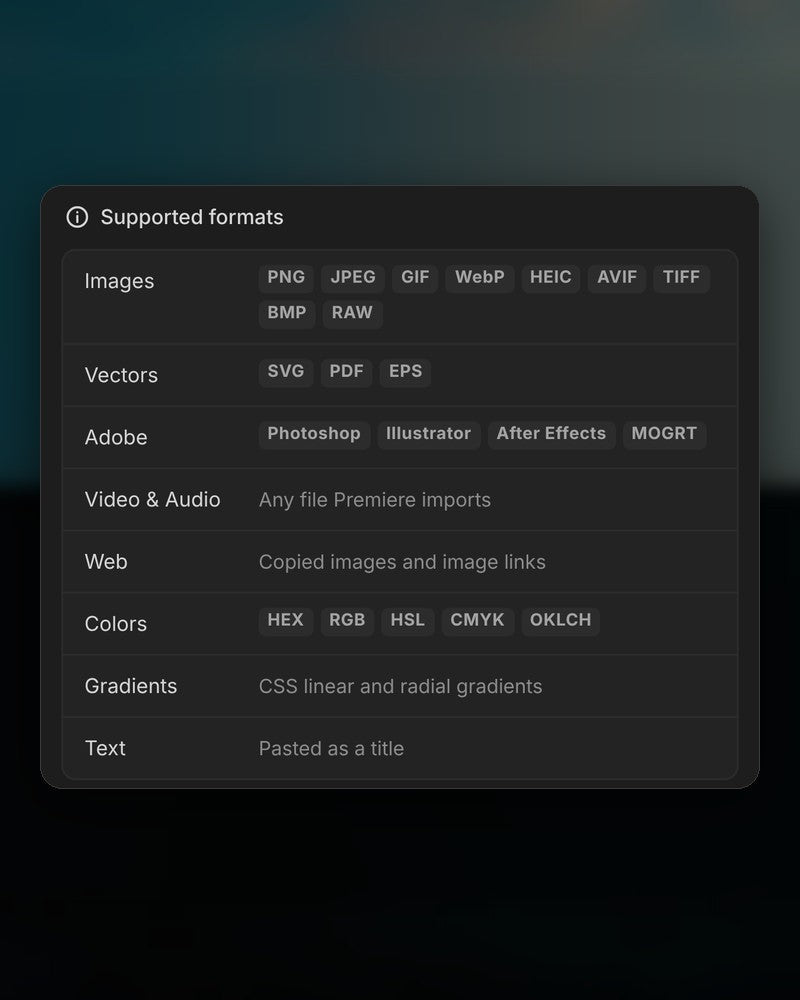
対応形式
画像、ファイル、カラー、テキスト。
画像はWebPやHEICでもPNGとして入ります。Photoshop、Illustrator、After Effectsのファイルも貼り付けられます。
-
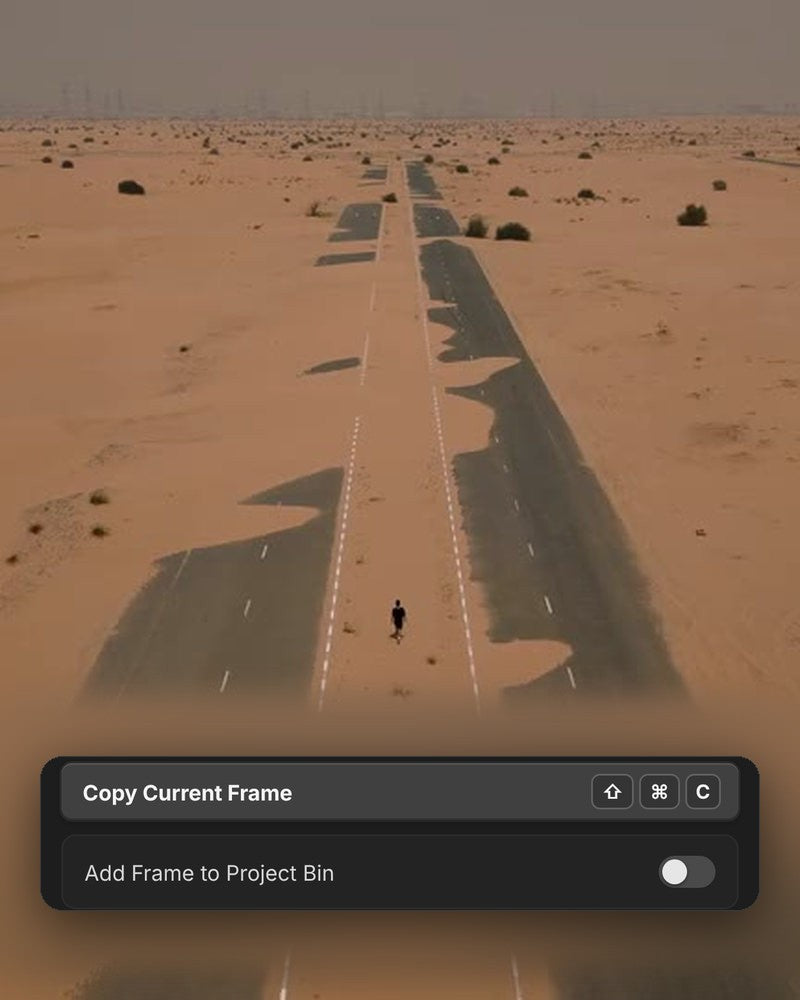
フレームをコピー
フレームをコピーして、どこにでも貼り付け。
再生ヘッド位置のフレームをフルサイズのPNGで。チャットやメールにすぐ使えます。
ダウンロード内容
-
QuickPasteアプリ
-
ライセンスキー
-
Premiere Proプラグイン
インストーラーとライセンスキー。どちらも購入時に届き、インストーラーがQuickPasteアプリとPremiere Proプラグインをセットアップします。
-

Paste
Just paste. Nothing else to press.
Copy an image anywhere and press ⌘V in Premiere Pro. It lands on the timeline at the playhead, with no save and no import.
- From anywhereA browser, a screenshot, a chat or a design app.
- At the playheadOn a track that is free, so nothing moves.
- On WindowsCtrl+C and Ctrl+V work the same way.
Convert
Any image in. A clean PNG out.
Every copied image becomes a PNG before it reaches Premiere Pro. No converting by hand.
- Every image formatWebP, HEIC, AVIF, JPEG, GIF, TIFF, BMP and RAW.
- Nothing to download firstCopy an image on a web page and paste.
- Ready in your projectThe PNG lands in the bin you choose.
Colors
Copy a color. Get a matte.
Copy a color code from anywhere and press ⌘V. A color matte the size of your frame lands at the playhead.
- Every formatHEX, rgb(), hsl(), oklch(), cmyk() and more.
- Your frame sizeThe matte matches your sequence.
- Named by colorEach matte is named after its HEX value.
Gradients
Copy a gradient. Paste a gradient.
Paste a CSS linear or radial gradient. It becomes a gradient matte, sized to your sequence.
- Linear and radialRepeating gradients too.
- Same colorsEvery color stop, in its place.
- Easy to findEach one is named after its colors.
Text
Copy text. Get a title.
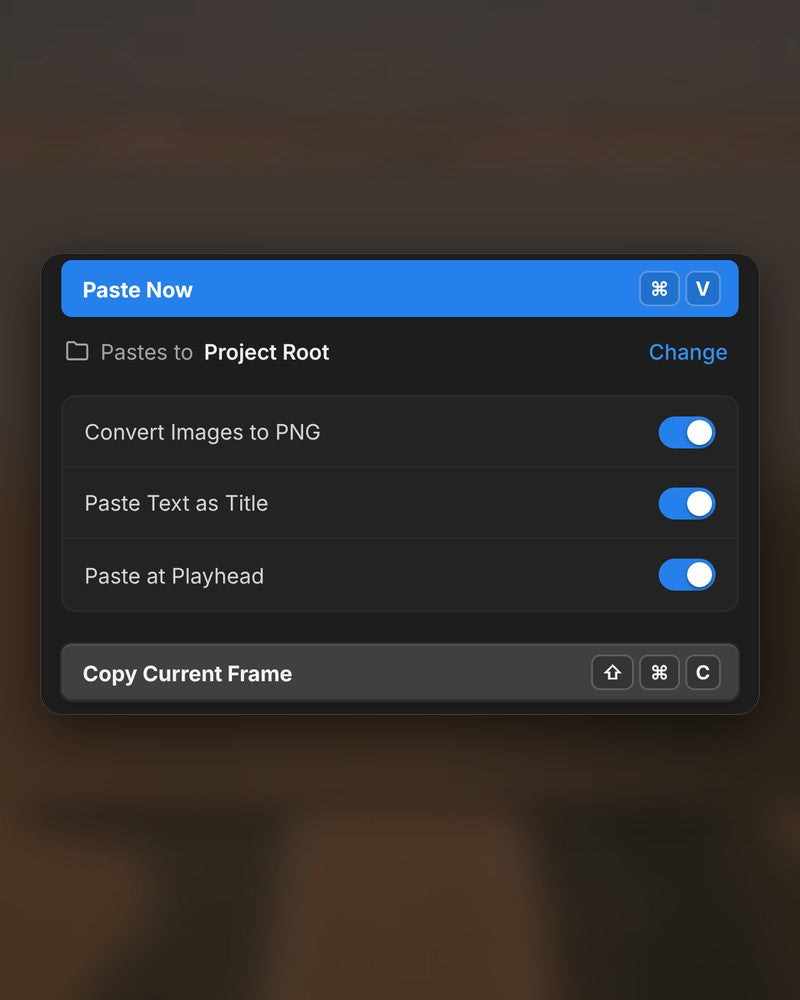
Copy any text, from a browser, a script or a chat, and press ⌘V. With Paste Text as Title on, it lands at the playhead as a title you can edit.
- Named for youThe clip takes the first line of your text.
- A real titleEdit it in Premiere Pro like any other.
- Your choiceOne switch in the panel turns it off.
PDFs and vectors
Paste a PDF. Get every page.
PDFs and SVGs are drawn sharp at your frame size. A PDF with several pages becomes one still per page, end to end.
- Up to 50 pagesOne after another from the playhead.
- Always sharpDrawn at your sequence’s frame size.
- Odd formats tooHEIC, AVIF, camera RAW and more become PNG.
Motion Graphics templates
A template? Paste it in.
Copy a .mogrt file and press ⌘V. It lands at the playhead, ready to edit.
- Its full lengthPlaced for the template’s whole duration.
- Never on your editIt goes on the lowest track that is free.
- Edit as usualChange its text and colors in Premiere Pro.
Several files
Copy a few. Paste them in order.
Copy files in Finder or File Explorer and press ⌘V. They land end to end at the playhead, on a track that is free.
- Nothing movesClips after the playhead are never pushed along.
- Lowest free trackPicked for the clips’ whole length.
- Anything Premiere importsVideo, audio, PSD, AI, AEP and more.
Bins
Every paste. In its bin.
Choose a bin in the panel, or make a new one. Everything you paste lands there.
- Your pickAny bin in your project, or the project root.
- New binName it in the panel and QuickPaste makes it.
- Files kept safeSaved in QuickPaste’s own folder, never a temp folder.
Copy frame
Need a still? Copy the frame.
Press ⇧⌘C in Premiere Pro. The frame under the playhead is on your clipboard, ready to paste anywhere.
- Full sizeA PNG at your sequence’s frame size.
- In your project tooTurn on Add Frame to Project Bin to keep a copy.
- On WindowsShift+Ctrl+C, and Ctrl+V to paste.
3ステップ、あとは貼るだけ。
ガイド付きのインストーラーひとつで、アプリとPremiere Proプラグインをまとめてセットアップします。
1QuickPasteをダウンロード
ダウンロードは購入後すぐに表示されます。メールでもお送りします。
2インストーラーを実行
インストーラーを開いて手順に従うと、アプリとPremiere Proプラグインが自動で入ります。
3コピーしてペースト
どこからでも画像をコピーして、Premiere Proにそのまま貼り付け。

QuickPasteで変わること。
多くのペースト系プラグインはボタンやメニュー、新しいショートカットを追加します。QuickPasteは、いつも押している⌘VやCtrl+Vをそのまま使います。

セットで15%オフ
Premiere一式を、まるごと。
- Number Counter Pro 動く数字
- SuperGlow プレミアムなグロー
- EaseFlow Pro なめらかなイージング
- Asteria Pro なめらかなテキストアニメーション
- BetterFX すべてのエフェクトを、ショートカットひとつで
- QuickPaste 画像やファイルを貼り付け
- ClearFrame Pro Safe zones for every app



- Asteria Proなめらかなテキストアニメーション
- EaseFlow Proなめらかなイージング
- BetterFXすべてのエフェクトを、ショートカットひとつで
- SuperGlowプレミアムなグロー
- QuickPaste画像やファイルを貼り付け
- Number Counter Pro動く数字
- ClearFrame ProSafe zones for every app
Specifications
- Version
- 1.5.6 · November 23, 2026 What's new
- Premiere Pro
- 2021–2027 and Premiere Pro (Beta)
- Operating system
- Mac macOS 11 or later, Apple silicon and IntelWindows 10 and 11, 64-bit
- Languages
- English, Deutsch, Français, Español, Português (Brasil), 日本語, 한국어
- Pastes
- Images, SVG, PDF, Illustrator artwork, styled text, MOGRTs, gradients and image links
- Keyboard shortcuts
- Colors
- HEX, RGB, HSL, CMYK and OKLCH
- Gradients
- CSS linear and radial
- Works offline
- Up to 7 days at a time
- License
- 2 computers, one-time payment
- Updates
- Free and automatic
- Download
- Mac 10.3 MB · Windows 4.8 MB
コピーして、⌘VまたはCtrl+V。
一度の購入で、ずっと使える。
- Premiere Pro 2021–2027
- WindowsとMac
返金保証 動作しない場合
- 購入から14日以内にご連絡ください。
- 24時間以内に解決をサポートします。
- 解決できない場合は返金します。