Hecho por quienes enseñan Premiere Pro.

Más de 700 tutoriales y miles de comentarios nos mostraron qué frena a los editores. Así que creamos las herramientas que queríamos como editores: simples y sin complicaciones.

Ver los tutoriales

Números animados. Con un clic.

Number Counter

Cuenta lo que quieras

58

Estilos

72

Plantillas

Efecto + panel

Un efecto nativo y una ventana de panel, en una sola instalación.

2

Ordenadores por licencia

30

Curvas de easing

$99.99

Precios, porcentajes y seguidores

Desenfoque de movimiento

Cualquier fuente

Glow

Hecho para la velocidad

Acelerado por GPU. Rápido en cualquier ordenador.

Premiere Pro 2021–2027

Paga una vez. Tuyo para siempre.

macOS Windows

Un instalador para cada uno.

Counting

Type two numbers. It counts.

Type a From and a To value in the panel. The counter runs from one to the other, up or down, and the preview plays it before you add it.

  • Any two numbersLike 0 to 250,000, or 2,400 down to 0.
  • SecondsSet how long the count takes.
  • Quick textOne click adds $, €, %, K, M, Followers, Views or Likes.

TemplatesPro

72 templates. Ready to count.

Followers, prices, percentages, speeds, scores and countdowns. Click one and the numbers, the text and the format are set.

  • 6 groupsSocial, Money, Stats, Measurements, Time, Sports and Games.
  • SearchFind one by name, or filter by group.
  • A starting pointChange any value after you click.

StylesPro

58 styles. One click each.

Gold, chrome, neon, gradients and bold outlines, in five groups with search. A style sets the color, stroke, shadow, glow and gradient, and leaves your numbers, text and font alone. The same 58 styles are in the effect's Style menu.

  • Essentials 8
  • Metals 10
  • Gradients 18
  • Neon 12
  • Outlines 10

Number format

Prices, percentages, big numbers.

Up to 10 decimals, with a comma, a period or a space between the thousands, your own separator, or none.

  • Decimals0 to 10 places. They count along with the number.
  • Separators1,000, 1.000, 1 000, or any text you type.
  • Steady digitsEvery digit takes the same width, so the number doesn't shift.

Text

Your font. Any text around it.

Pick any font installed on your computer. Put any text before and after the number, in any language.

  • FontsEvery installed font, with search and styles.
  • Size, tracking and capsPlus alignment, faux bold and faux italic.
  • Before and after$, %, km/h, Followers or a whole phrase.

Styling

Stroke, shadow, glow, gradient. Built in.

Each one is a switch with its own settings, so there are no extra effects to stack on the clip.

  • StrokeColor, width and order.
  • Shadow and glowDirection, distance and softness. Radius and intensity.
  • GradientTwo colors, down, across or diagonal, on the fill.

Motion

30 easing curves. Motion blur built in.

The easing sets how the count moves. Expo slows into the final number. Back and Bounce overshoot and settle.

  • Start delayHold the first number for up to 10 seconds.
  • Motion blurWith an adjustable shutter angle.
  • TransformPosition, scale, rotation and opacity built in.

Wiggle

Wiggle the whole text. Or every letter.

A handheld drift in position and rotation. Move the whole counter, each word or each letter on its own.

  • 3 modesWhole Text, Words or Letters.
  • Anchor pointChoose the point each piece rotates around.
  • Your own feelSpeed, sideways, up and down, rotation and seed.

Saved presetsPro

Save your own. Use them in every project.

Set up a counter you like and press Save as Preset. It keeps everything: the numbers, the text, the format and the style.

  • One clickYour presets load like the built-in ones.
  • In the effect tooSave Preset and Load Preset sit in Effect Controls.
  • Yours to keepEach preset is a file on your computer.

What you get

A native effect. And a panel that builds it for you.

Number Counter installs two things: an effect in your Effects panel and its own panel window. Build the counter in the panel, then fine-tune it in Effect Controls.

Number Counter in Premiere Pro's Effect Controls, with the effect name and its Presets, Counter and Number Format groups open.

The effectIn your Effects panel

A real Premiere Pro effect.

It renders on your graphics card like Premiere Pro's own effects, so the count plays back smoothly and exports fast.

  • GPU accelerated: Metal on Mac, CUDA on Windows
  • Every setting in Effect Controls, in 12 clear groups
  • Transparent, or drawn over the clip
  • Position, scale, rotation and opacity built in
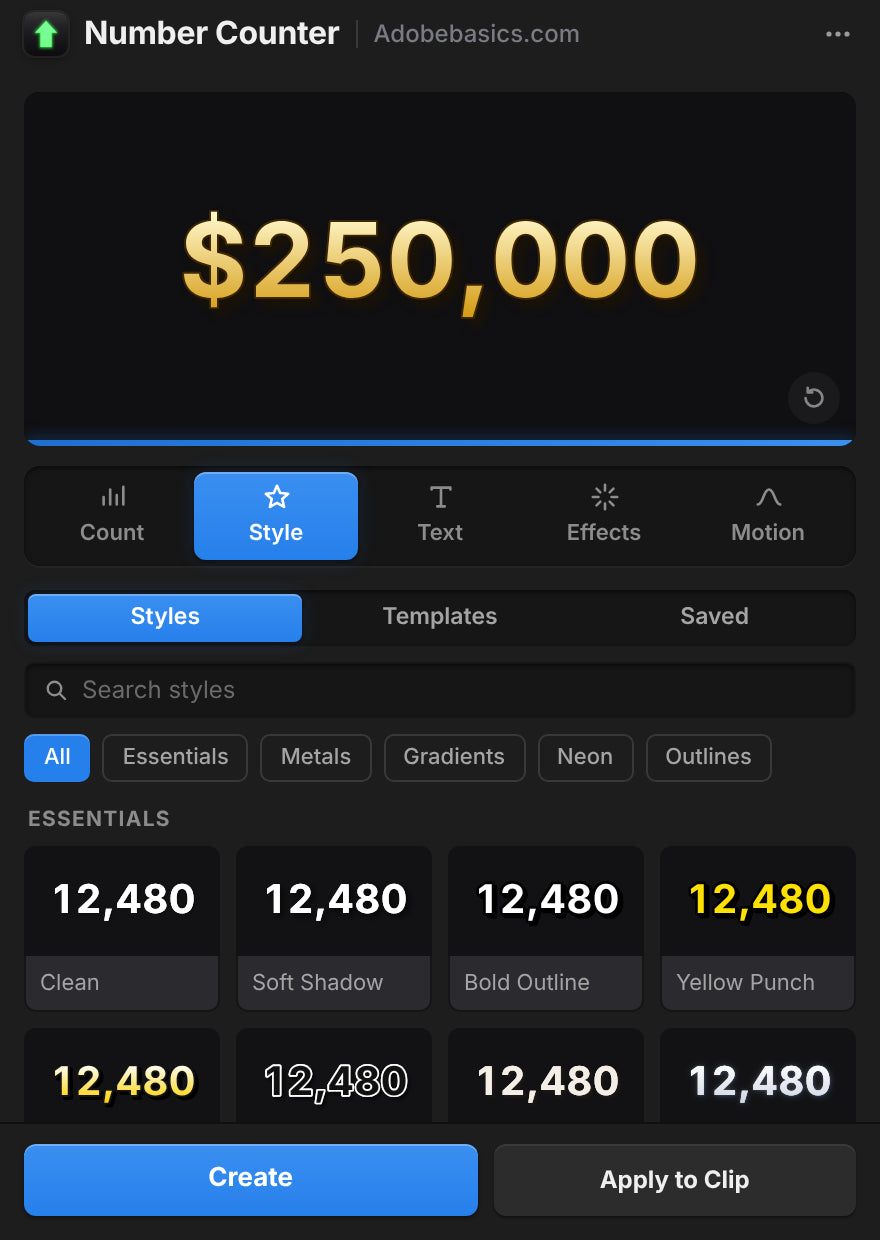
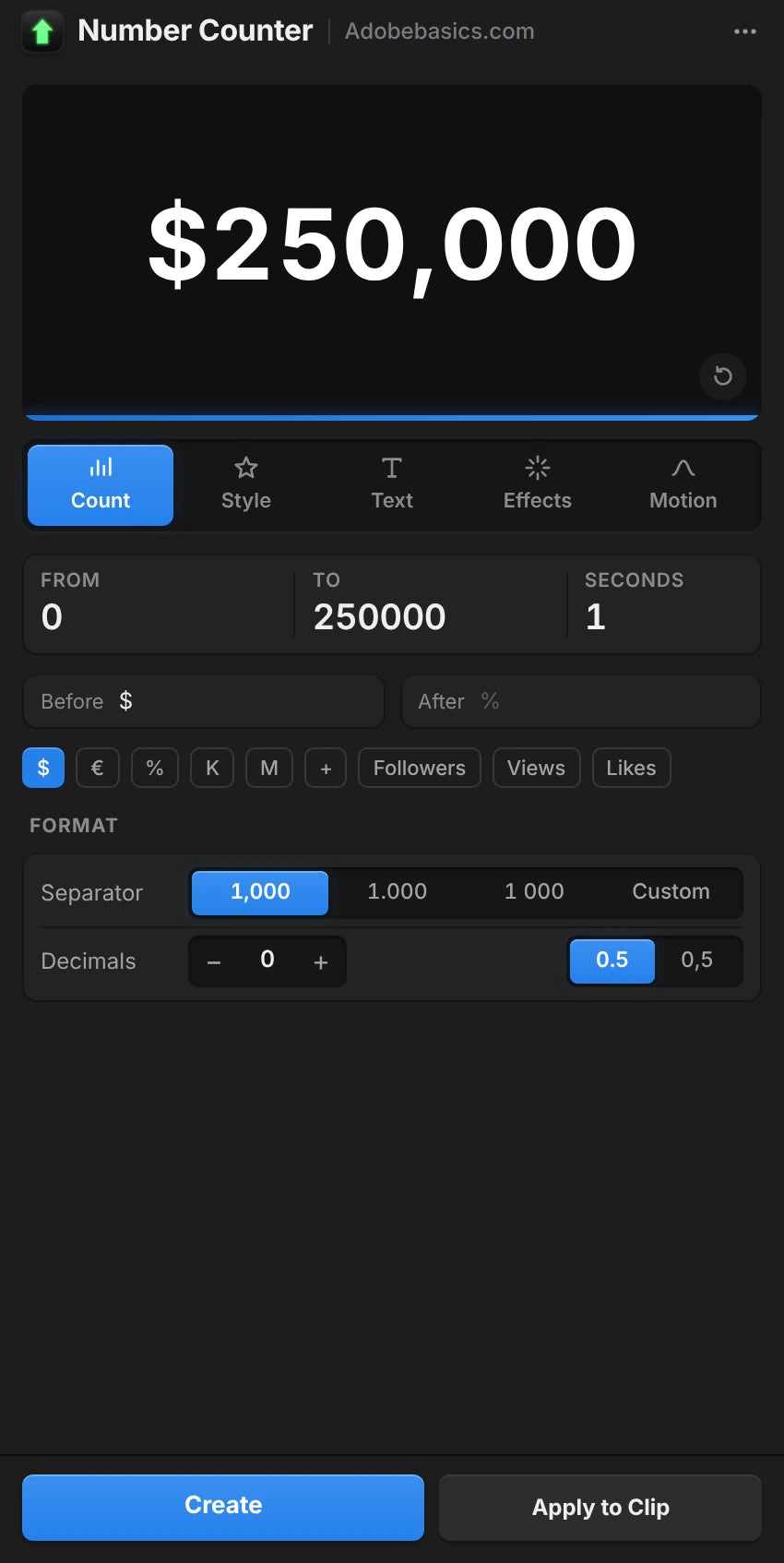
The Number Counter panel in Premiere Pro, on the Style tab with a gold $250,000 preview.

The panelIts own window

A panel that sets it up for you.

Build the counter with a live preview and add it in one click. Select a counter later and the panel loads it for editing.

  • Live preview with five tabs: Count, Style, Text, Effects and Motion
  • Create adds the counter on a new track
  • Apply to Clip puts it over your footage
  • Auto Apply updates the clip as you change things

Dos versiones. Un solo pago.

Ambas versiones tienen el efecto y el panel. Pro desbloquea 58 estilos, ajustes preestablecidos propios y 72 plantillas.

Number Counter Standard

El efecto y el panel.

$29.99 one-time

  • Efecto GPU nativo y la ventana del panel
  • Vista previa en vivo, Create y Apply to Clip
  • Cada ajuste: conteo, formato, texto, estilo y movimiento
  • 30 curvas de easing, wiggle y desenfoque de movimiento
  • Cualquier fuente instalada y cualquier texto antes y después
Elegir Standard
El más popular

Number Counter Pro

Desbloquea todo lo que Number Counter puede hacer.

130 estilos y plantillas

$34.99 one-time

Solo $5 más que Standard.

  • Todo lo de Standard
  • Desbloquea 58 estilos en 5 grupos, del dorado al neón
  • Desbloquea ajustes propios para guardar tus contadores
  • Desbloquea 72 plantillas para seguidores, precios, estadísticas y más
  • Búsqueda con filtros por grupo
Elegir Pro

Tu descarga y tu clave de licencia están listas justo después de la compra. También te las enviamos por correo.

Deja de rehacer contadores.

A mano, un conteo fluido de 2 segundos son 60 clips de texto a 30 fps. Con Number Counter, escribes dos números.

Funciones Number Counter (recomendado) A mano en Premiere
Cuenta solo, en cualquier fuente
Comas, decimales y $ una sola vez
Easing y desenfoque de movimiento integrados
Estilos y plantillas, con un clic 130
Renderiza en tu tarjeta gráfica
Se queda en Premiere Pro

Cada ajuste. Un solo efecto.

Contador y formato

  • Valor inicial y final. Dos números cualesquiera, hacia arriba o hacia abajo.
  • Duración. Cuánto dura el conteo, en segundos.
  • Retraso inicial. Mantiene el primer número antes de contar.
  • 30 curvas de easing. De Linear a Expo, Back, Elastic y Bounce.
  • Decimales. De ninguno a 10.
  • Separador de miles. Coma, punto, espacio, apóstrofo, ninguno o el tuyo.
  • Separador decimal. Punto o coma.
  • Dígitos de ancho fijo. Los dígitos mantienen el mismo ancho mientras cuentan.

Texto y estilo

  • Fuente y estilo. Cualquier fuente instalada.
  • Texto antes y después. Cualquier texto, en cualquier idioma.
  • Tamaño, color y alineación. Con su propia posición de texto.
  • Tracking y mayúsculas. Todo mayúsculas, versalitas, negrita falsa y cursiva falsa.
  • Trazo. Color, grosor y orden.
  • Sombra. Color, opacidad, dirección, distancia y suavidad.
  • Glow. Umbral, radio e intensidad.
  • Degradado. Dos colores entre dos puntos, en el relleno.

Movimiento y ajustes

  • Wiggle. Texto completo, palabras o letras, con punto de anclaje, velocidad, correlación y semilla.
  • Desenfoque de movimiento. Ángulo de obturación ajustable.
  • Transformar. Posición, punto de anclaje, escala, rotación y opacidad.
  • Fondo. Transparente o sobre el clip.
  • 58 estilos, en Pro. Essentials, Metals, Gradients, Neon y Outlines.
  • 72 plantillas, en Pro. Social, Money, Stats, Measurements, Time, Sports y Games.
  • Ajustes guardados, en Pro. Guarda tus contadores y cárgalos en cualquier proyecto.

Specifications

Version
1.1.0 · November 21, 2026 What's new
Premiere Pro
2021–2027
Operating system
Mac macOS 11 or later, Apple silicon and IntelWindows 10 and 11, 64-bit
GPU accelerated
Metal on Mac, CUDA on NVIDIA graphics cards
Languages
English, Deutsch, Français, Español, Português (Brasil), 日本語, 한국어
Versions
Standard the effect, the panel and every settingPro adds 58 styles, 72 templates and your saved presets
Numbers
Any length, up to 10 decimals, any thousands separator, 30 easings
Fonts
Any font
Keyframeable
Every control, in Effect Controls
Text before and after
Any language, Arabic and Hebrew too
Resolution
Up to 8K
High bit depth
32-bit float and linear color
Works offline
Up to 7 days at a time
License
2 computers, one-time payment, commercial use
Updates
Free, from Check for Updates
Download

Tres pasos. Y a contar.

Un instalador añade el efecto y el panel a Premiere Pro.

  1. 1Descarga Number Counter

    Tu descarga y tu clave de licencia aparecen justo después de la compra. También te las enviamos por correo.

  2. 2Ejecuta el instalador

    Cierra Premiere Pro y ejecútalo. Añade el efecto y el panel.

  3. 3Abre el panel

    Elige Ventana › Extensiones › Number Counter, escribe tus números y pulsa Create.

Premiere Pro 2021 y posteriores · Windows 10 y 11 · macOS 11 y posteriores

¿Alguna duda?

¿Otra pregunta? Escríbenos desde la página de contacto. Respondemos en 24 horas.

Ver todas las preguntas frecuentes

O pregunta a 37K editores en nuestro Discord

Preguntas

10 items
  • ¿Qué obtengo?

    Dos cosas en una instalación: un efecto nativo de Premiere Pro llamado Number Counter y una ventana de panel que crea contadores por ti con vista previa en vivo. Usa el panel, el efecto o ambos.

  • ¿Necesito After Effects?

    No. Number Counter es un efecto nativo de Premiere Pro. Todo se ajusta dentro de Premiere Pro, en Windows y Mac.

  • ¿Qué diferencia hay entre Standard y Pro?

    Ambas tienen el efecto y el panel. Pro desbloquea 58 estilos, ajustes preestablecidos propios y 72 plantillas.

  • ¿También puede contar hacia atrás?

    Sí. Escribe un valor inicial mayor que el final, como 2.400 a 0. Para un reloj de cuenta atrás, mira el Countdown Timer.

  • ¿Qué versiones de Premiere Pro son compatibles?

    Adobe Premiere Pro 2021–2027, en Windows 10 y 11 y en macOS 11 o posterior.

  • ¿Cómo lo instalo?

    Descarga el instalador para tu ordenador desde la página de tu pedido y ábrelo. Reinicia Premiere Pro y Number Counter estará en el panel Efectos y en Ventana › Extensiones.

  • ¿En cuántos ordenadores puedo usarlo?

    En dos. Para pasarlo a otro ordenador, quita uno en Manage License.

  • ¿Se incluyen las futuras actualizaciones?

    Sí. Las actualizaciones son gratis y el nuevo instalador está en la página de tu pedido.

  • ¿Puedo usarlo en vídeos de clientes y monetizados?

    Sí. Úsalo en vídeos personales y comerciales ilimitados, incluidos trabajos para clientes, canales monetizados y anuncios. Una compra es para un usuario.

  • ¿Hay garantía de devolución?

    Sí. Si no funciona en una versión de Premiere Pro indicada en esta página, contáctanos en los 14 días siguientes a la compra. Respondemos en 24 horas y te ayudamos a solucionarlo, y si no podemos, te devolvemos el dinero. Las versiones antiguas de Premiere Pro no están cubiertas, así que comprueba la tuya primero. Los problemas causados por Premiere Pro, tu ordenador o tu configuración tampoco están cubiertos. Esto no afecta a tus derechos como consumidor. Lee la política de reembolso completa.

Keyframes suaves. A un clic.

Cada contador, precio y estadística, dentro de Premiere Pro. Paga una vez, tuyo para siempre.

Standard

El efecto y el panel

$29.99

Pro El más popular

Desbloquea 58 estilos, ajustes propios y 72 plantillas

$34.99

  • Premiere Pro 2021–2027
  • Windows y Mac

Garantía de reembolso si no funciona

Escríbenos en un plazo de 14 días desde la compra. Ayuda en menos de 24 horas para solucionarlo. Si no podemos solucionarlo, te devolvemos el dinero.