






The QuickPaste panel, inside Premiere Pro


QuickPaste
Pega imágenes directamente en Premiere Pro.
Lleva cualquier imagen a tu edición con una sola tecla. Copia una imagen web, una captura o un archivo y pulsa ⌘V o Ctrl+V en Premiere Pro. Aparece en la bandeja que elijas o justo en el cabezal, sin guardar ni importar nada antes.
 Premiere Pro 2021–2027
- Windows y Mac
- Actualizaciones gratis

On your phone? Get the link on your computer.
Garantía de reembolso ¿No funciona en tu Premiere Pro? Escríbenos en un plazo de 14 días.
QuickPaste
Hecho por quienes enseñan Premiere Pro.
Más de 700 tutoriales y miles de comentarios nos mostraron qué frena a los editores. Así que creamos las herramientas que queríamos como editores: simples y sin complicaciones.
Ver los tutoriales- 200K+editores usan nuestras herramientas
- 30M+visualizaciones de nuestros tutoriales en YouTube
- 90K+seguidores en redes sociales
- 37K+editores en nuestra comunidad de Discord
Copia. Pega. Sigue editando.
Tu pegado de siempre.
Directo a Premiere Pro.
Los archivos de Adobe también se pegan.
Pega un color
HEX, RGB, HSL, CMYK u OKLCH.
Cualquier imagen
Incluso HEIC, AVIF y RAW.

Premiere Pro 2021–2027
Lo más destacado.
-
Pegar
Cópiala. Pégala en Premiere.
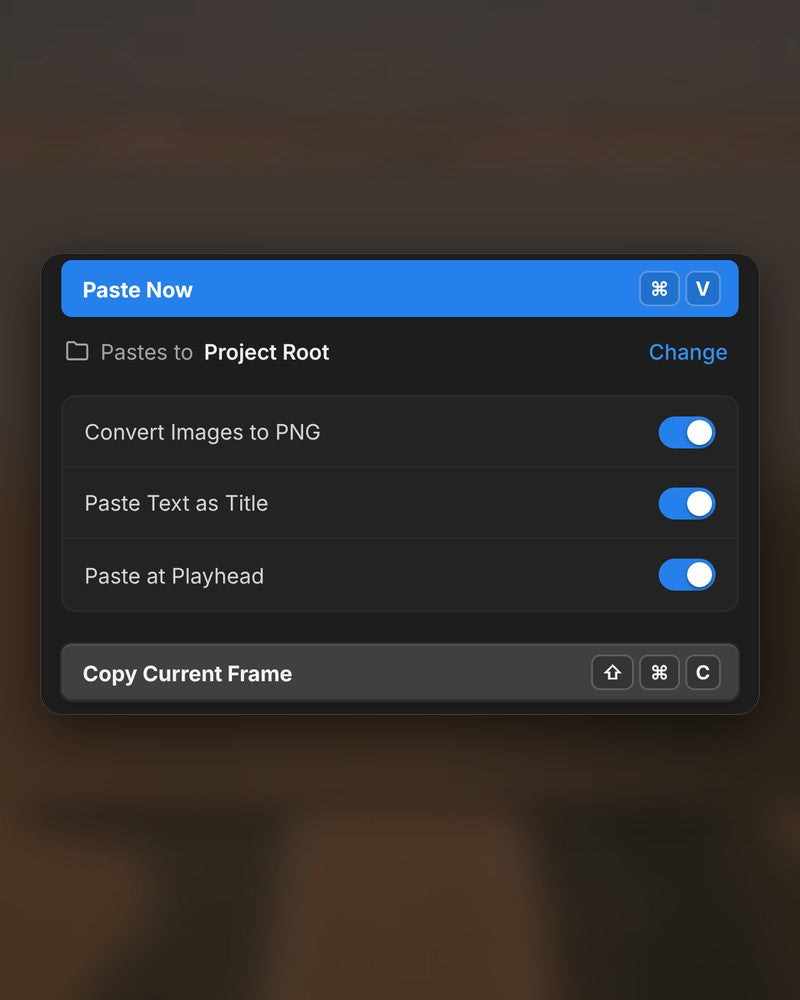
Copia una imagen desde cualquier sitio y pulsa ⌘V. Llega a tu bandeja, o a tu línea de tiempo con Paste at Playhead.
-
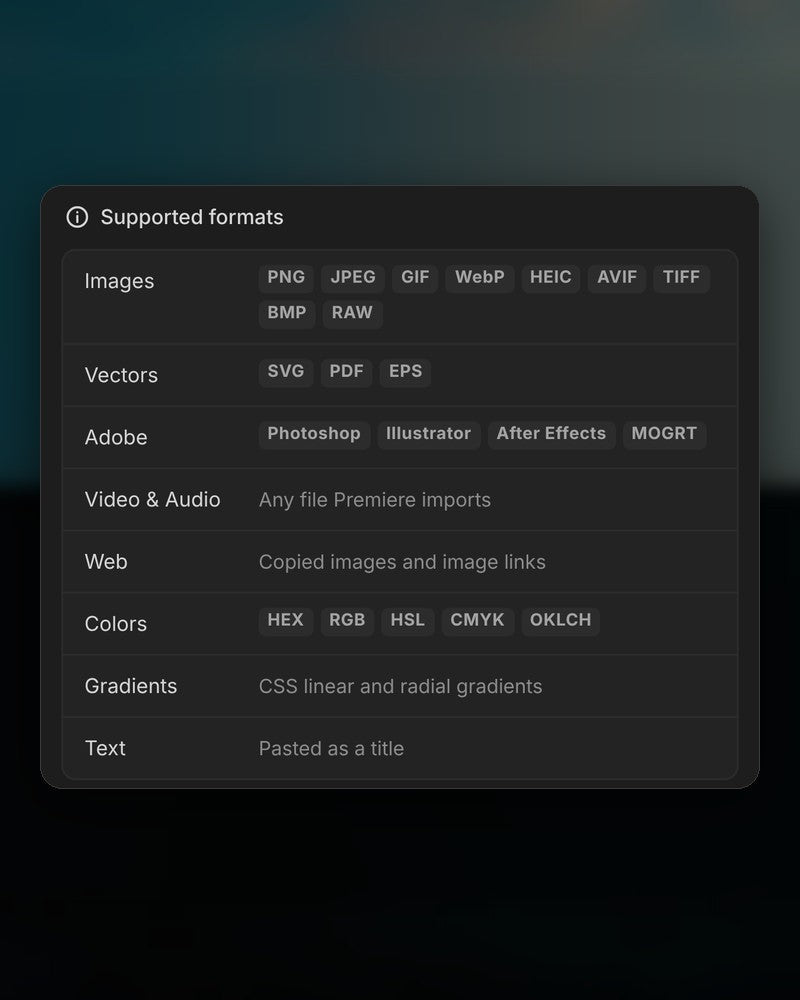
Formatos
Imágenes, archivos, colores y texto.
Las imágenes llegan como PNG, incluso WebP y HEIC. Los archivos de Photoshop, Illustrator y After Effects también se pegan.
-
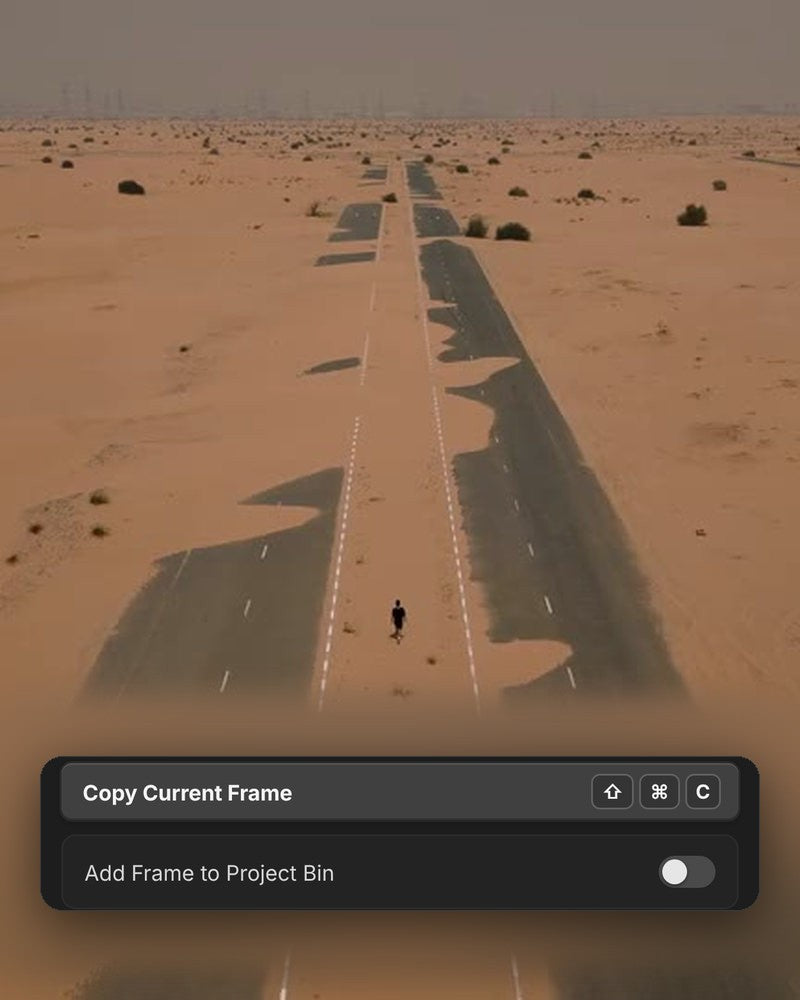
Copiar fotograma
Copia el fotograma. Pégalo donde quieras.
El fotograma bajo tu cabezal, como PNG a tamaño completo, listo para un chat o un correo.
En la descarga
-
App QuickPaste
-
Clave de licencia
-
Plugin de Premiere Pro
El instalador y tu clave de licencia. Los dos llegan al comprar, y el instalador instala la app QuickPaste y el plugin de Premiere Pro por ti.
-

Paste
Just paste. Nothing else to press.
Copy an image anywhere and press ⌘V in Premiere Pro. It lands on the timeline at the playhead, with no save and no import.
- From anywhereA browser, a screenshot, a chat or a design app.
- At the playheadOn a track that is free, so nothing moves.
- On WindowsCtrl+C and Ctrl+V work the same way.
Convert
Any image in. A clean PNG out.
Every copied image becomes a PNG before it reaches Premiere Pro. No converting by hand.
- Every image formatWebP, HEIC, AVIF, JPEG, GIF, TIFF, BMP and RAW.
- Nothing to download firstCopy an image on a web page and paste.
- Ready in your projectThe PNG lands in the bin you choose.
Colors
Copy a color. Get a matte.
Copy a color code from anywhere and press ⌘V. A color matte the size of your frame lands at the playhead.
- Every formatHEX, rgb(), hsl(), oklch(), cmyk() and more.
- Your frame sizeThe matte matches your sequence.
- Named by colorEach matte is named after its HEX value.
Gradients
Copy a gradient. Paste a gradient.
Paste a CSS linear or radial gradient. It becomes a gradient matte, sized to your sequence.
- Linear and radialRepeating gradients too.
- Same colorsEvery color stop, in its place.
- Easy to findEach one is named after its colors.
Text
Copy text. Get a title.
Copy any text, from a browser, a script or a chat, and press ⌘V. With Paste Text as Title on, it lands at the playhead as a title you can edit.
- Named for youThe clip takes the first line of your text.
- A real titleEdit it in Premiere Pro like any other.
- Your choiceOne switch in the panel turns it off.
PDFs and vectors
Paste a PDF. Get every page.
PDFs and SVGs are drawn sharp at your frame size. A PDF with several pages becomes one still per page, end to end.
- Up to 50 pagesOne after another from the playhead.
- Always sharpDrawn at your sequence’s frame size.
- Odd formats tooHEIC, AVIF, camera RAW and more become PNG.
Motion Graphics templates
A template? Paste it in.
Copy a .mogrt file and press ⌘V. It lands at the playhead, ready to edit.
- Its full lengthPlaced for the template’s whole duration.
- Never on your editIt goes on the lowest track that is free.
- Edit as usualChange its text and colors in Premiere Pro.
Several files
Copy a few. Paste them in order.
Copy files in Finder or File Explorer and press ⌘V. They land end to end at the playhead, on a track that is free.
- Nothing movesClips after the playhead are never pushed along.
- Lowest free trackPicked for the clips’ whole length.
- Anything Premiere importsVideo, audio, PSD, AI, AEP and more.
Bins
Every paste. In its bin.
Choose a bin in the panel, or make a new one. Everything you paste lands there.
- Your pickAny bin in your project, or the project root.
- New binName it in the panel and QuickPaste makes it.
- Files kept safeSaved in QuickPaste’s own folder, never a temp folder.
Copy frame
Need a still? Copy the frame.
Press ⇧⌘C in Premiere Pro. The frame under the playhead is on your clipboard, ready to paste anywhere.
- Full sizeA PNG at your sequence’s frame size.
- In your project tooTurn on Add Frame to Project Bin to keep a copy.
- On WindowsShift+Ctrl+C, and Ctrl+V to paste.
Tres pasos. Luego, pega.
Un instalador guiado configura la app y el plugin de Premiere Pro por ti.
1Descarga QuickPaste
Tu descarga aparece justo después de la compra. También te la enviamos por correo.
2Ejecuta el instalador
Abre el instalador y sigue los pasos. Instala la app y el plugin de Premiere Pro por ti.
3Copia y pega
Copia una imagen de cualquier sitio y pégala directamente en Premiere Pro.

Lo que añade QuickPaste.
La mayoría de los plugins para pegar añaden un botón, un menú o un atajo nuevo. QuickPaste usa el ⌘V o Ctrl+V que ya pulsas.


Compra el pack y ahorra un 15%
Todo el kit para Premiere.
- Asteria ProAnimaciones de texto suaves
- EaseFlow ProEasing fluido
- BetterFXTodos los efectos, un atajo
- SuperGlowResplandor premium
- QuickPastePegar imágenes y archivos
- Number Counter ProNúmeros animados
- ClearFrame ProSafe zones for every app
Specifications
- Version
- 1.5.6 · 23 de noviembre de 2026 What's new
- Premiere Pro
- 2021–2027 and Premiere Pro (Beta)
- Operating system
- Mac macOS 11 or later, Apple silicon and IntelWindows 10 and 11, 64-bit
- Languages
- English, Deutsch, Français, Español, Português (Brasil), 日本語, 한국어
- Pastes
- Images, SVG, PDF, Illustrator artwork, styled text, MOGRTs, gradients and image links
- Keyboard shortcuts
- Colors
- HEX, RGB, HSL, CMYK and OKLCH
- Gradients
- CSS linear and radial
- Works offline
- Up to 7 days at a time
- License
- 2 computers, one-time payment
- Updates
- Free and automatic
- Download
- Mac 10.3 MB · Windows 4.8 MB
Cópialo. Pulsa ⌘V o Ctrl+V.
Pagas una vez y es tuyo para siempre.
- Premiere Pro 2021–2027
- Windows y Mac
Garantía de reembolso si no funciona
- Escríbenos en un plazo de 14 días desde la compra.
- Ayuda en menos de 24 horas para solucionarlo.
- Si no podemos solucionarlo, te devolvemos el dinero.