






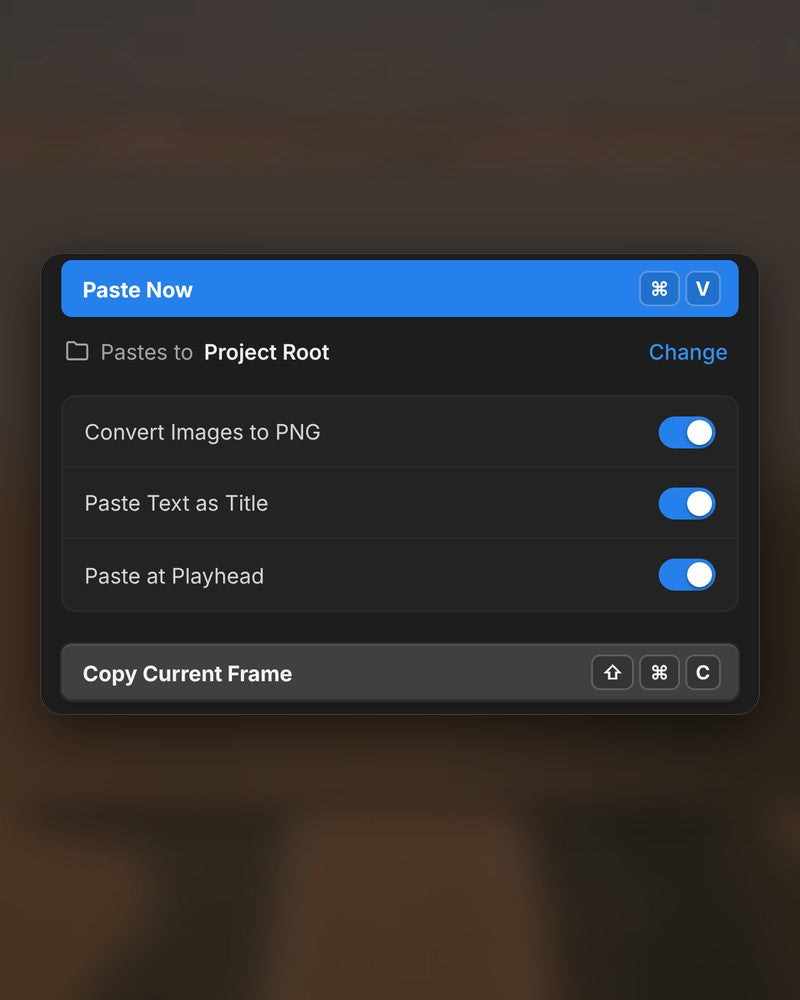
The QuickPaste panel, inside Premiere Pro


QuickPaste
इमेज सीधे Premiere Pro में पेस्ट करें।
एक कीस्ट्रोक से कोई भी इमेज अपने एडिट में लाएँ. वेब की कोई इमेज, स्क्रीनशॉट या फ़ाइल कॉपी करें, फिर Premiere Pro में ⌘V या Ctrl+V दबाएँ. यह आपके चुने हुए बिन में या सीधे प्लेहेड पर आ जाती है, पहले कुछ सेव या इंपोर्ट किए बिना.
 Premiere Pro 2021–2027
- Windows और Mac
- मुफ़्त अपडेट

On your phone? Get the link on your computer.
मनी-बैक गारंटी आपके Premiere Pro में नहीं चल रहा? 14 दिनों के अंदर हमसे संपर्क करें।
QuickPaste
उन लोगों ने बनाया जो Premiere Pro सिखाते हैं।
700+ ट्यूटोरियल और हज़ारों कमेंट्स ने हमें दिखाया कि एडिटर्स को क्या धीमा करता है। इसलिए हमने वे टूल बनाए जो हम एडिटर के तौर पर चाहते थे: आसान और बिना झंझट।
ट्यूटोरियल देखें- 200K+एडिटर हमारे टूल इस्तेमाल करते हैं
- 30M+हमारे YouTube ट्यूटोरियल पर व्यूज़
- 90K+सोशल मीडिया पर फ़ॉलोअर्स
- 37K+एडिटर हमारी Discord कम्युनिटी में
कॉपी। पेस्ट। कटिंग जारी रखें।
आपका आम पेस्ट।
सीधे Premiere Pro में।
Adobe फ़ाइलें भी पेस्ट होती हैं।
कोई कलर पेस्ट करें
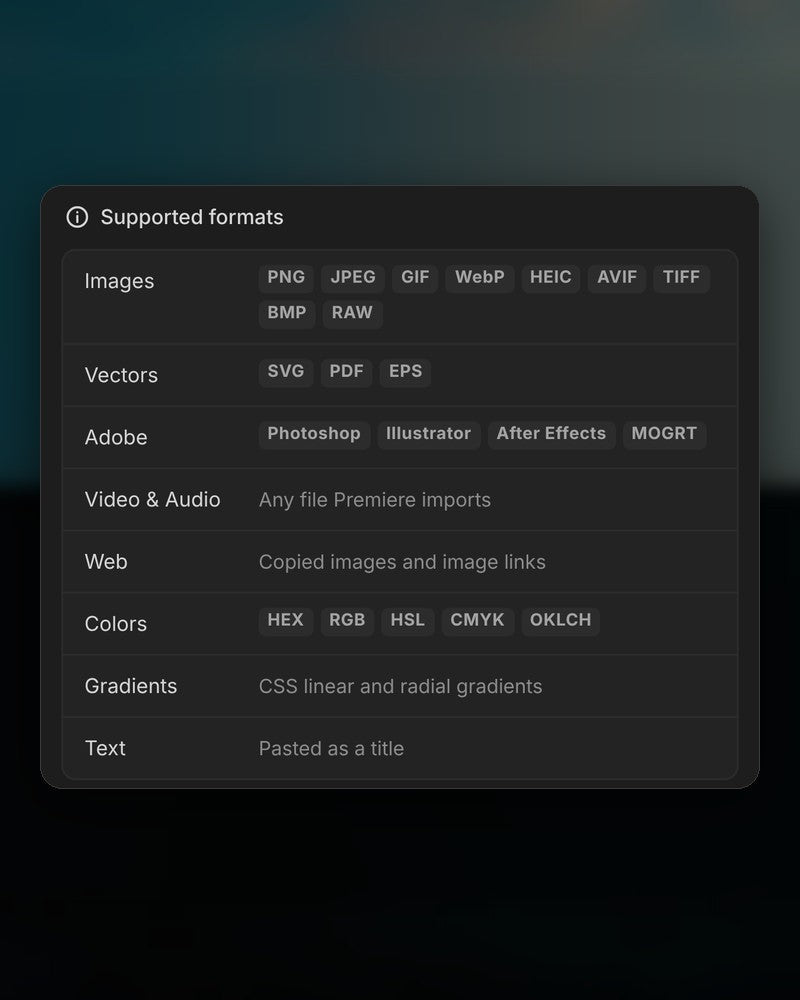
HEX, RGB, HSL, CMYK या OKLCH।
कोई भी इमेज
HEIC, AVIF और RAW भी।

Premiere Pro 2021–2027
खास बातें देखें।
-
पेस्ट
कॉपी करें। Premiere में पेस्ट करें।
कहीं भी एक इमेज कॉपी करें और ⌘V दबाएँ। यह आपके बिन में आती है, या Paste at Playhead से आपकी टाइमलाइन पर।
-
फ़ॉर्मैट
इमेज, फ़ाइलें, रंग और टेक्स्ट।
इमेज PNG बनकर आती हैं, WebP और HEIC भी। Photoshop, Illustrator और After Effects फ़ाइलें भी पेस्ट होती हैं।
-
फ़्रेम कॉपी करें
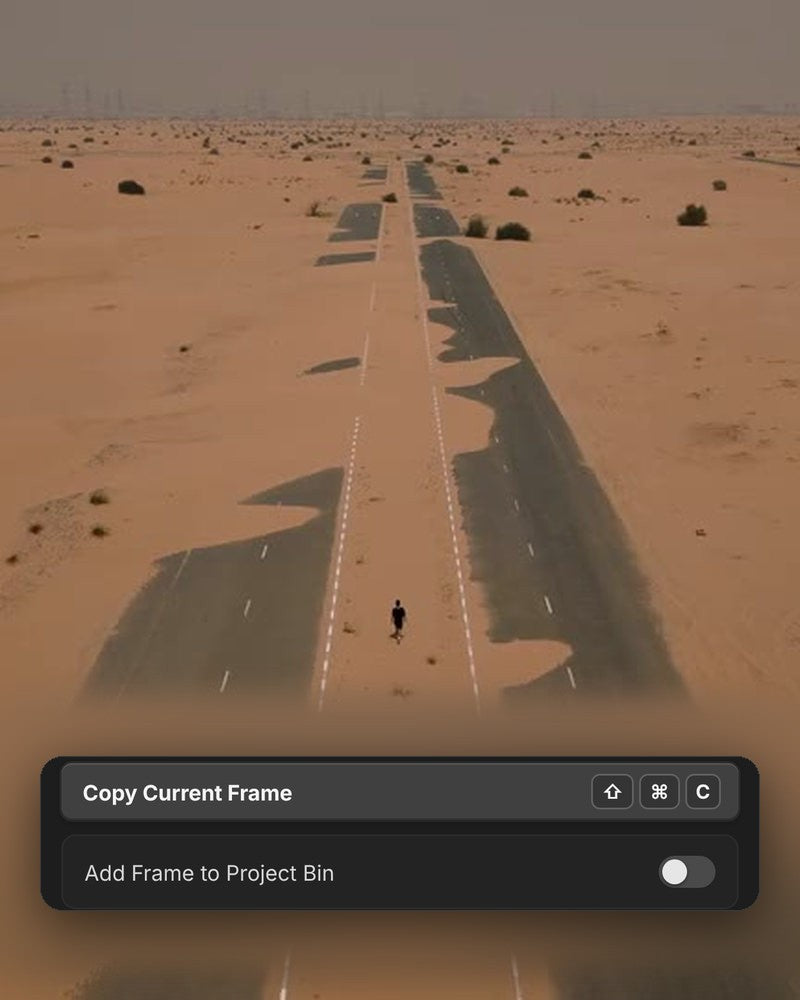
फ़्रेम कॉपी करें। कहीं भी पेस्ट करें।
आपके प्लेहेड के नीचे का फ़्रेम, फ़ुल-साइज़ PNG के रूप में, चैट या ईमेल के लिए तैयार।
डाउनलोड में
-
QuickPaste ऐप
-
लाइसेंस की
-
Premiere Pro प्लगइन
इंस्टॉलर और आपकी लाइसेंस की। दोनों चेकआउट पर मिलते हैं, और इंस्टॉलर आपके लिए QuickPaste ऐप और Premiere Pro प्लगइन सेट कर देता है।
-

Paste
Just paste. Nothing else to press.
Copy an image anywhere and press ⌘V in Premiere Pro. It lands on the timeline at the playhead, with no save and no import.
- From anywhereA browser, a screenshot, a chat or a design app.
- At the playheadOn a track that is free, so nothing moves.
- On WindowsCtrl+C and Ctrl+V work the same way.
Convert
Any image in. A clean PNG out.
Every copied image becomes a PNG before it reaches Premiere Pro. No converting by hand.
- Every image formatWebP, HEIC, AVIF, JPEG, GIF, TIFF, BMP and RAW.
- Nothing to download firstCopy an image on a web page and paste.
- Ready in your projectThe PNG lands in the bin you choose.
Colors
Copy a color. Get a matte.
Copy a color code from anywhere and press ⌘V. A color matte the size of your frame lands at the playhead.
- Every formatHEX, rgb(), hsl(), oklch(), cmyk() and more.
- Your frame sizeThe matte matches your sequence.
- Named by colorEach matte is named after its HEX value.
Gradients
Copy a gradient. Paste a gradient.
Paste a CSS linear or radial gradient. It becomes a gradient matte, sized to your sequence.
- Linear and radialRepeating gradients too.
- Same colorsEvery color stop, in its place.
- Easy to findEach one is named after its colors.
Text
Copy text. Get a title.
Copy any text, from a browser, a script or a chat, and press ⌘V. With Paste Text as Title on, it lands at the playhead as a title you can edit.
- Named for youThe clip takes the first line of your text.
- A real titleEdit it in Premiere Pro like any other.
- Your choiceOne switch in the panel turns it off.
PDFs and vectors
Paste a PDF. Get every page.
PDFs and SVGs are drawn sharp at your frame size. A PDF with several pages becomes one still per page, end to end.
- Up to 50 pagesOne after another from the playhead.
- Always sharpDrawn at your sequence’s frame size.
- Odd formats tooHEIC, AVIF, camera RAW and more become PNG.
Motion Graphics templates
A template? Paste it in.
Copy a .mogrt file and press ⌘V. It lands at the playhead, ready to edit.
- Its full lengthPlaced for the template’s whole duration.
- Never on your editIt goes on the lowest track that is free.
- Edit as usualChange its text and colors in Premiere Pro.
Several files
Copy a few. Paste them in order.
Copy files in Finder or File Explorer and press ⌘V. They land end to end at the playhead, on a track that is free.
- Nothing movesClips after the playhead are never pushed along.
- Lowest free trackPicked for the clips’ whole length.
- Anything Premiere importsVideo, audio, PSD, AI, AEP and more.
Bins
Every paste. In its bin.
Choose a bin in the panel, or make a new one. Everything you paste lands there.
- Your pickAny bin in your project, or the project root.
- New binName it in the panel and QuickPaste makes it.
- Files kept safeSaved in QuickPaste’s own folder, never a temp folder.
Copy frame
Need a still? Copy the frame.
Press ⇧⌘C in Premiere Pro. The frame under the playhead is on your clipboard, ready to paste anywhere.
- Full sizeA PNG at your sequence’s frame size.
- In your project tooTurn on Add Frame to Project Bin to keep a copy.
- On WindowsShift+Ctrl+C, and Ctrl+V to paste.
तीन स्टेप। फिर पेस्ट करें।
एक गाइडेड इंस्टॉलर आपके लिए ऐप और Premiere Pro प्लगइन, दोनों सेट कर देता है।
1QuickPaste डाउनलोड करें
आपका डाउनलोड चेकआउट के तुरंत बाद दिखता है। हम इसे ईमेल भी करते हैं।
2इंस्टॉलर चलाएं
इंस्टॉलर खोलें और स्टेप्स फ़ॉलो करें। यह आपके लिए ऐप और Premiere Pro प्लगइन सेट कर देता है।
3कॉपी करें, फिर पेस्ट
कहीं से भी इमेज कॉपी करें, फिर सीधे Premiere Pro में पेस्ट करें।

QuickPaste क्या जोड़ता है।
ज़्यादातर पेस्ट प्लगइन एक बटन, मेन्यू या नया शॉर्टकट जोड़ते हैं। QuickPaste वही ⌘V या Ctrl+V इस्तेमाल करता है जो आप पहले से दबाते हैं।

बंडल लें और 15% बचाएं
पूरी Premiere किट पाएं।
- Number Counter Pro एनिमेटेड नंबर
- SuperGlow प्रीमियम ग्लो
- EaseFlow Pro स्मूथ ईज़िंग
- Asteria Pro स्मूद टेक्स्ट एनिमेशन
- BetterFX हर इफ़ेक्ट, एक शॉर्टकट
- QuickPaste इमेज और फ़ाइलें पेस्ट करें
- ClearFrame Pro Safe zones for every app



- Asteria Proस्मूद टेक्स्ट एनिमेशन
- EaseFlow Proस्मूथ ईज़िंग
- BetterFXहर इफ़ेक्ट, एक शॉर्टकट
- SuperGlowप्रीमियम ग्लो
- QuickPasteइमेज और फ़ाइलें पेस्ट करें
- Number Counter Proएनिमेटेड नंबर
- ClearFrame ProSafe zones for every app
Specifications
- Version
- 1.5.6 · November 23, 2026 What's new
- Premiere Pro
- 2021–2027 and Premiere Pro (Beta)
- Operating system
- Mac macOS 11 or later, Apple silicon and IntelWindows 10 and 11, 64-bit
- Languages
- English, Deutsch, Français, Español, Português (Brasil), 日本語, 한국어
- Pastes
- Images, SVG, PDF, Illustrator artwork, styled text, MOGRTs, gradients and image links
- Keyboard shortcuts
- Colors
- HEX, RGB, HSL, CMYK and OKLCH
- Gradients
- CSS linear and radial
- Works offline
- Up to 7 days at a time
- License
- 2 computers, one-time payment
- Updates
- Free and automatic
- Download
- Mac 10.3 MB · Windows 4.8 MB
कॉपी करें। ⌘V या Ctrl+V दबाएँ।
एक बार भुगतान करें, हमेशा के लिए रखें।
- Premiere Pro 2021–2027
- Windows और Mac
मनी-बैक गारंटी अगर यह न चले
- ख़रीद के 14 दिनों के अंदर हमसे संपर्क करें।
- ठीक करने के लिए 24 घंटों के अंदर मदद।
- अगर हम इसे ठीक न कर पाएँ, तो आपको पैसे वापस मिलेंगे।