


Ultiem presetpakket voor Premiere Pro
$59.99eenmalig
Zit al in je winkelwagen
Past goed bij je winkelwagen
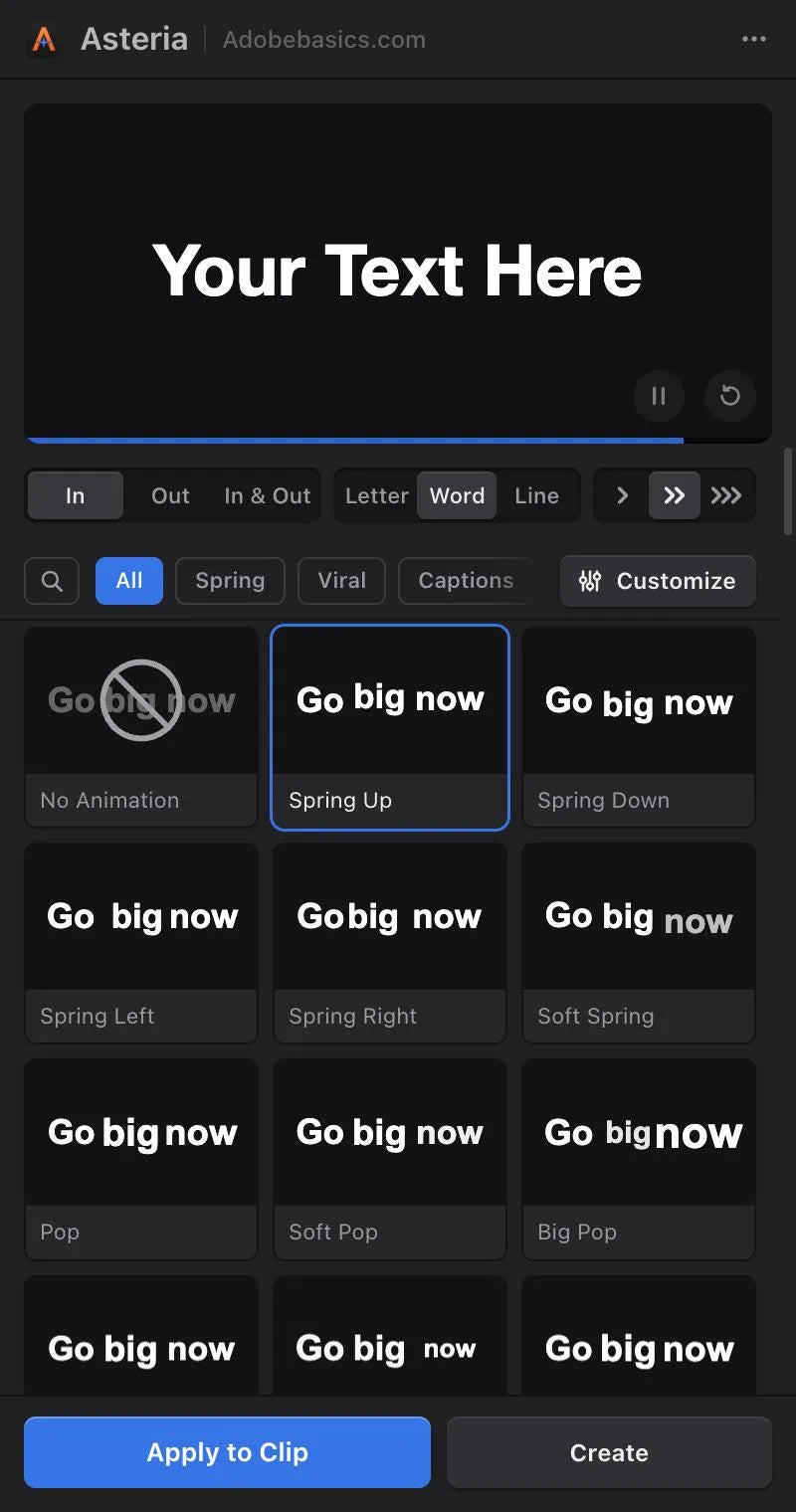
The Asteria panel, inside Premiere Pro


Smooth text animations in one click.
Plain text gets scrolled past. Asteria animates any title or caption by letter, word or line, with springs, pops and reveals that feel hand-animated. Click an animation and it's on your clip. No keyframes, no After Effects.
 Premiere Pro 2021–2027
Geld-teruggarantie Werkt het niet in je Premiere Pro? Neem binnen 14 dagen contact met ons op.
Asteria
700+ tutorials en duizenden reacties lieten ons zien wat editors ophoudt. Dus bouwden we de tools die we zelf als editors wilden: simpel en zonder gedoe.
Bekijk de tutorials
Select your Premiere text clip and click. Your words, font and position stay.
Animations in Pro
GPU accelerated on Mac and Windows, so playback stays smooth.
Springs you can feel
Words overshoot, bounce and settle, like the big channels.
By letter, word or line
Speed, bounce, stagger and order. In Asteria Pro.

Premiere Pro 2021–2027
A menu-bar app keeps it up to date.
Pick an animation in the panel and it's on your clip, with your words and your font.
The panel
Every tile plays as you hover. Click one and the preview shows it, then Apply puts it on your clip.
The look of the big channels: words and letters that overshoot, settle and land. From a soft glide to a big bounce.
206 animations
Pops, springs and drops for hooks, intros and punchlines.
Captions
Word-by-word highlights that keep viewers reading.
Cinematic
Masks and wipes for quiet, precise titles.
Tech and gamingPro
Scrambled letters and glitch hits for tech, gaming and trailers.
Animation settingsPro
Every animation is a starting point. Drag a value and the preview follows.
Custom animationsPro
Save your settings as a custom animation and it's in your library for the next video, with favorites a click away.
Basic has 40 essentials, with no animation settings. Pro unlocks everything, including custom animations.
Asteria Basic
Basic users see every Pro animation in the gallery. Upgrade any time to unlock them.
Both apply in one click, by letter, word or line. Pro adds every animation, animation settings and custom animations.
40 essentials for everyday titles.
40 animations
$69.99 one-time
Every animation, every setting, your custom animations.
206 animations
$79.99$99.99
Bespaar 20%
Only $10 more than Basic.
Already own Basic? Upgrade naar Pro
Your license key and download links arrive by email right after checkout.
Animating a title word by word in Premiere means a layer and keyframes for every word. With Asteria, you click once.
Asteria plugin
License key
Asteria effect
Yours the moment you pay. Your license key and installer arrive at checkout and by email. The installer adds the Asteria effect, the panel and the menu-bar app to Premiere Pro.
One installer sets up the effect, the panel and the menu-bar app.
Your installer and license key show up right after checkout. We also email them to you.
It adds Asteria to Premiere Pro and activates it for you.
Open Window › Extensions › Asteria, select a clip, click a tile.
Pick a version. Pay once, keep it forever.
Geld-teruggarantie als het niet werkt
Neem binnen 14 dagen na aankoop contact met ons op. Hulp binnen 24 uur om het op te lossen. Lukt het ons niet, dan krijg je je geld terug.


