~에 의해

Premiere Pro 2026 at a glance
- AI-powered Object Mask (26.0). Hover over a person or object, click, and Premiere masks and tracks it.
- Redesigned shape masks (26.0). New Ellipse, Rectangle and Pen masks that Adobe says track up to 20 times faster.
- Color Mode beta (26.2). A first look at a new color grading workspace built for editors.
- Sequence Index and Global Audio Mute (26.2). Find your way around long timelines, and silence everything in one click.
- Single-word captions (26.3). The one word at a time caption style, made straight from your transcript.
- Generative Media Tool (26.5). Make video and sound effects from a text prompt, right on the timeline.
- Paper Edit (26.5). Pick lines in your transcript and turn them into a sequence.
- Native Windows on ARM (26.0). Premiere runs natively on Snapdragon X PCs.
Object Mask: hover, click, done
Object Mask is the headline of Premiere Pro 2026. Pick the Object Mask tool from the toolbar, hover over your frame, and a colored overlay snaps onto the person or object under your cursor. Click, and Premiere makes the mask and tracks it through the shot.
You can add or take away areas with lasso and rectangle tools, and soften or grow the mask with feather and expansion controls. Use it to blur a face, relight a subject or grade one part of the frame. The AI model runs on your computer, not in the cloud.

Object Mask kept getting better during the year. 26.2 added Sharp and Smooth edge modes, 26.3 made tracking faster and can rebuild masks when a project moves to another computer, and 26.5 added a smoothness control for finer edges.
Shape masks that track faster
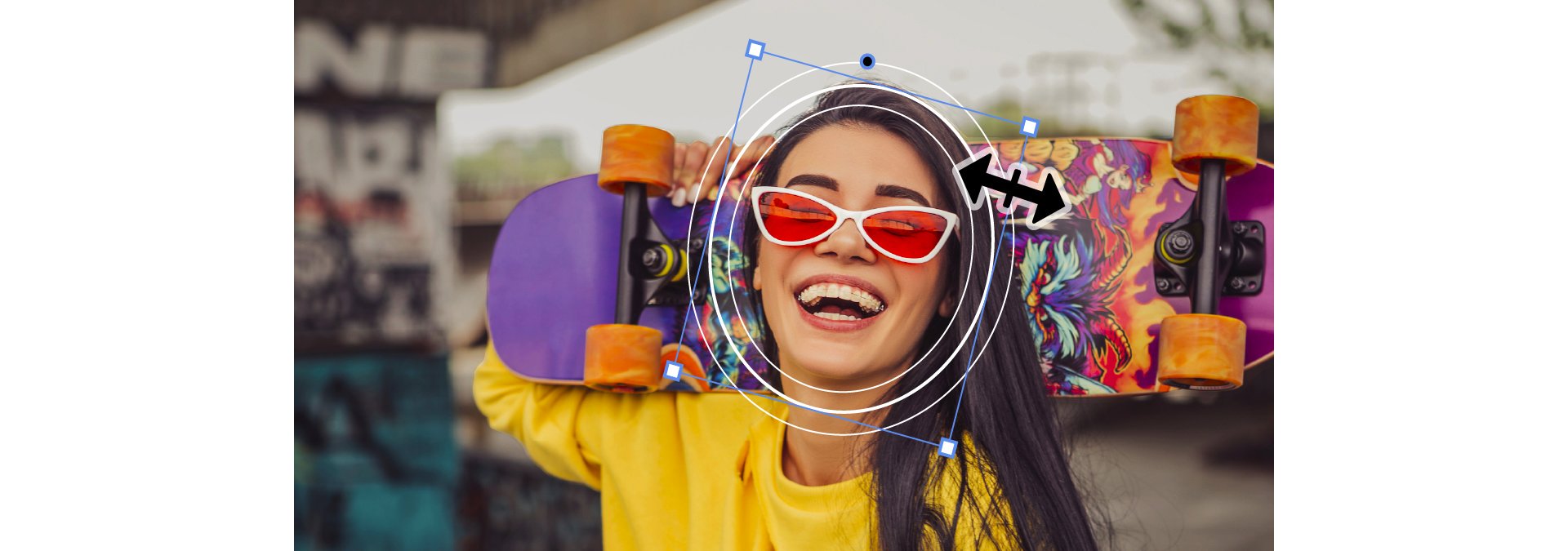
The Ellipse, Rectangle and Pen masks were rebuilt in 26.0. You draw them straight from the toolbar, and you can resize, rotate and feather them in the Program Monitor. Rectangles get rounded corners, and you can mix several masks with blend modes.
Tracking is where you feel it most. Adobe says it's up to 20 times faster than before. You can track forward and backward from any frame, pin a mask to a screen or a wall with 3D perspective tracking, and watch the mask while it tracks.
Faster everyday editing
- Transition handles (26.0). Drag the edges of a video transition right on the clip to change it.
- GPU thumbnails (26.0). Thumbnails draw faster and match your color managed, graded clips.
- Sequence Index (26.2). A searchable, spreadsheet style list of everything in your sequence.
- Global Audio Mute (26.2). Mute all sequence audio at once, without touching track or clip settings.
- Waveforms in the Source Monitor (26.2). See the audio under the picture, so you find dialogue and beats faster.
- Marker search (26.2). Find markers by name, comment or color in the Search panel.
- Smarter relinking (26.2). Premiere finds offline media on its own more often, even across drives and systems.
- Faster workspaces (26.3). Switching workspaces is a lot quicker.
- Track creation preference (26.3). Choose whether Premiere adds tracks when you edit clips into a sequence.
Color Mode (beta)
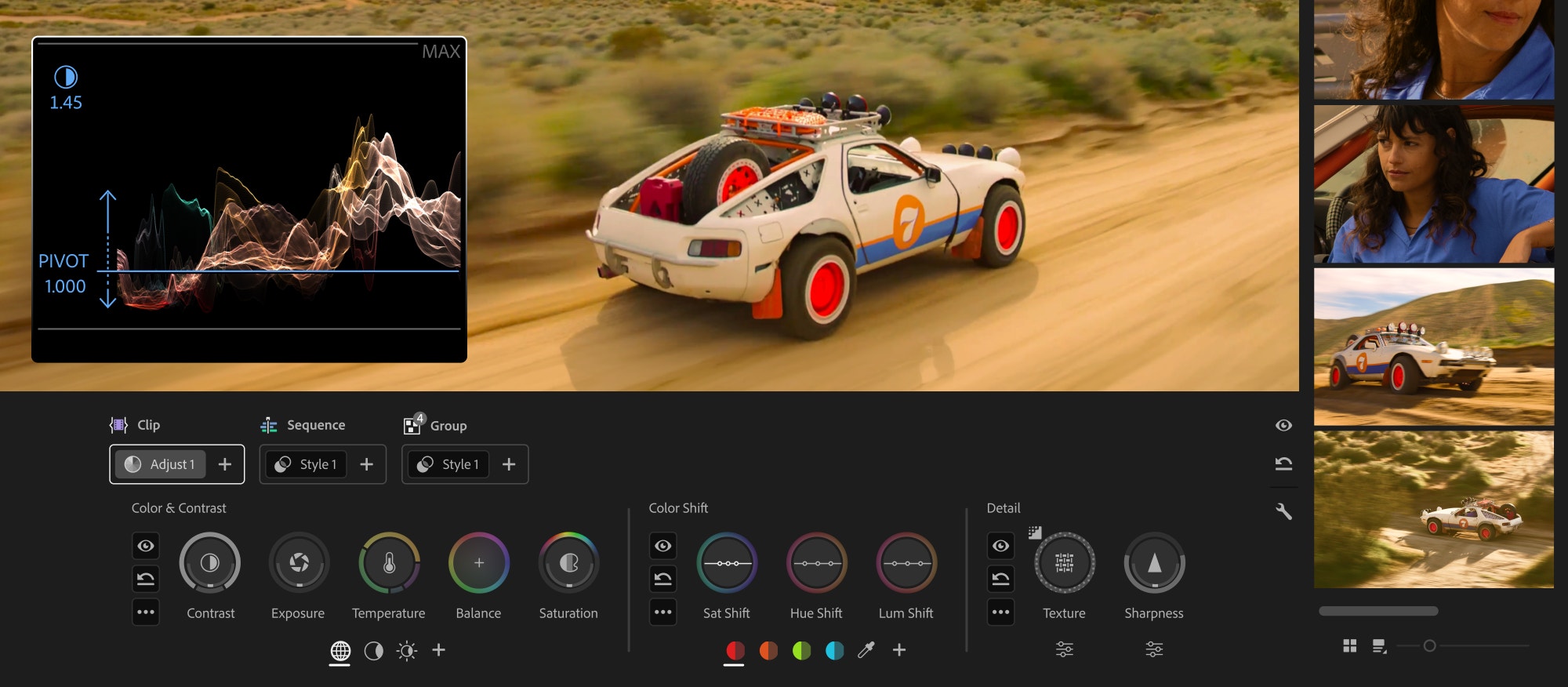
With 26.2, Adobe opened a public beta of Color Mode, a new color grading workspace made for editors. It brings a Clip Grid, new Color Controls and grading in layers for a clip, a group or the whole sequence. Later in the year the beta got Auto Color and new Style modules like Vignette and Midtones.
Color Mode stayed in beta for all of Premiere Pro 2026. The full version arrived with Premiere Pro 2027. In 26 you still grade with the Lumetri Color panel.
Captions and transcripts
Single-word captions arrived in 26.3. Choose Single Word when you create captions, and Premiere times each word to your audio. Style them, export them, and you have the fast caption look that social video uses everywhere.

Transcripts got better too. 26.2 made transcription faster and more accurate, with better speaker labels and better handling of people talking over each other. 26.5 added a new voice detection model for more accurate speech to text.
Paper Edit: build a cut from the transcript
Paper Edit came with 26.5. Open the Text panel, select the lines you want to keep, preview them, and Premiere turns them into a new sequence. It's made for interviews, podcasts and any edit where the words are the plan.
Generative Media Tool and Firefly
The Generative Media Tool arrived in 26.5. Pick a spot on your timeline, describe what you need, and Premiere makes a video clip or a sound effect that lands in your sequence as a normal, editable clip. You can use frames from your project as a visual reference, and choose Adobe Firefly or partner models such as Google Veo, Kling, Runway and Luma. It uses generative credits.

- Firefly Boards to Premiere (26.0). Send media from Firefly Boards straight into your Premiere project.
- Sequences from Boards (26.3). Send several assets, and Premiere builds a sequence in the order you picked them.
- Generative Extend (26.5). Now works with footage from 360p to 4K UHD, any aspect ratio, interlaced footage, 12 to 60 fps and SDR or HDR.
New effects and transitions
- Channel Blur, Gradient and Noise (26.2). New Film Impact effects for texture and compositing.
- 3D Spinback and Slide (26.2). New motion transitions.
- Shape Dissolve (26.3). A transition built from shapes, with control over shape, motion, feather and timing.
- Magnify (26.3). A magnifying lens that zooms in on one detail of your shot.
- Lens Flare, Twirl and Mosaic (26.5). A fully adjustable Lens Flare, a rebuilt Twirl and a better softness control in Mosaic.
Cameras, formats and hardware
- Windows on ARM (26.0). Premiere runs natively on ARM64 PCs with Snapdragon X processors.
- OpenTimelineIO (26.0). Import and export OTIO timelines. 26.2 added FCP XML and OTIO export of sequences.
- Nikon R3D NE (26.0). Support for the new single-file R3D NE format, with 32-bit float audio and lens metadata.
- Canon and Sony (26.3). Canon Cinema RAW Light from the EOS C50, EOS R6 Mark III, EOS R6 V and EOS C400, and new Sony BURANO V3 resolutions.
- Sony FX5, ProRes RAW and ARRICORE (26.5). Sony XAVC and XOCN with 32-bit float audio, better ProRes RAW support and ARRICORE from the ALEXA 35 Xtreme.
- NVIDIA Blackwell (26.5). Hardware decoding of 4:2:2 10-bit AVC and HEVC in MXF.
Updates during Premiere Pro 2026
- 26.0 (January 2026). Object Mask, new shape masks, transition handles, Firefly Boards, Windows on ARM.
- 26.2 (April 2026). Color Mode beta, Sequence Index, new effects and transitions, Global Audio Mute. See what's new in 26.2.
- 26.2.2 (May 2026). A fix for a stability problem that could make Premiere hang.
- 26.3 (June 2026). Single-word captions, Magnify, Shape Dissolve, faster Object Mask. See what's new in 26.3.
- 26.5 (September 2026). Generative Media Tool, Paper Edit, Sony FX5 support, more Generative Extend. See what's new in 26.5.
There was no 26.1 or 26.4. The other updates, like 26.0.1, 26.3.2 and 26.5.1 to 26.5.3, were fixes.
Premiere Pro 2026 system requirements
| Computer | Premiere Pro 2026 |
|---|---|
| Mac with Apple silicon | Supported. macOS 14 Sonoma was the minimum at launch, Adobe now lists macOS 15 Sequoia |
| Intel Mac | Supported (8th generation Intel or newer). Premiere 26 is the last version for Intel Macs |
| Windows | Windows 11 version 24H2 or later, Intel 6th generation or AMD Ryzen 1000 or newer, GPU with 4 GB of memory |
| Windows on ARM | Supported natively on Snapdragon X processors |
| Memory | 8 GB minimum, 16 GB for HD, 32 GB or more for 4K |
Windows 10 isn't officially supported, and from 26.3 Premiere shows an alert on it. Within Premiere 26, projects open in every 26.x version, but a project saved in 26 doesn't open in Premiere Pro 2025.
Our plugins and templates work in Premiere Pro 2026
EaseFlow, BetterFX, QuickPaste and Mako all work in Premiere Pro 2026, on Intel and Apple silicon Macs and on Windows. Our plugins and Motion Graphics templates work in Premiere Pro 2021 to 2027, and our presets in 2019 to 2027, so they keep working whether you stay on 26 or move on.
FAQ
When did Premiere Pro 2026 come out?
Adobe released Premiere 26.0, the version known as Premiere Pro 2026, on January 20, 2026. The last feature update for it was 26.5 in September 2026.
Why is it called Adobe Premiere and not Premiere Pro?
Adobe dropped "Pro" from the name with version 26.0. It's the same app, and most editors still call this version Premiere Pro 2026.
Is Color Mode in Premiere Pro 2026?
Only as a beta, from 26.2 on. The finished Color Mode came with Premiere Pro 2027. In 26 your main grading tool is still the Lumetri Color panel.
Does Premiere Pro 2026 run on an Intel Mac?
Yes. Premiere 26 runs on Intel Macs, and it's the last version that does. Premiere Pro 2027 needs Apple silicon.
Want to edit faster in Premiere Pro 2026? See our Premiere Pro plugins.