作者:
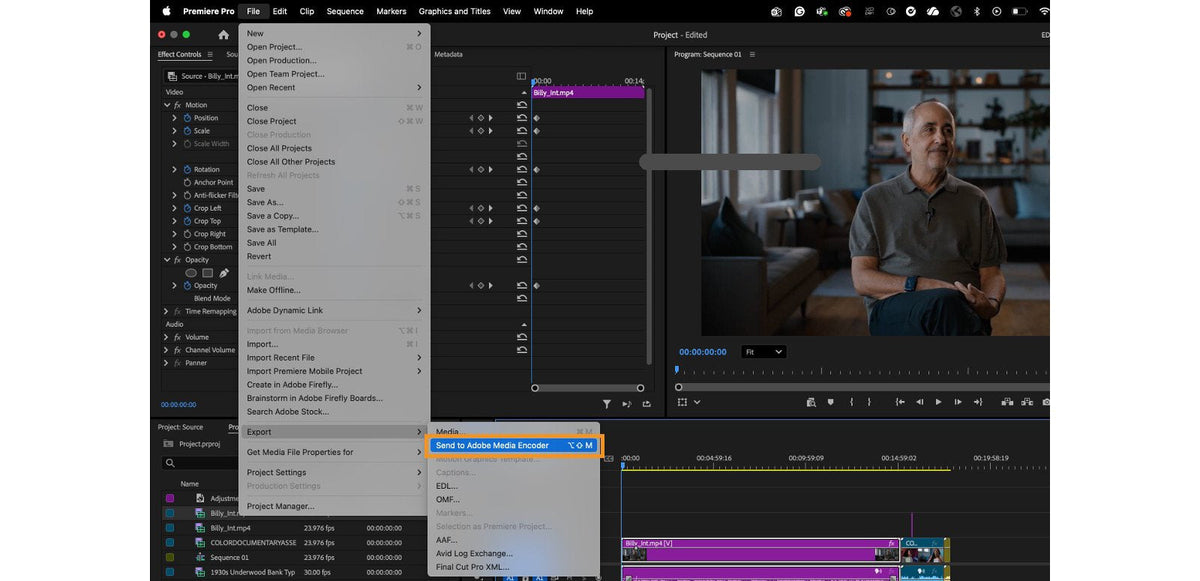
Send to Adobe Media Encoder
選擇 File > Export > Send to Adobe Media Encoder,或在 macOS 上按 Option+Shift+M、在 Windows 上按 Alt+Shift+M。你的序列會直接送到 Media Encoder,不必開啟輸出模式。輸出在背景執行,所以你可以繼續剪輯。

輸出模式中的最近預設集
輸出模式的 Preset 選單現在會列出你最近輸出時用過的三個預設集。如果你每週都交付相同的格式,下次輸出只要點兩下。
這次更新的其他內容
- 在 Productions 中拖放。在同一個 Production 的專案之間移動素材和序列。按住 Cmd(macOS)或 Ctrl(Windows)則改為複製。
- 更快的 RED R3D。在 Apple M1 和 M2 Mac 上播放 RED 素材更順。
- GPU 加速的轉場。Center Split、Split 和 Non-Additive Dissolve 播放更流暢、輸出更快。
- 新的 Learn 面板。在 Window > Workspaces > Learning 中提供教學和個人觀看清單。
- 更簡單的範本匯入。對話框會說明匯入的動態圖形範本會放在 Essential Graphics 面板的 Browse 分頁。
想看這一年的所有功能,請參考 Premiere Pro 2023 新功能。
常見問題
把序列送到 Media Encoder 的快速鍵是什麼?
從 Premiere Pro 23.3 開始,macOS 上是 Option+Shift+M,Windows 上是 Alt+Shift+M。
Premiere Pro 23.3 就有 Text-Based Editing 了嗎?
沒有。當時它還在公開測試版中,直到 2023 年 5 月才隨 Premiere Pro 23.4 推出。
想像輸出一樣快速套用效果嗎?BetterFX 讓任何效果都只差一個快速鍵。