

 by
by 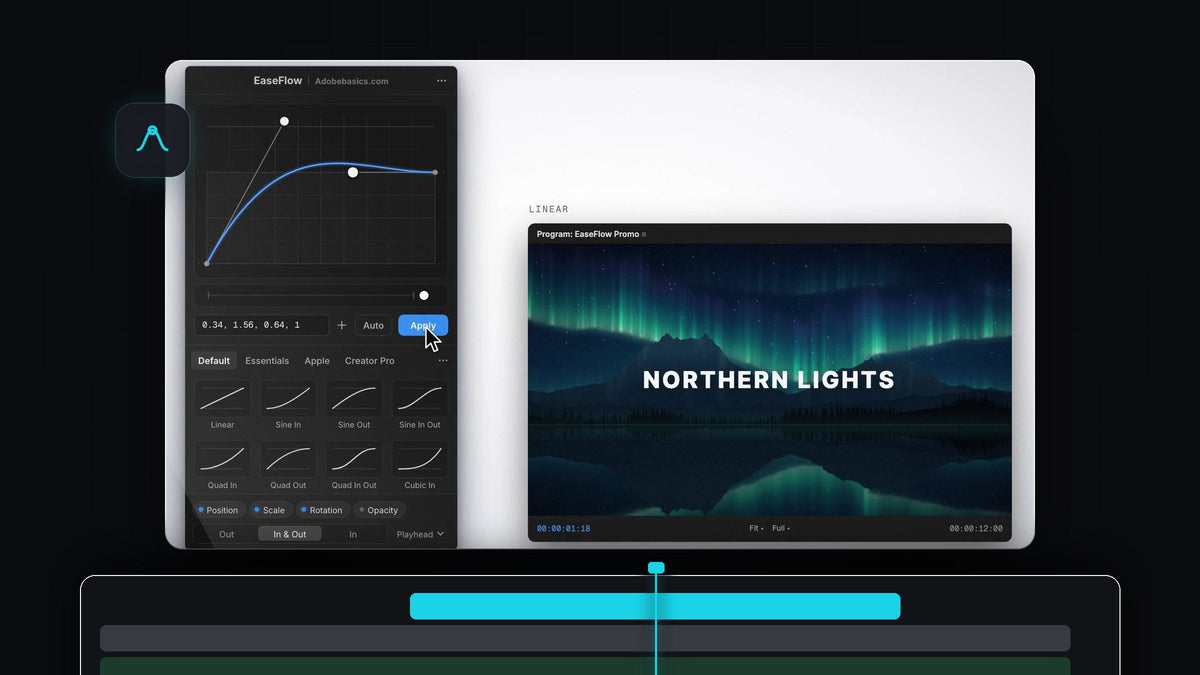
The best easing plugin for Premiere Pro: the short answer
For most editors, the best easing plugin for Premiere Pro is EaseFlow. It costs $24.99 or $34.99 once, runs on Premiere Pro 2021 to 2026 on Mac and Windows, eases the keyframes at the playhead on every selected clip at once, and its Auto Mode eases new keyframes as you set them. If you want a full animation toolkit that also runs in After Effects, Easify 4 is the stronger pick, at a higher price.
Watch the intro
Easing plugins for Premiere Pro compared
Prices and versions are as of October 2026, from each maker's own page. "Not listed" means we could not find the feature on that page.
| Feature | EaseFlow | Easify 4 | Motion Studio | Smoothify | Eaze | Premiere built-in |
|---|---|---|---|---|---|---|
| Premiere Pro versions | 2021 to 2026 | 2024 and newer | Yes | 2024 and newer | 2021 and newer | Any |
| Mac and Windows | Yes | Yes | Yes | Yes | Yes | Yes |
| Price | $24.99 or $34.99 one-time | $49 or $99 one-time | From $11 a month | Unclear (see below) | Free, paid Pro tier | Included |
| Every selected clip at once | Yes | Not listed | One property at a time | Not listed | Not listed | No |
| Auto-eases new keyframes | Yes (Auto Mode) | Not listed | Not listed | Not listed | Not listed | No |
| Bounce and spring curves | Pro ($34.99) | Pro ($99) | Not listed | Yes | Yes | No |
| Paste a cubic-bezier | Yes | Not listed | Yes | Not listed | Yes | No |
| Shortcut per preset | Yes | Not listed | Not listed | Not listed | Not listed | No |
| Also runs in After Effects | No | Yes | Yes | Planned | Yes | No |
Each easing plugin in short
Premiere's built-in easing
Right-click a keyframe, choose Temporal Interpolation and pick Ease In, Ease Out or Bezier, then drag the handles. It works, but there are no presets, no numeric curve input and no bounce on desktop. Our guide to easing keyframes in Premiere Pro shows the manual way.
Easify 4
Easify 4 by Leyero runs in Premiere Pro and After Effects 2024 or newer. Essentials is $49 and Pro is $99, and the Back, Bounce and Elastic curves sit in Pro. Its strength is breadth: an After Effects style keyframe timeline, eased speed ramps, stagger, align, wiggle and loops.
Motion Studio
Mt. Mograph's Motion Studio is a subscription, $13 a month or $11 a month billed yearly. Its Premiere panel eases one property at a time with a speed graph, cubic-bezier handles or a preset. Shared curve libraries across After Effects, Premiere and Resolve are its big plus.
Smoothify
Smoothify, now part of blinkl.io, offers custom Bezier curves, bounce and a preset library for Premiere Pro 2024 and up. Pricing is unclear: one page says it is free, while blinkl's page lists a 14-day trial and then a blinkl subscription ($75 a year for one extension). It opens from blinkl's own app.
Eaze
Eaze by Creovanta is a free panel for Premiere Pro 2021 and up with 36 presets and a graph editor. Its "True Handles" mode aims to leave two real Bezier keyframes by reopening your project, with 20 free uses before Eaze Pro.
Why editors switch to EaseFlow
- Pay once. Standard is $24.99 and Pro is $34.99, with lifetime updates.
- Every selected clip at once. Press Apply and EaseFlow eases the keyframes at the playhead on all selected clips, across Position, Scale, Rotation, Opacity, Anchor Point and effect parameters.
- Auto Mode. Set two keyframes and they are eased the moment the second one lands.
- Bouncy curves for less. Pro adds 12 Apple-style springs, 10 Essentials and 25 Creator Pro curves, 72 in total.
- Your keyframes stay put. EaseFlow only adds the keyframes a curve needs and never moves yours. One Cmd+Z (Ctrl+Z on Windows) takes the easing back off.
- Older Premiere versions too. It supports Premiere Pro 2021 to 2026, so you do not need the newest release.

Premiere's scripting does not expose keyframe influence the way After Effects does, so most easing plugins build the curve from extra in-between keyframes. EaseFlow keeps that lean: a two-second Easy Ease takes about 20 keyframes, not one on every frame.

How to get started
Step 1: Install EaseFlow
Your license key and download link arrive by email right after checkout. Run the installer, which sets up the EaseFlow app and the Premiere Pro panel, then dock the panel next to Effect Controls.
Step 2: Pick a curve and press Apply
Animate something with two keyframes, select the clips, put the playhead on the keyframes and click a preset or Apply. For a classic example, try it on a smooth zoom.
Step 3: Turn on Auto Mode
Click Auto next to Apply. From now on every new pair of keyframes is eased with your current curve. Right-click a favorite preset and choose Set Shortcut to ease without touching the panel.

When another plugin is a better fit
If you animate heavily in After Effects as well, or you want stagger, align, wiggle and AE-style keyframe editing in one tool, Easify 4 or Motion Studio will serve you better. If you only ease a keyframe now and then and spend nothing, Eaze or Premiere's own Ease In and Ease Out are fine. For fast, everyday easing inside Premiere Pro, EaseFlow is the simplest path.

FAQ
What is the best easing plugin for Premiere Pro?
For most editors it is EaseFlow: one-time price, Premiere Pro 2021 to 2026, every selected clip at once and Auto Mode. Easify 4 is the pick for a bigger animation toolkit across Premiere and After Effects.
Is there a free easing plugin for Premiere Pro?
Eaze has a free version, and Premiere itself offers Ease In, Ease Out and Bezier handles. Smoothify has been described as free, but blinkl's page lists a subscription after a trial, so check before you rely on it.
Does Premiere Pro have a graph editor for easing?
Yes, in a basic form. You can drag Bezier handles in the Value and Velocity graphs in Effect Controls, but there is no preset library or way to type a cubic-bezier.
Can I use After Effects easing curves in Premiere Pro?
With EaseFlow you can paste a cubic-bezier(), a cubic-bezier.com link or four numbers and save it as a preset. Read the full EaseFlow guide for every feature.
Does EaseFlow work on Windows?
Yes. EaseFlow runs on macOS and Windows, and its menu bar app keeps it up to date.
Make every move land softly, in one click and for a one-time price. Get EaseFlow for Premiere Pro.




