

 by
by 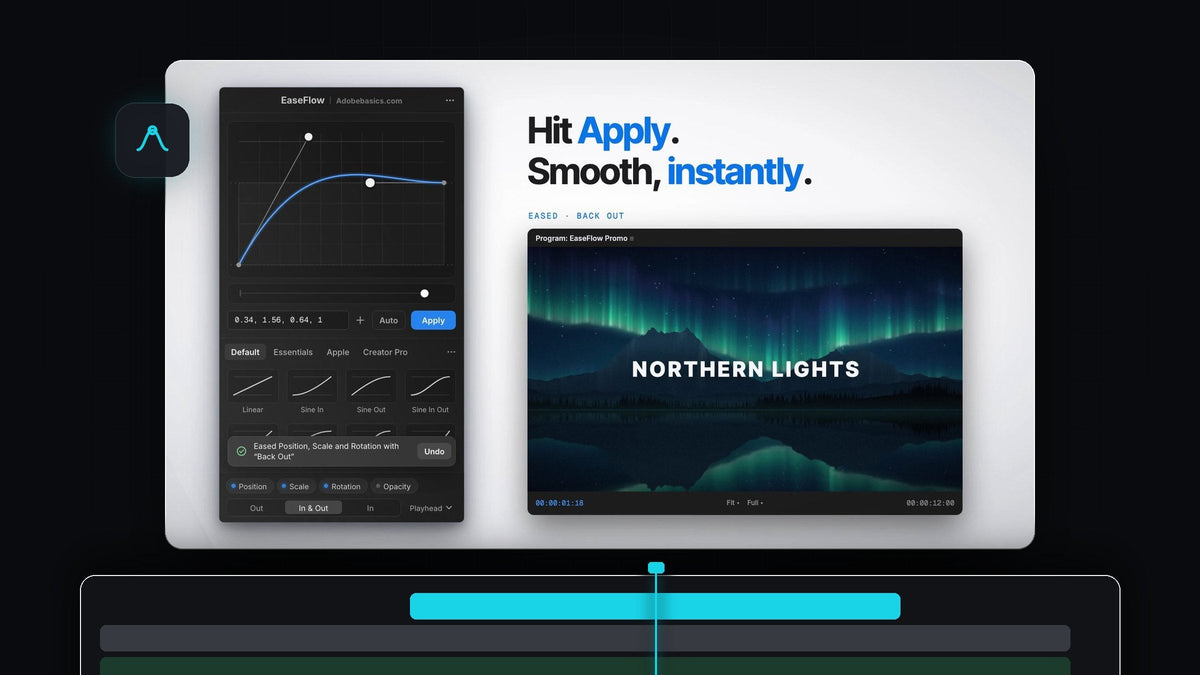
Is there a Flow plugin for Premiere Pro?
No. Flow, the popular easing plugin by Zack Lovatt and renderTom sold on aescripts, runs only in After Effects (2020 to 2026, as of October 2026). There is no Premiere Pro version. If you edit in Premiere Pro and want the same "pick a curve, press Apply" workflow, EaseFlow gives you real easing curves right inside Premiere Pro 2021 to 2026, on Mac and Windows.
To be clear: EaseFlow is Adobe Basics' own Premiere Pro plugin. It is not made by aescripts and it is not a version of Flow.
Watch the intro
Flow plugin vs EaseFlow for Premiere Pro editors
Here is how the After Effects plugin, Premiere's built-in easing and EaseFlow compare. Prices and versions are as of October 2026.
| Flow (aescripts) | Premiere built-in | EaseFlow (Adobe Basics) | |
|---|---|---|---|
| Works in Premiere Pro | No | Yes | Yes, 2021 to 2026 |
| Works in After Effects | Yes, 2020 to 2026 | No | No |
| Mac and Windows | Couldn't confirm | Yes | Yes |
| Price | $35 per user | Included | $24.99 or $34.99 one-time |
| Preset curves | 25 plus community packs | Ease In, Ease Out | 25 (Standard), 72 (Pro) |
| Curve editor | Yes | Bezier handles per keyframe | Yes, with snapping |
| Paste a cubic-bezier | Yes | No | Yes, plus links and springs |
| Bouncy spring curves | Overshoot and undershoot | No | 12 in Pro |
| Eases new keyframes automatically | Not listed | No | Yes, Auto Mode |
| Shortcut per preset | Via KBar export | No | Yes |

Why editors switch to EaseFlow
- It runs where you edit. No trip to After Effects just to ease a title. EaseFlow is a panel inside Premiere Pro that finds the keyframes under your playhead and eases them.
- One click, or one key. Pick a curve and press Apply, or give your favorite presets their own keyboard shortcut, even an F key on its own.
- Auto Mode. Turn on Auto, set two keyframes, and they are eased the moment the second one lands. No button, no menu, no graph.
- The curves you already know. The Default pack has 25 classics: Sine, Quad, Cubic, Expo, Circ, Back and more, each In, Out and In Out. Pro adds Essentials (10), Apple-style bouncy springs (12) and Creator Pro (25) with speed ramps, 72 curves in total.
- Bring your own curves. Paste a cubic-bezier(), a cubic-bezier.com link, four numbers or a spring(damping, frequency), save it to your library and export the library to share it.
- Safe on real projects. One Cmd+Z (Ctrl+Z on Windows) takes EaseFlow's easing back off, and your own keyframes are never moved.
- Pay once. Standard is $24.99 and Pro is $34.99, one-time, with free updates for life.

Want the full feature tour? Read our EaseFlow guide.
How to get started
Getting from install to your first eased move takes a few minutes.
Step 1: Install EaseFlow
Your license key and download links arrive by email right after checkout. Run the guided installer: it sets up the EaseFlow app and the Premiere Pro plugin, and a small menu bar app keeps it up to date on Mac and Windows.
Step 2: Open the panel and pick a curve
Open EaseFlow in Premiere Pro and dock it next to Effect Controls. Animate something the way you always do, for example two Position keyframes on a title. Then pick a curve from the Default, Essentials, Apple or Creator Pro tab, or shape your own in the graph editor: hold Shift to snap, Alt to mirror, and pull past the edge for overshoot.

Step 3: Press Apply, or turn on Auto
Put the playhead on your keyframes and click Apply. EaseFlow eases the keyframes at or nearest the playhead on every selected clip at once, and a small message with an Undo button confirms it. Click Auto beside Apply and every new pair of keyframes is eased as you work. It is a great fit for smooth text animations.

When Flow is the better fit
If you animate mostly in After Effects, Flow is an excellent tool and we won't pretend otherwise. It has a clean normalized curve editor, several preset libraries with downloadable community packs, and it can export curves to KBar.
It also helps to know how EaseFlow works under the hood. Premiere's scripting doesn't expose keyframe speed and influence the way After Effects does, so EaseFlow builds each curve by adding only the in-between keyframes it needs, about 20 for a two-second Easy Ease, and never moves yours. So the simple rule: animate in After Effects, use Flow. Edit in Premiere Pro, use EaseFlow.
FAQ
Does the Flow plugin work in Premiere Pro?
No. As of October 2026, Flow is listed for After Effects 2020 to 2026 only. For easing curves inside Premiere Pro, use a Premiere plugin such as EaseFlow.
Is EaseFlow the same as Flow?
No. EaseFlow is made by Adobe Basics for Premiere Pro. It is not affiliated with aescripts, Zack Lovatt or renderTom.
Is there a free Flow alternative for Premiere Pro?
Premiere's built-in Ease In, Ease Out and Bezier handles are free, but you shape every keyframe by hand. Our guide to easing keyframes in Premiere Pro shows that method. EaseFlow is a one-time purchase from $24.99.
Which Premiere Pro versions does EaseFlow support?
EaseFlow works with Adobe Premiere Pro 2021 to 2026 on macOS and Windows.
What is the difference between EaseFlow Standard and Pro?
Standard ($24.99) is the full plugin with the Default pack of 25 curves. Pro ($34.99) adds the Essentials, Apple and Creator Pro packs, 72 curves in total, plus every pack added in the future.
Want Flow-style easing without leaving Premiere Pro? Get EaseFlow and make your next keyframes land softly.


