by

Update now if
- You edit people talking. Enhance Speech cleans up noisy dialogue, and Text-Based Editing removes filler words and pauses in one step.
- You mix your own audio. Fade handles, audio type badges and clearer waveforms in 24.4 save a lot of clicks.
- Your Mac runs macOS 12 Monterey. Premiere Pro 2024 is the newest version that supports Monterey. Premiere Pro 2025 needs macOS 13 Ventura or later.
- You've lost work to a crash before. Recovery mode restores your open projects, and the Video Effects Manager helps you find plugins that cause problems.
Wait if
- You're in the middle of a big project. Finish it in the version you started it in, then update.
- You share projects with others. Projects saved in Premiere Pro 2024 don't open in 2023 or older, so update together.
- Your computer is older. Check the table below. Without AVX2 support, or on macOS 11 Big Sur, Premiere Pro 2024 won't install.
- Your computer can run something newer. Premiere Pro 2024 is no longer the latest version. If your system meets the requirements, look at Premiere Pro 2025 or newer first.
Premiere Pro 2024 system requirements
| Computer | Premiere Pro 2024 |
|---|---|
| Mac with Apple silicon | M1 or newer with macOS 12 Monterey or later |
| Intel Mac | Intel 6th generation or newer with AVX2, macOS 12 Monterey or later |
| Mac Pro 2013 or older | Can't install it |
| Mac on macOS 11 Big Sur | Update macOS first |
| Windows | Windows 10 (64-bit) version 22H2 or later, or Windows 11 |
| Windows processor | Intel 6th generation or AMD Ryzen 1000 series or newer, with AVX2 |
| Memory | 8 GB minimum, 16 GB for HD, 32 GB or more for 4K |
| GPU memory | 2 GB minimum, 4 GB for HD and some 4K, 6 GB or more for 4K |
On an Apple silicon Mac, Premiere Pro 2024 runs natively. The option to open it with Rosetta is gone.
What changes when you update
- Your projects get converted. When you open an older project, Premiere Pro 2024 keeps the original and saves a new 2024 project file. That new file won't open in 2023 or older. To go back, save the project as XML and import that into the older version.
- Projects stay compatible within 2024. Any 24.x version opens projects from any other 24.x version, so point updates during the year are safe.
- Sync Settings are gone. With version 24.1, Adobe announced that Sync Settings and Creative Cloud Synced files are being discontinued. Your custom presets can still move between Premiere versions on the same computer.
- Obsolete effects are removed. Version 24.6 removed the Obsolete Effects and Obsolete Transitions folders and presets built from them. Adobe says they slowed projects down and that faster, modern alternatives exist.
- Color settings moved. Project, clip and sequence color settings now live in one Settings tab in the Lumetri Color panel.

How to update safely
Step 1: Save and back up your projects
Save every open project and keep a copy of any project you're still working on, along with your custom presets.
Step 2: Keep your current version installed
In the Creative Cloud app, click Update next to Premiere Pro, open Advanced options and turn off Remove old versions. If Premiere Pro 2024 isn't the version offered, open the menu next to Premiere Pro, choose Other versions and install 2024 from there. Both versions then sit side by side.
Step 3: Check your plugins and templates
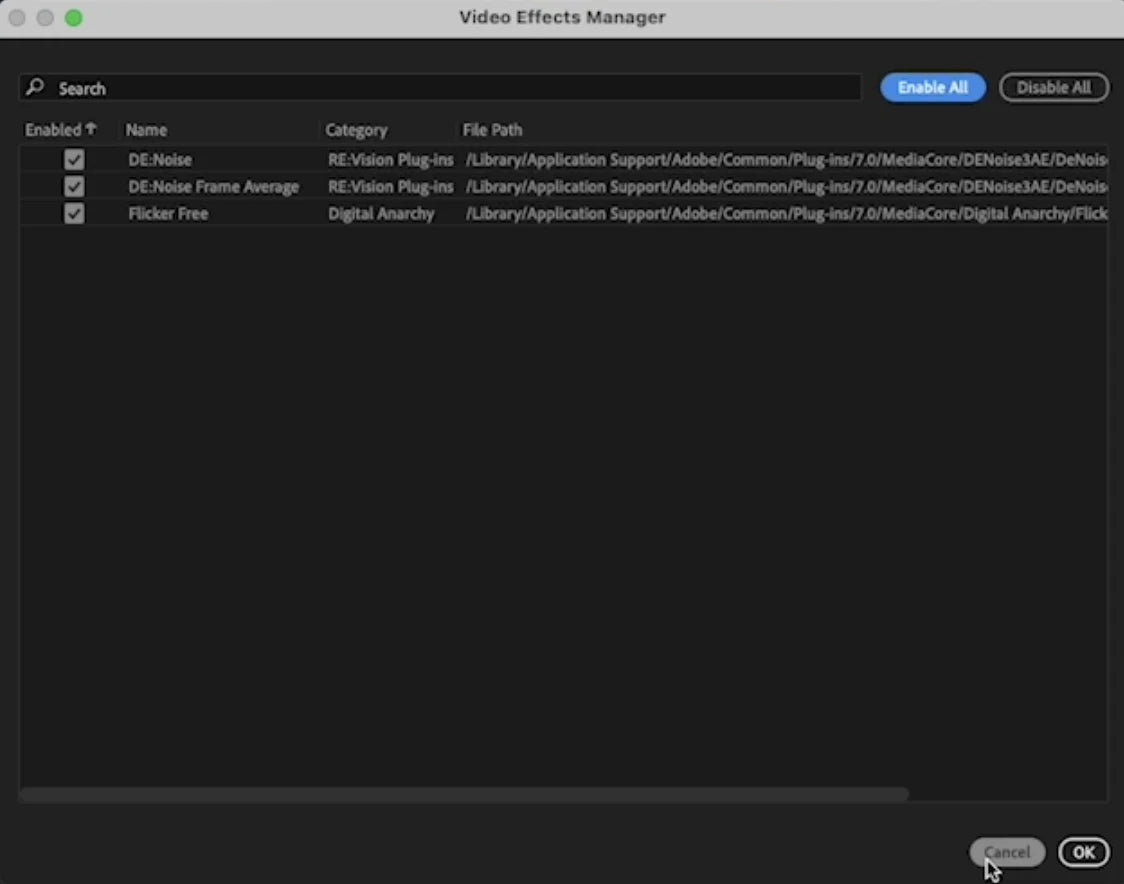
Make sure the plugins and templates you use every day support Premiere Pro 2024. After installing, the Video Effects Manager shows your third-party plugins in one place, so you can spot and turn off one that misbehaves. All of ours work (see below).
Step 4: Start with a copy
Open a copy of a finished project, or start a new one, and try Enhance Speech and the new audio tools there first. When everything works the way you like, move your next big project over.
Do our plugins, templates and presets work in Premiere Pro 2024?
Yes. EaseFlow, BetterFX, QuickPaste and Mako all work in Premiere Pro 2024, on Windows and Mac.
- Plugins. Premiere Pro 2021 to 2027.
- Motion Graphics templates. Premiere Pro 2021 to 2027.
- Presets. Premiere Pro 2019 to 2027.
So whether you stay on 2021 to 2023 for now, settle on 2024 or move to something newer later, your tools keep working.
FAQ
Is Premiere Pro 2024 worth updating to?
If you're on 2023 or older, yes. Enhance Speech, filler word detection and the new audio timeline save real time. Wait only if you're mid-project, share projects with people on older versions, or your computer doesn't meet the requirements.
Can I still install Premiere Pro 2024 today?
Yes. In the Creative Cloud app, open the menu next to Premiere Pro, choose Other versions and pick Premiere Pro 2024. It installs next to any other version you have.
Can I go back to Premiere Pro 2023?
Yes, you can install 2023 again the same way. Projects saved in 2024 won't open there, so keep copies, or save the project as XML and import it into 2023.
Does Premiere Pro 2024 work on Windows 10?
Yes. It needs Windows 10 (64-bit) version 22H2 or later, or Windows 11.
Updating to Premiere Pro 2024? See the plugins that work in it.