

 by
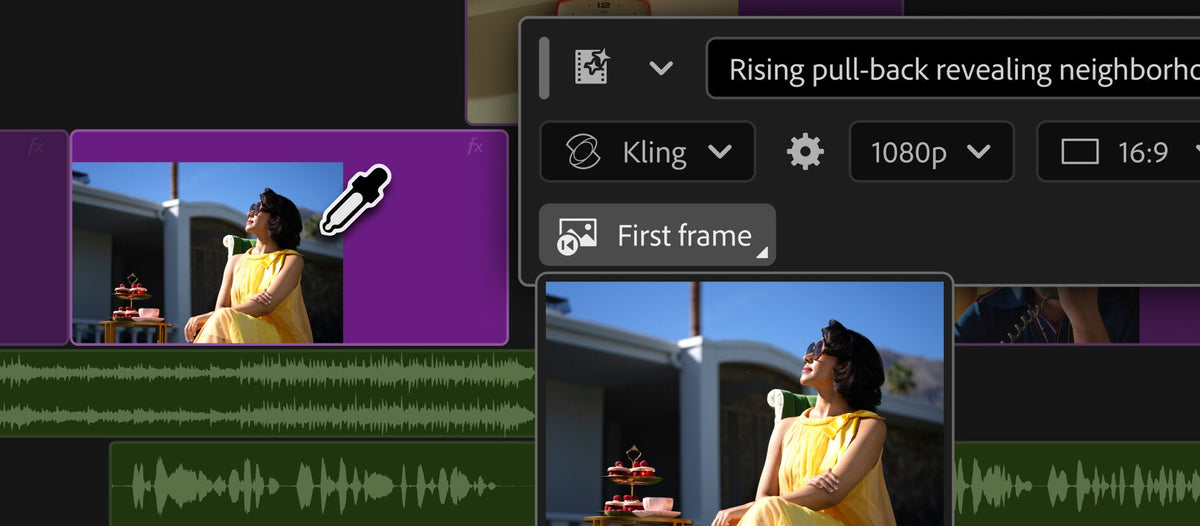
Generative Media Tool
Missing a shot to cover a cut, or a sound effect for a scene? Pick a spot on your timeline, describe what you need, and Premiere generates a video clip or sound effect that lands in your sequence as a normal, editable clip.
You can use frames from your project as a reference, so the new clip fits the shots around it. You choose the model, from Adobe Firefly to partner models such as Google Veo, Kling, Runway and Luma. The tool uses generative credits, and the 26.5.1 update made it clearer how many credits a generation uses.

Paper Edit
Paper Edit turns your transcript into a rough cut. Open the Text panel, select the lines you want, preview them, and create a new sequence from them. It's made for interviews, podcasts and dialogue heavy edits, where the transcript is already your plan.

Also in this update
- Smoother Object Masks. A new smoothness control gives you finer, more natural mask edges, for things like hair and fabric.
- New and updated effects. A fully adjustable Lens Flare, a rebuilt Twirl (the original is under Legacy) and a better softness control in Mosaic.
- More Generative Extend. Works with footage from 360p to 4K UHD, any aspect ratio, interlaced or non-square pixels, 12 to 60 fps, and SDR or HDR.
- Sony FX5. Edit XAVC and XOCN media with 32-bit float audio.
- ProRes RAW and ARRICORE. Better ProRes RAW support, and ARRICORE media from the ALEXA 35 Xtreme.
- Match Source for audio. Exports now match your source's audio channels and sample rate, and warn you when a format can't.
- NVIDIA Blackwell. Hardware decoding of 4:2:2 10-bit AVC and HEVC in MXF.
- Better transcripts. A new voice detection model for more accurate speech to text.
- Transition handles. Show or hide them in Timeline Display Settings, with matching shortcuts.
- Faster previews. Smart Rendering now covers more XAVC-I media.
Adobe also kept working on beta features during this time, like Auto Color and new Style modules in Color Mode, and Generate Music and Generate Soundscape. They became regular features in Premiere Pro 2027.
26.5 is the newest Premiere you can run on an Intel Mac. See everything that came to this version line in What's New in Premiere Pro 2026.
FAQ
Is Premiere 26.5 the last version for Intel Macs?
Yes. Premiere Pro 2027 needs Apple silicon, so 26.5 and its fix updates, like 26.5.3, are the newest versions you can run on an Intel Mac.
Does the Generative Media Tool cost extra?
It uses Adobe's generative credits. The 26.5.1 update made it clearer how many credits each generation uses.
Want a smarter way to paste in Premiere? Get QuickPaste for Premiere Pro.






