

 by
by 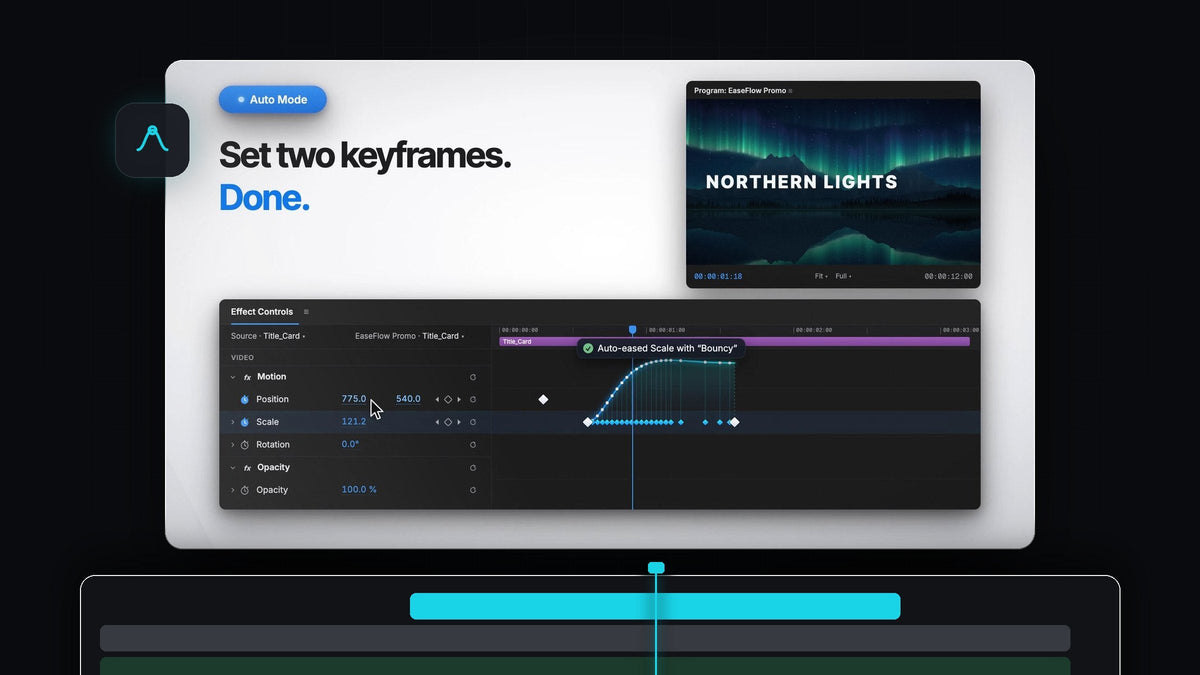
Smooth motion without touching a graph
Looking for a Smooth It alternative for Premiere Pro? EaseFlow eases your keyframes automatically: turn on Auto Mode, add two keyframes, and the move is already smooth.
No right-clicking, no speed graph, no handles to drag. EaseFlow works on Mac and Windows and costs $24.99 for Standard or $34.99 for Pro, one-time, with free updates for life.
Watch the intro
Why plain keyframes look stiff
Premiere Pro moves between two keyframes at one flat speed. The move starts at full speed and stops hard, which is why a slide or a zoom can feel robotic.

Real motion builds up, glides and settles into place. That is what an easing curve adds, and EaseFlow adds it for you, so every frame between your keyframes follows the curve.
Auto Mode does the easing for you
Auto Mode is the easiest way to get smooth motion in Premiere Pro. Click Auto beside Apply in the EaseFlow panel and it stays on while you work.

- Eased the moment it lands. When you create the second keyframe, the pair is eased with your current curve, wherever the playhead is.
- Your old work is safe. Keyframes that were there before are never touched.
- Edits stay smooth. Add a keyframe between two eased ones and both sides are eased again.
- Easy to reverse. One press of Cmd+Z (Ctrl+Z on Windows) takes the easing back off.
Step 1: Install EaseFlow
Get EaseFlow from the product page. Your license key and download links arrive by email right after checkout. Run the guided installer and it sets up the EaseFlow app and the Premiere Pro plugin for you.
EaseFlow works with Premiere Pro 2021 to 2026, and a small menu bar app keeps it up to date on its own.
Step 2: Open the panel and turn on Auto
Open EaseFlow in Premiere Pro and dock it next to Effect Controls. Click Auto. A short message confirms that Auto Mode is on.
Auto Mode uses the curve you picked. To choose the feel, click a preset in the panel first, such as Sine In Out for a gentle move or Expo Out for a fast start and a soft landing.
Step 3: Animate like you always do
Select a clip, turn on the stopwatch for Position or Scale in Effect Controls, move the playhead and change the value. The second keyframe lands and EaseFlow eases the pair right away.

Keep going: Rotation, Opacity, effect parameters, even audio levels. Every new pair is eased the same way. Try it on a photo move from our photo animation tutorial.
Step 4: Pick a different feel any time
Want a move to feel different? Put the playhead on it, click another preset and press Apply. EaseFlow swaps only its own keyframes and leaves yours exactly where they are.
When you're ready for more, the graph editor lets you drag your own curve, and Pro adds bouncy Apple-style springs and creator curves. Our EaseFlow guide shows everything the panel can do.
Room to grow
Auto Mode gets you smooth motion on day one. The rest of the panel is there when you want more control.
- One-click presets. The Default pack has 25 classic curves, each as In, Out and In Out.
- A real graph editor. Drag the handles to shape your own curve, with a live preview.
- Preset shortcuts. Give a favorite curve its own key and ease with one press.
- Clean timelines. EaseFlow adds only the keyframes a curve needs and never moves yours.
FAQ
What is the best Smooth It alternative for Premiere Pro?
EaseFlow. Its Auto Mode eases every new pair of keyframes as you animate, and Apply eases existing ones in one click, on Mac and Windows.
Do I need to understand Bezier curves to use EaseFlow?
No. Pick a preset by its name and shape, or just leave Auto Mode on. The graph editor is there when you want it, never required.
Will Auto Mode change keyframes I already made?
No. Auto Mode only eases keyframes as you add them, and it eases each pair once. Keyframes that were already in your project are left alone.
Does EaseFlow work on Mac and Windows?
Yes. EaseFlow runs in Premiere Pro 2021 to 2026 on macOS and Windows, with one guided installer for each.
Which version should a beginner choose?
Standard ($24.99) has Auto Mode, the graph editor, shortcuts and 25 classic curves. Pro ($34.99) adds 47 more presets, including bouncy springs. You can upgrade from Standard to Pro later.
Let your next animation ease itself. Get EaseFlow for Premiere Pro.



