

 by
by 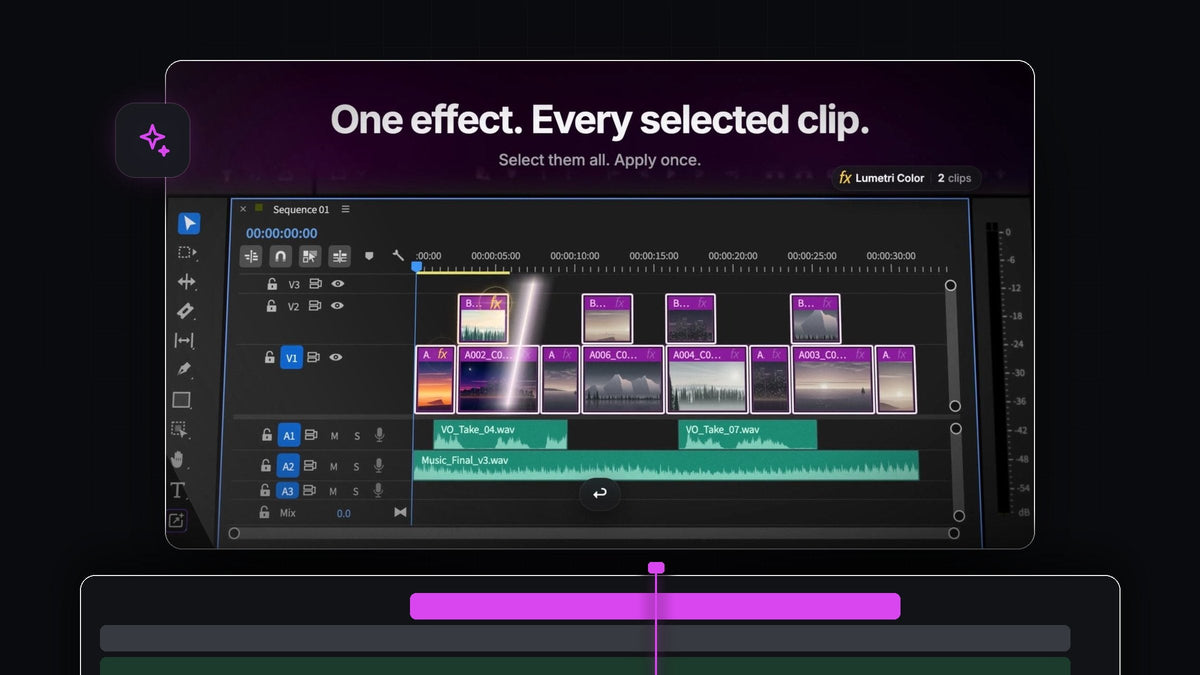
The answer for reel editors
If you cut Reels, TikToks and Shorts, the best effect search plugin for Premiere Pro 2023 is BetterFX. Select every clip in your reel, press one shortcut, type a few letters and press Enter. The effect lands on all of them at once.
BetterFX works in Premiere Pro 2023 (version 23) on Mac and Windows, for $29.99 one-time with lifetime access and free updates.
Vertical edits are fast and dense. A 30-second reel can hold twenty short cuts, and every one of them needs the same grade so the video feels like one piece. Dragging an effect onto each clip by hand is where the time goes.
Watch the intro
Built for many short clips
Social edits reward speed and consistency. BetterFX gives you both from the keyboard.
- One shortcut. Option + Space on a Mac or Alt + Space on Windows opens the search over your timeline. No panels to open.
- Every selected clip. Select as many clips as you like and apply the effect once. BetterFX puts it on all of them.
- Custom presets. Save your own presets, keyframes included, and apply your series look as fast as any built-in effect.
- Recent effects. Your last five effects are waiting the moment you open BetterFX, newest first.
- Intelligent search. lum is enough for Lumetri Color, and wrp stb finds Warp Stabilizer.
- Unified search. Built-in effects, your presets and third-party effects from plugins like Sapphire and Boris FX, all in one bar.
Posting several times a week means you reach for the same handful of effects over and over: the grade, the stabilizer, the punchy preset for the hook. BetterFX learns that rhythm and keeps those effects one or two letters away, so the next reel starts faster than the last.
Step 1: Install BetterFX
Download BetterFX right after checkout or from your email. One guided installer sets up the app and the Premiere Pro plugin. Open Premiere Pro 2023 and your vertical sequence. There is no complicated manual setup, so you can be applying effects a few minutes after checkout.
Step 2: Select every clip in the reel
Drag a selection box across the timeline, or click the first clip and Shift-click the rest. Include the B-roll on the upper tracks too.

Step 3: Apply the grade once
Press your BetterFX shortcut and type lum. Lumetri Color is the top result.

Press Enter. Every selected clip now carries the effect, twelve clips in a single keystroke, with no dragging and no missed clip at the end of the reel. Adjust each one in Effect Controls or the Lumetri Color panel as needed.

Step 4: Steady the handheld shots
Phone footage moves. Select the shaky clips, open BetterFX and type wrp stb to add Warp Stabilizer to all of them. Our guide on how to stabilize video in Premiere Pro explains the settings.

Step 5: Save your series look as a preset
Once a reel looks right, save the effects as a Premiere Pro preset and import it into BetterFX. From then on, every new episode gets the same look with one search, keyframes included.
Your text stays consistent too: in Premiere Pro 2023 you can select several title clips in the timeline and change the font, size, colors and backgrounds together. For a full vertical workflow, see how to make a TikTok edit in Premiere Pro.
The complete BetterFX guide covers every setting, and the 2022 edition of this post shows the long-form side.
FAQ
Does BetterFX work with Premiere Pro 2023?
Yes. BetterFX works with Premiere Pro 2023 (version 23) on Mac and Windows. It supports Premiere Pro 2021 through 2026.
Can I apply one effect to multiple clips at once in Premiere Pro?
Yes, with BetterFX. Select all the clips, open the search, pick the effect and press Enter. It is applied to every selected clip.
Can I use my own presets with BetterFX?
Yes. Import your own presets, keyframes included, and they appear in search next to the built-in effects.
Does BetterFX work on Windows?
Yes. BetterFX runs on Windows and macOS. Press Alt + Space on Windows or Option + Space on a Mac to open it. Free updates install automatically on both.
Grade the whole reel in one keystroke. Get BetterFX for Premiere Pro 2023.




