by
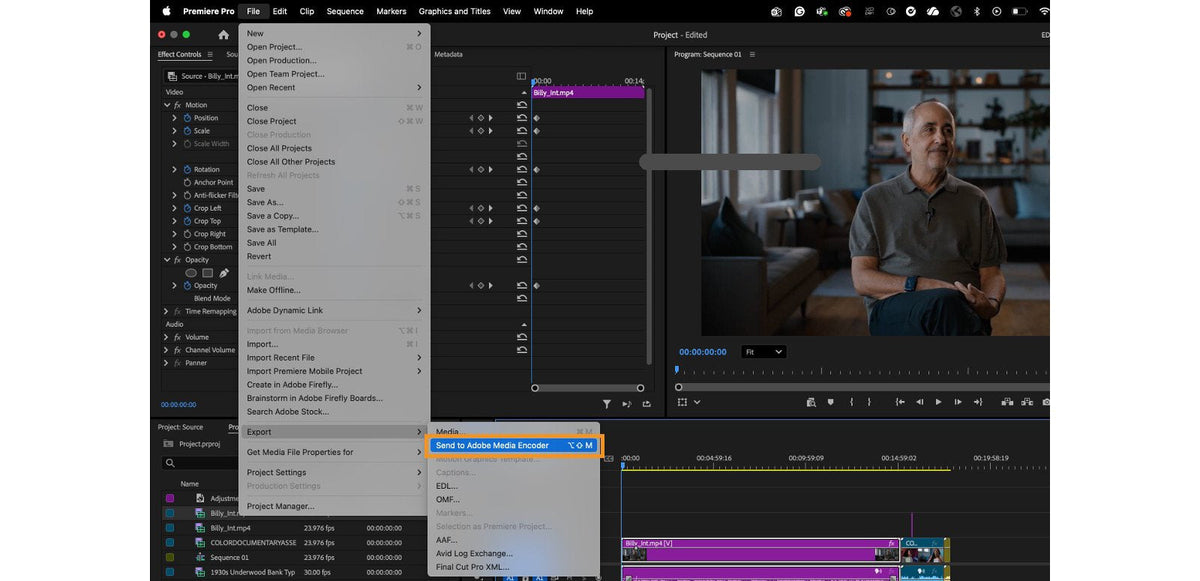
Send to Adobe Media Encoder
Choose File > Export > Send to Adobe Media Encoder, or press Option+Shift+M on macOS or Alt+Shift+M on Windows. Your sequence goes straight to Media Encoder without opening Export mode. The export runs in the background, so you can keep editing.

Recent presets in Export mode
The Preset menu in Export mode now lists the last three presets you exported with. If you deliver the same formats every week, your next export is two clicks away.
Also in this update
- Drag and drop in Productions. Move assets and sequences between projects in the same Production. Hold Cmd (macOS) or Ctrl (Windows) to copy instead.
- Faster RED R3D. Better playback of RED footage on Apple M1 and M2 Macs.
- GPU accelerated transitions. Center Split, Split and Non-Additive Dissolve play back more smoothly and export faster.
- New Learn panel. Tutorials and a personal watchlist under Window > Workspaces > Learning.
- Easier template import. A dialog explains that imported Motion Graphics templates go to the Browse tab of the Essential Graphics panel.
See every feature of the year in what's new in Premiere Pro 2023.
FAQ
What is the shortcut to send a sequence to Media Encoder?
Option+Shift+M on macOS and Alt+Shift+M on Windows, from Premiere Pro 23.3 on.
Was Text-Based Editing in Premiere Pro 23.3?
No. It was still in the public beta then. It shipped in Premiere Pro 23.4 in May 2023.
Want to apply effects as fast as you export? BetterFX puts any effect one shortcut away.