by
Premiere Pro 2023 at a glance
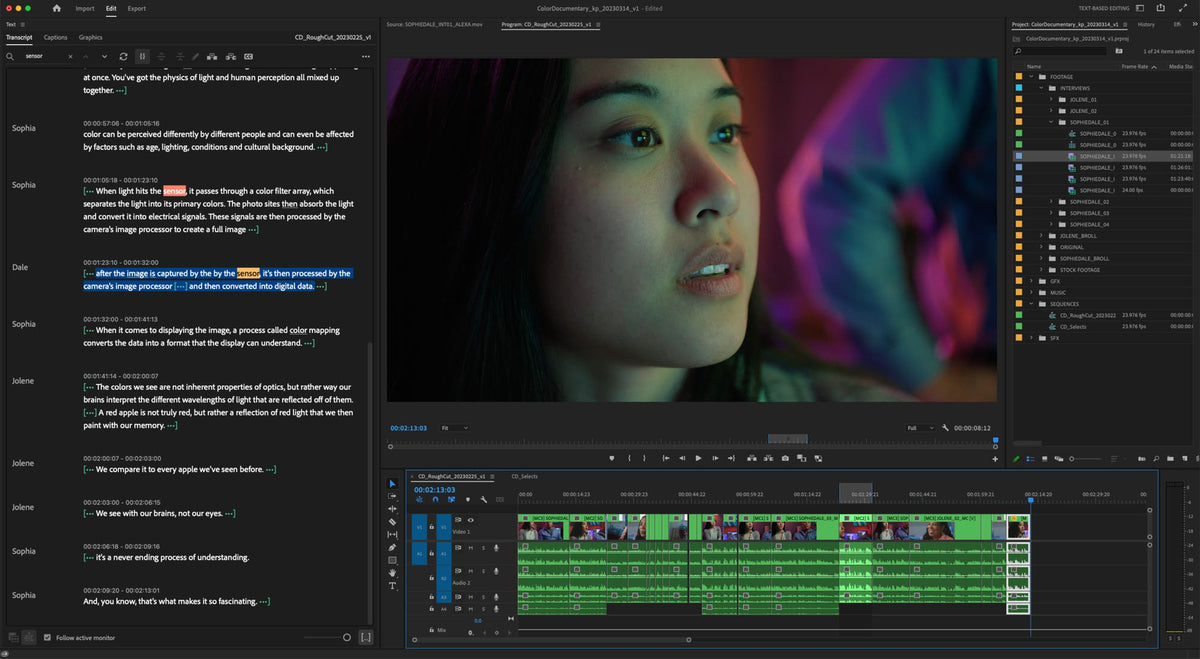
- Text-Based Editing (23.4). Build a rough cut by selecting, copying and deleting words in a transcript.
- Better titles (23.0). Bulk edit titles on the Timeline, align with one click, and pick inner or outer strokes.
- Upgrade captions to graphics (23.1). Turn captions into graphics you can style and animate.
- Automatic tone mapping (23.2). Log, HDR and iPhone HLG clips look right in a normal Rec. 709 sequence.
- Background Auto Save (23.4). Backups save while you keep working.
- Team Projects upgrades (23.1 to 23.5). Sequence Locking, offline editing and a clear save and sync status.
- Faster exports and playback. Send to Media Encoder in one shortcut, GPU accelerated Lumetri scopes and transitions.
- New cameras and formats. ARRI ALEXA 35, RED V-Raptor XL, Sony VENICE 2 and iPhone Cinematic clips.
- Legacy Titler removed (23.0). Old titles are upgraded to Source Graphics when you open a project.
Text-Based Editing: cut your video like a document
Text-Based Editing arrived in Premiere Pro 23.4 in May 2023, and it's the headline of the year. Premiere transcribes your source clips, so you can read and search them instead of scrubbing through hours of footage.
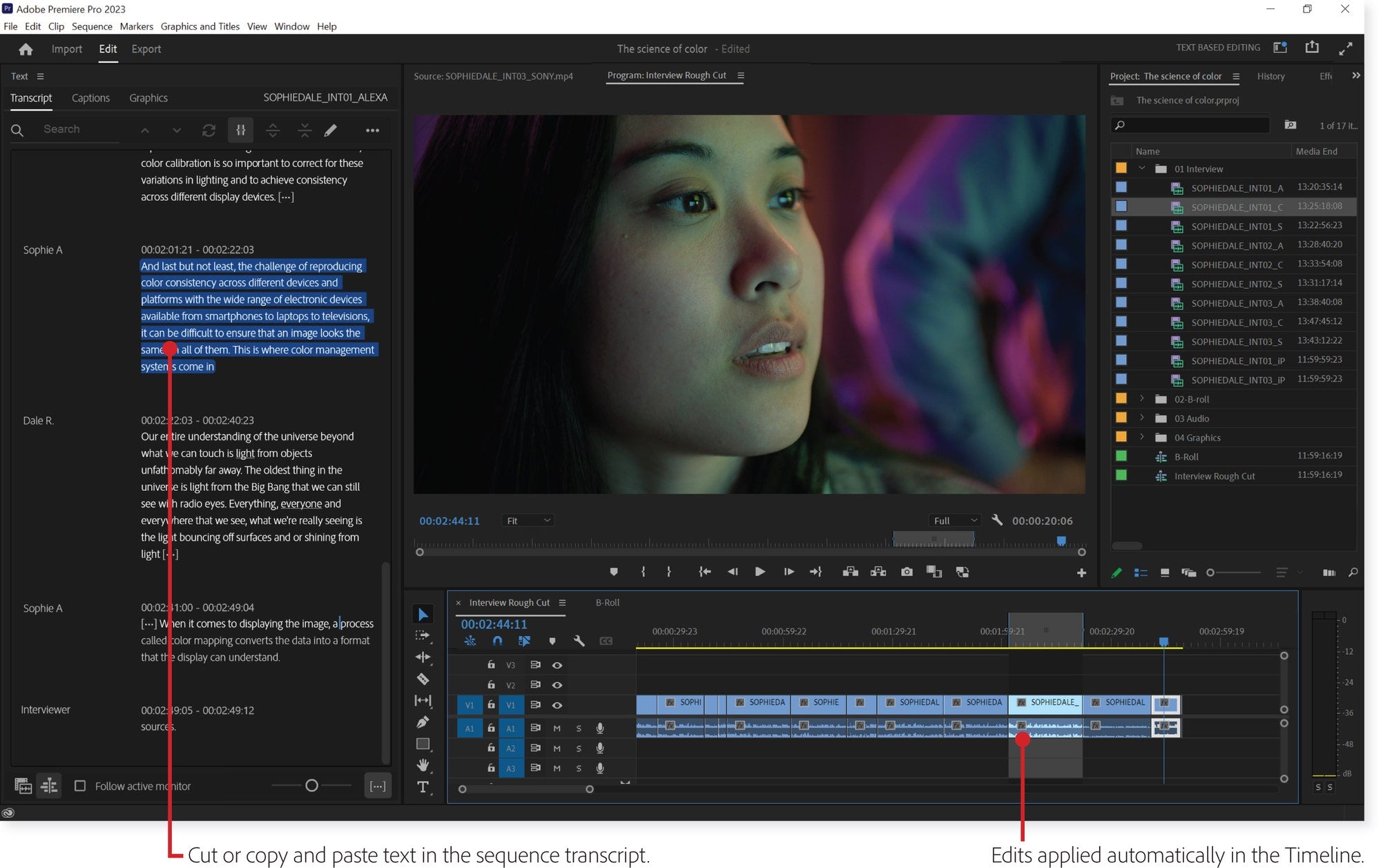
Select the sentences you want and insert them into your sequence. Premiere also writes a transcript of the sequence as you build it, so you can cut, copy and paste lines there and the Timeline follows. When the rough cut is done, switch to your usual trim tools to fine-tune it. The finished transcript can also become your captions.
Transcription got more languages during the year too. Version 23.2 added Dutch, Norwegian and Swedish to Speech to Text, and 23.4 added Danish.
Titles and graphics
Premiere Pro 23.0 focused on titles. You can now select several title clips on the Timeline and change the font, size, color or background of all of them at once.

- Flexible alignment (23.0). Line up text and shapes with one click in the Program Monitor.
- Inner and outer strokes (23.0). Choose inner, centered or outer strokes on text and shapes.
- Faster Motion Graphics templates (23.0). Templates made in After Effects now use Multi-Frame Rendering. Adobe says they play up to 2x faster.
- Upgrade captions to graphics (23.1). Turn a caption into a graphic, then add effects, transitions and keyframes. You can still edit the words in the Program Monitor or the Text panel.
- Easier template import (23.3). A new dialog shows you where imported Motion Graphics templates go: the Browse tab of the Essential Graphics panel.
The Legacy Titler is gone as of 23.0. When you open an older project, legacy titles are upgraded to Source Graphics. They may look a little different and need some touching up.
Color: tone mapping, faster scopes and ARRIRAW
Automatic tone mapping, added in 23.2, lets you mix log footage, iPhone HLG and other HDR clips in a standard Rec. 709 sequence. Premiere converts them so colors stay consistent and highlights don't clip, with no LUTs needed. It's on by default, and you can switch it off in Sequence Settings.

- GPU accelerated Lumetri scopes (23.0). Smoother playback while the scopes are open.
- ARRIRAW in every sequence (23.6). Better color management and new settings for ARRIRAW, plus real-time playback thanks to hardware acceleration.
Working together in Team Projects
Several updates made shared editing calmer and safer.
- Add collaborators from the header bar (23.1). And see who is working in the Team Project right now.
- Sequence Locking (23.1). When someone opens a sequence, Premiere locks it for everyone else, so no one overwrites anyone.
- Publish and a Changes column (23.1). Share your edits with one button and see which sequences changed.
- Offline editing (23.2). No internet? Premiere saves your changes locally and you publish them when you're back online.
- Drag and drop between projects (23.3). Move assets and sequences between projects in the same Production.
- Save and sync status (23.5). A cloud icon shows if your Team Project is saved, synced and connected. You can also choose where the local Auto Save cache goes.

Faster, steadier everyday editing
Background Auto Save, added in 23.4, saves backups without stopping your work, as often as every minute. A new dashboard shows all background processes in one place, so you know what Premiere is busy with.

- Reset options at launch (23.2). Hold a modifier key while Premiere starts to reset preferences, clear the media cache or skip third-party plugins.
- Send to Media Encoder (23.3). File > Export > Send to Adobe Media Encoder, or Option+Shift+M (macOS) and Alt+Shift+M (Windows), skips Export mode. Export mode also lists your last three presets.
- GPU accelerated transitions (23.3). Center Split, Split and Non-Additive Dissolve play back more smoothly and export faster.
- Masking (23.1). Add many points to a mask path without rotate and scale getting in the way, and zoom the Program Monitor to 800% or 1600%.
- Track header switches (23.1). Hold Ctrl (Windows) or Command (macOS) to change switches like visibility and locks on several tracks at once.
- Smoother scrolling (23.4) and scrubbing (23.5). Better support for Apple trackpads and Magic Mouse, and a playhead that drags more smoothly.
- Metadata & Timecode Burn-in (23.5). Show up to five lines of clip info, like timecode or file name, on your video and in exports.
- ProRes previews (23.0). Apple ProRes is now the default preview codec for most formats on Windows and macOS.
- Learn panel (23.3). Tutorials and a watchlist inside Premiere.
New cameras and formats
- ARRI ALEXA 35 (23.0), including ARRIRAW and ProRes.
- AAF on Apple silicon (23.0), and 10-bit AVC Intra up to 2x faster on Apple silicon, according to Adobe.
- ARRIRAW GPU deBayering (23.1) and RED V-Raptor XL support (23.1).
- XAVC HDR export (23.1) in Rec. 2100 PQ, intra and long GOP.
- Faster RED R3D (23.3) on Apple M1 and M2 Macs.
- Sony VENICE 2 Version 2.0 and iPhone Cinematic clips (23.4).
- Blackmagic RAW help (23.5). Premiere guides you to the plugin you need when you import BRAW.

Updates during Premiere Pro 2023
- 23.1 (December 2022). Captions to graphics, Sequence Locking and better masking. What's new in 23.1.
- 23.2 (February 2023). Automatic tone mapping and reset options at launch. What's new in 23.2.
- 23.3 (April 2023). Send to Media Encoder and recent export presets. What's new in 23.3.
- 23.4 (May 2023). Text-Based Editing and Background Auto Save. What's new in 23.4.
- 23.5 (June 2023). Metadata & Timecode Burn-in and Team Projects sync status. What's new in 23.5.
- 23.6 (August 2023). Better ARRIRAW color and real-time playback. What's new in 23.6.
Premiere Pro 2023 system requirements
These are Adobe's recommended specs for Premiere Pro 2023 (23.x).
| Computer | Premiere Pro 2023 |
|---|---|
| macOS | macOS 11 Big Sur or later |
| Mac processor | Apple silicon (M1 or newer) or Intel 7th generation or newer |
| Windows | Windows 10 (64-bit) version 20H2 or later |
| Windows processor | Intel 7th generation or newer with Quick Sync, or AMD Ryzen 3000 series or newer |
| Memory | 16 GB for HD, 32 GB or more for 4K (Apple silicon: 16 GB unified memory) |
| GPU memory | 4 GB for HD and some 4K, 6 GB or more for 4K |
| Storage | Fast internal SSD for the app and cache, plus a fast drive for media |
Premiere Pro 2023 dropped macOS 10.15 Catalina and Windows 10 version 1909, which Premiere Pro 2022 still supported.
Our plugins and templates work in Premiere Pro 2023
EaseFlow, BetterFX, QuickPaste and Mako all work in Premiere Pro 2023. Our plugins and Motion Graphics templates work in Premiere Pro 2021 to 2027, and our presets in 2019 to 2027, on Windows and Mac. So whether you stay on 2023 or move to a newer version, your tools come with you.
FAQ
When did Premiere Pro 2023 come out?
Adobe released Premiere Pro 2023 (version 23.0) on October 18, 2022, at Adobe MAX. The last feature update of the year was 23.6 in August 2023.
Which version of Premiere Pro 2023 added Text-Based Editing?
Version 23.4, released in May 2023. It was in the public beta before that.
Is the Legacy Titler still in Premiere Pro 2023?
No. Premiere Pro 2023 removed it. Old legacy titles are upgraded to Source Graphics when you open the project, and you edit them with the Essential Graphics tools.
Can I still install Premiere Pro 2023?
Yes. In the Creative Cloud app, choose Other versions for Premiere Pro and pick 23.x. It installs next to your newer version.
Want to see what came next? Read what's new in Premiere Pro 2024, or see our Premiere Pro plugins.