by
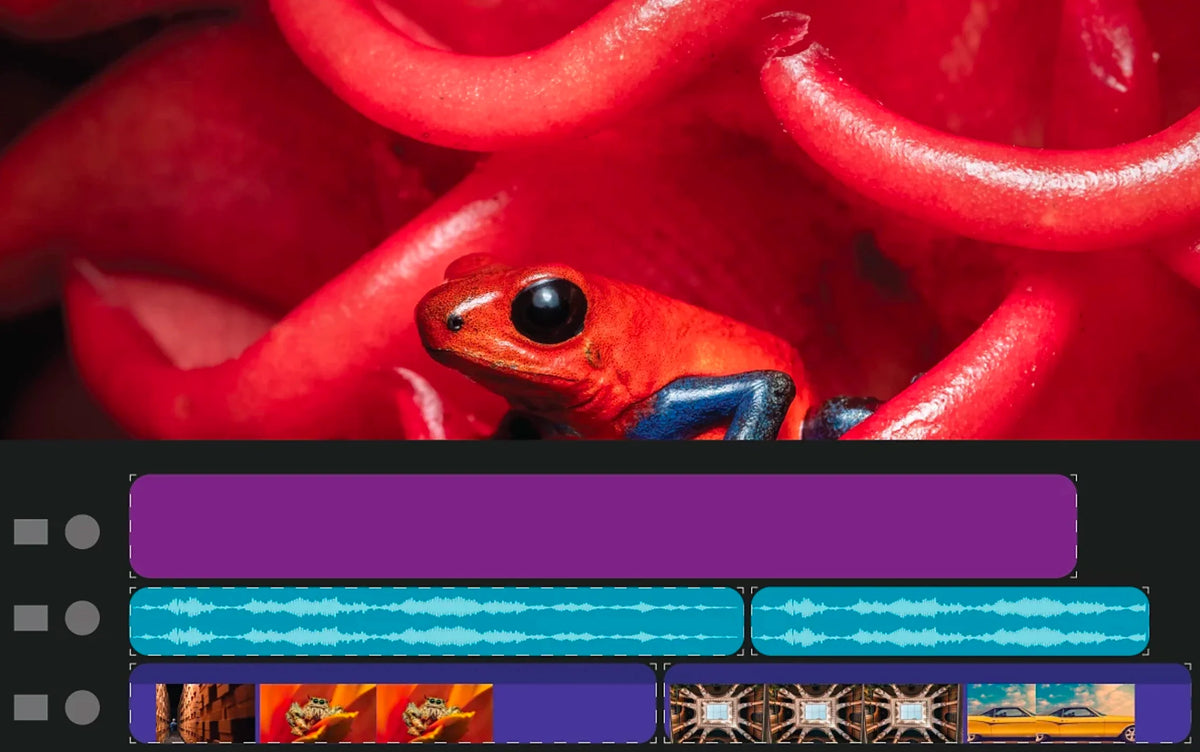

Rounded Timeline clips
Clips on the Timeline now have rounded corners and a cleaner, more consistent look. It sounds like a small thing, but you look at the Timeline all day. The new design makes it easier to see where one clip ends and the next one starts, and it's easier on the eyes over a long edit.
Video, audio and graphics clips all get the new look.

Faster H.264 playback
Adobe completely rewrote support for H.264 in MP4 and MOV files. Adobe says it performs up to 4x faster on Apple silicon computers and up to 2x faster on Windows. Since most cameras and phones record H.264, you'll feel this in almost every project, with smoother scrubbing and playback on the Timeline.
Also in this update
- Audio import fix. MXF files with 32-bit audio import their audio again.
- Morph Cut fixes. Fixes for crashes when using Morph Cut, including on adjustment layers.
- Timeline zoom. Option or Alt plus the mouse wheel zooms around your cursor again.
- Text-Based Editing fixes. Better handling of markers and imported transcripts.
Version 25.1 is part of Premiere Pro 2025. See everything new in Premiere Pro 2025, or read on to what's new in Premiere Pro 25.2.
FAQ
When did Premiere Pro 25.1 come out?
Adobe released Premiere Pro 25.1 in December 2024 and recommended it for all users. You get it from the Creative Cloud app.
Do I need new hardware for the faster H.264?
No. The speed-up comes from Premiere's rewritten H.264 support, on both Apple silicon Macs and Windows PCs.
Editing faster in Premiere Pro 25.1? See our Premiere Pro plugins.