

 by
by 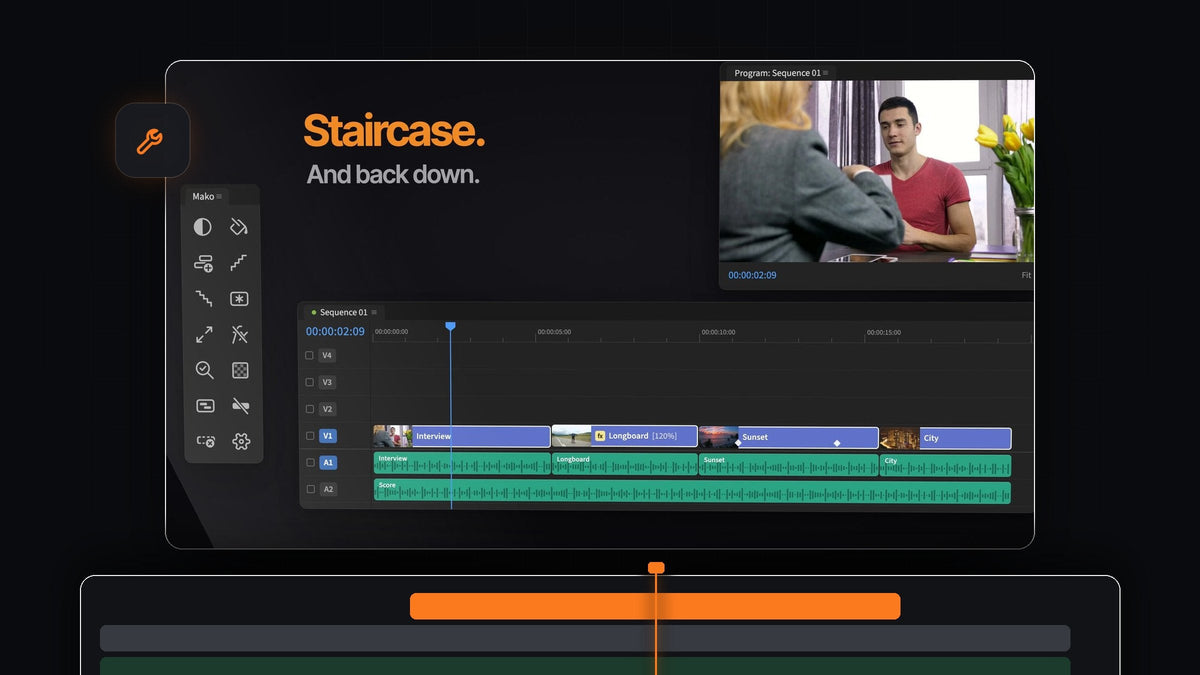
The short answer
Want pt_ShiftLayers-style results inside Premiere Pro? Mako steps every selected clip up onto its own track in one click, and brings them back down just as fast. It is free, on Mac and Windows.
The same panel holds the other layer moves a motion-minded editor reaches for: freeze frames on the track above, a transparency checkerboard, solid mattes and fit or fill for any clip.
Layer moves, built for the Premiere timeline
Layered edits, collages and picture-in-picture openers all start the same way: clips on separate tracks so each one can move, scale and animate on its own. Mako makes every step of that a single click.
- Staircase. Each selected clip moves a track higher, so they step up like stairs.
- Unstaircase. The stepped clips drop back onto one track.
- Freeze Frame. A still of the playhead's frame on the track above, held for the whole clip. Shift-click for a 3-second still.
- Transparency Grid. The checkerboard in the Program Monitor, on in one click.
- Fit to Frame. Scales a clip to fit the frame, or Shift-click to fill it.
- Color Matte. A solid in any color, over your selection.
Step 1: Install Mako in a minute
Check out for $0, with no card, no account and no license key. Open Mako.pkg on a Mac, or run MakoSetup.exe from the zip on Windows, no administrator needed.
Restart Premiere Pro and open Window > Extensions > Mako. Mako works with Premiere Pro 2021 and later, and it installs new versions quietly in the background.
Step 2: Stagger clips onto their own tracks
Select the clips you want to layer and click Staircase. The first clip stays put and each one after it steps a track higher.

Now every clip has a track of its own. Slide them so they overlap, scale them down into a grid or animate each one in, and nothing trims anything else. For a classic layered look, try a picture-in-picture effect in Premiere Pro.
Step 3: Hold a frame on the track above
Motion work often needs a held frame: a pose that stays still while the rest moves, or a moment frozen for a title. Park the playhead and click Freeze Frame.

The still goes on the track above the clip, held for the whole clip, so the moving shot stays underneath. Shift-click for a 3-second still from the playhead. The stills are stored in a Mako bin, out of the way.
Step 4: Check your cutouts on the checkerboard
When you layer graphics, logos or keyed shots, you need to see exactly where the transparency is. Click Transparency Grid and the checkerboard appears in the Program Monitor.

Soft edges and stray pixels show up right away. Click again to turn it off. It is a perfect check before you export transparent video from Premiere Pro.
Step 5: Flatten the stack again
Done with the layered section? Select the stepped clips and click Unstaircase. They drop back onto one track, ready for a straight cut.
Then click Delete Empty Tracks to remove every track the stack left behind. If a clip in the stack arrived at the wrong size, Fit to Frame scales it to fit in one click, and a Shift-click fills the frame.
Make it a one-key habit
Every Mako button can have its own keyboard shortcut, and so can each Shift-click. Right-click a button, choose Keyboard Shortcut and press something like Option + 1, or an F key on its own.
Put Staircase and Unstaircase next to each other on the keyboard and stacking becomes as quick as a cut. New layers from Mako never overwrite a clip: they use the first free track and add one if needed. See every button in our Mako panel guide.
FAQ
What is the best pt_ShiftLayers alternative for Premiere Pro?
Mako. Its Staircase button steps every selected clip onto its own track in one click, Unstaircase brings them back, and it is free on Mac and Windows.
How do I staircase clips in Premiere Pro?
Install the free Mako panel, select the clips and click Staircase. Each clip moves one track higher than the one before.
How do I turn on the transparency grid in Premiere Pro?
Click Transparency Grid in Mako and the checkerboard appears in the Program Monitor. Click it again to switch it off.
Can I put Staircase on a keyboard shortcut?
Yes. Right-click the button and choose Keyboard Shortcut, or set it on the Shortcuts tab in Mako's Settings.
Stack, hold and check your layers in one click each, for free. Get Mako for Premiere Pro.



