

 by
by 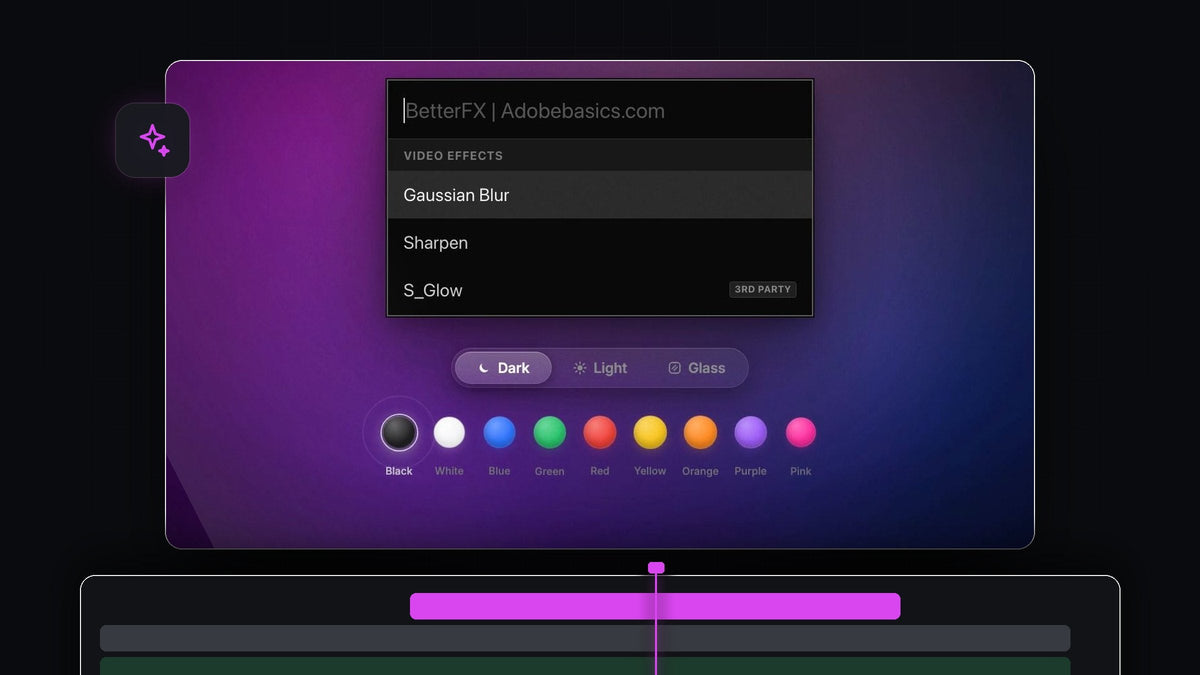
Short answer
Looking for a SickMotionz ToolBox alternative for Premiere Pro? BetterFX searches every effect, preset and third-party plugin you have and applies the result to all selected clips, on Mac and Windows.
Pair it with the free Mako panel for one-click timeline jobs like adjustment layers and color mattes, and you have a complete kit. BetterFX is $29.99 one-time, with lifetime updates.
Watch the intro
One search for everything you own
Effects pile up fast: Premiere's own video and audio effects, the presets you've saved over the years and the plugins you've added on top. BetterFX puts all of it behind one shortcut.

Press Option + Space on a Mac or Alt + Space on Windows, type a letter or two and press Enter. The search bar floats over your timeline, so you never leave the edit to go looking for a panel.
Step 1: Install BetterFX
Your download is ready right after checkout and also arrives by email. The guided installer for Mac or Windows sets up both the BetterFX app and the Premiere Pro plugin, with no manual setup.
BetterFX supports Premiere Pro 2021 to 2026, and updates install automatically, so the tool keeps up with Premiere.
Step 2: Search across effects, presets and plugins
Everything lives in one result list. Built-in video and audio effects sit next to your custom presets and third-party effects from plugins like Sapphire and Boris FX, with a small tag so you can tell them apart.

Search is forgiving, too. Type an abbreviation like gb for Gaussian Blur and BetterFX brings the most useful match forward. Star your favorites, hide what you never use, and keep Premiere's legacy copies out of the list with one switch.
Step 3: Apply one effect to a whole row of clips
Select every clip that needs the effect, open BetterFX, pick it once and press Enter. It lands on all of them in one step.

That makes a shared starting grade across a whole sequence a single move. To match shots more closely afterwards, see how to copy color grading in Premiere Pro.
Step 4: Put your top effects on their own keys
For the handful of effects you use on every project, skip the search entirely. In the BetterFX panel, click the shortcut field next to an effect or preset and press your keys, such as Option + 1, Option + 2 and Option + 3.
BetterFX warns you about clashes, and your shortcuts show as tags in search. Save it all as a profile and export it as one small file to use the same keys on another computer.
Add Mako for one-click timeline jobs
BetterFX handles effects. For the jobs around them, dock the free Mako panel next to your Tools panel. It adds adjustment layers, color mattes and freeze frames in one click, nests and unnests clips, staircases them, fits oversized clips to the frame, clears effects and runs a QC check before export.
Every Mako button can have its own shortcut as well. To see the manual steps the Freeze Frame button saves you, read how to make a freeze frame in Premiere Pro.
Why BetterFX is the best pick for Premiere Pro editors
It's made for one job, effects, and it does that job instantly. It works the way Premiere already works, applying effects straight into Effect Controls, and it's optimized to stay fast in large, effect-heavy projects.
You pay once and keep it, on macOS and Windows, with a commercial license included. The complete BetterFX guide walks through every feature.
FAQ
What is the best SickMotionz ToolBox alternative for Premiere Pro?
BetterFX for searching and applying effects, presets and third-party plugins, together with the free Mako panel for one-click timeline jobs.
Can BetterFX apply an effect to several clips at once?
Yes. Select the clips, search once and press Enter. The effect is applied to every selected clip.
Does BetterFX find my presets and third-party effects?
Yes. Your custom presets, keyframes included, and third-party effects like Sapphire and Boris FX appear in the same search as Premiere's built-in effects.
Can I add adjustment layers in one click?
Yes, with Mako. The free panel adds an adjustment layer over the selected clips, at the playhead, on the first free track.
Which Premiere Pro versions does BetterFX support?
Premiere Pro 2021 to 2026, on both macOS and Windows.
All your effects, one search, every selected clip. Get BetterFX for Premiere Pro.



