

 by
by 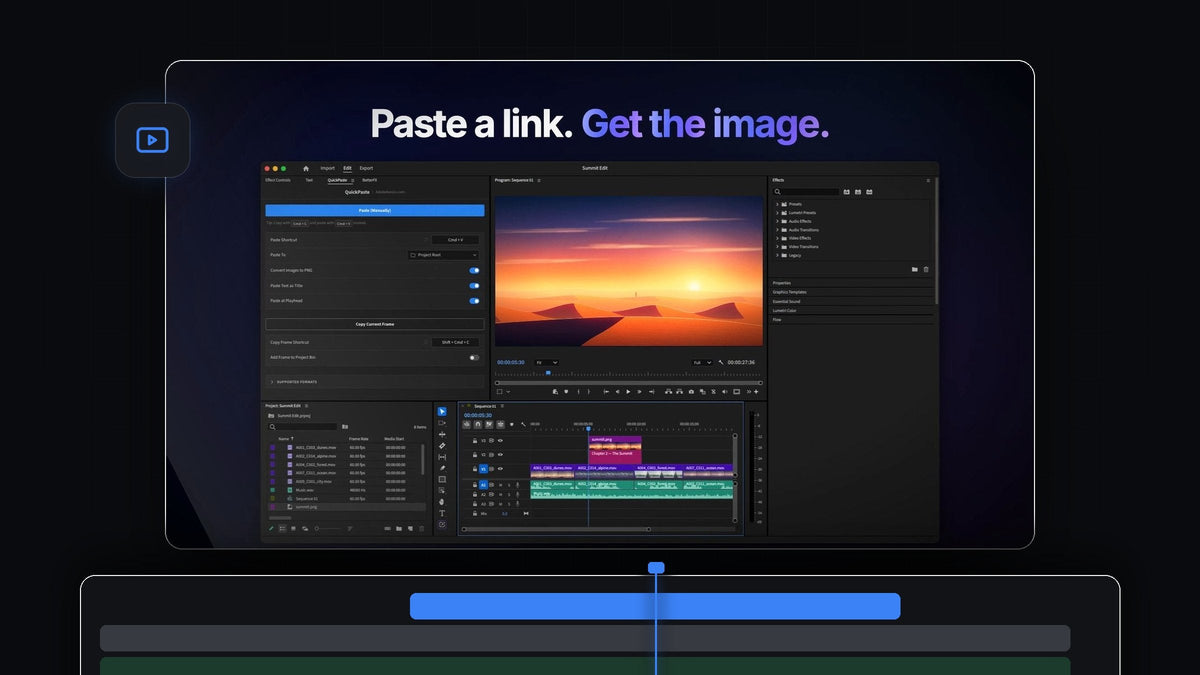
The short answer
Want the JustPaste feel inside Premiere Pro? QuickPaste makes Cmd + V (Ctrl + V on Windows) work for images, screenshots, image links and files, right inside your edit.
Copy something anywhere on your computer, press paste in Premiere Pro, and it is in your project. No saving, no importing, no new shortcut to learn.
Watch the intro
The shortcut you already know
You copy and paste all day in your browser, your notes and your chat apps. QuickPaste brings that exact habit into Premiere Pro. There is no panel to click into, no button to press and no extra step between finding something and using it.
It listens for your paste shortcut anywhere in Premiere Pro, so the keys your hands already reach for are all it takes.

Step 1: Install it once
Your download is ready the moment you check out, and the link is emailed to you as well. Run the guided installer for Mac or Windows. It sets up the QuickPaste app and the Premiere Pro plugin in one go.
That is all the setup there is. QuickPaste supports Premiere Pro 2021 to 2026, and future updates arrive automatically.
Step 2: Copy an image or its link
Found the picture you need on a web page? Right-click it and copy the image. Or simply copy its link from the address bar. A screenshot, a photo in another app or an image file in Finder works just as well.
There is nothing to download first. QuickPaste saves the image for you when you paste.

Step 3: Press Cmd + V anywhere in Premiere Pro
Switch to Premiere Pro and press Cmd + V or Ctrl + V. It doesn't matter which panel is active. The image arrives in your project as a clean PNG, in the bin you chose.
Turn on Paste at Playhead in the QuickPaste panel and it also lands on your timeline at the playhead, ready to scale and position. From there, give it some life with our tutorial on animating photos in Premiere Pro.

Step 4: Make the shortcut yours
The default is the normal paste shortcut, and most editors never change it. If you prefer something else, click the Paste Shortcut field in the QuickPaste panel and record your own keys. One click on the reset arrow brings back the default.
The Paste (Manually) button at the top of the panel is there too, for the rare moment you'd rather click.
What happens behind the paste
A single paste does more than it looks like. QuickPaste handles each step for you:
- It reads the clipboard. An image, an image link, a file, a color or text. Each one gets the right treatment.
- It converts images. WebP, HEIC, AVIF, JPEG, GIF, TIFF, BMP and RAW all become a clean PNG.
- It keeps files whole. Photoshop, Illustrator, After Effects and MOGRT files, video and audio come in as the real file.
- It files the result. Into its own bin, a bin you pick, or the project root.
- It places it. On your timeline at the playhead, when you want it there.
Text and colors paste too: a copied line becomes a title, and a HEX code lands as a color in your edit. Our complete QuickPaste guide shows every format, and if images are your main job, see our guide to pasting images in any format.
FAQ
What is the best JustPaste alternative for Premiere Pro?
QuickPaste. It makes Cmd + V and Ctrl + V paste images, screenshots, image links and files straight into Premiere Pro, on Mac and Windows.
Can I paste an image link instead of the image?
Yes. Copy the link and paste it in Premiere Pro. QuickPaste fetches the image and brings it in as a PNG.
Do I need to click into a panel before pasting?
No. Paste from anywhere in Premiere Pro. The panel is only for settings.
Can I change the paste shortcut?
Yes. Record your own shortcut in the QuickPaste panel, and reset it to Cmd + V or Ctrl + V in one click.
How much does QuickPaste cost?
$24.99 one-time, with lifetime access, free updates and a commercial license.
Copy anything, paste it into your edit. Get QuickPaste for Premiere Pro.



