

 by
by 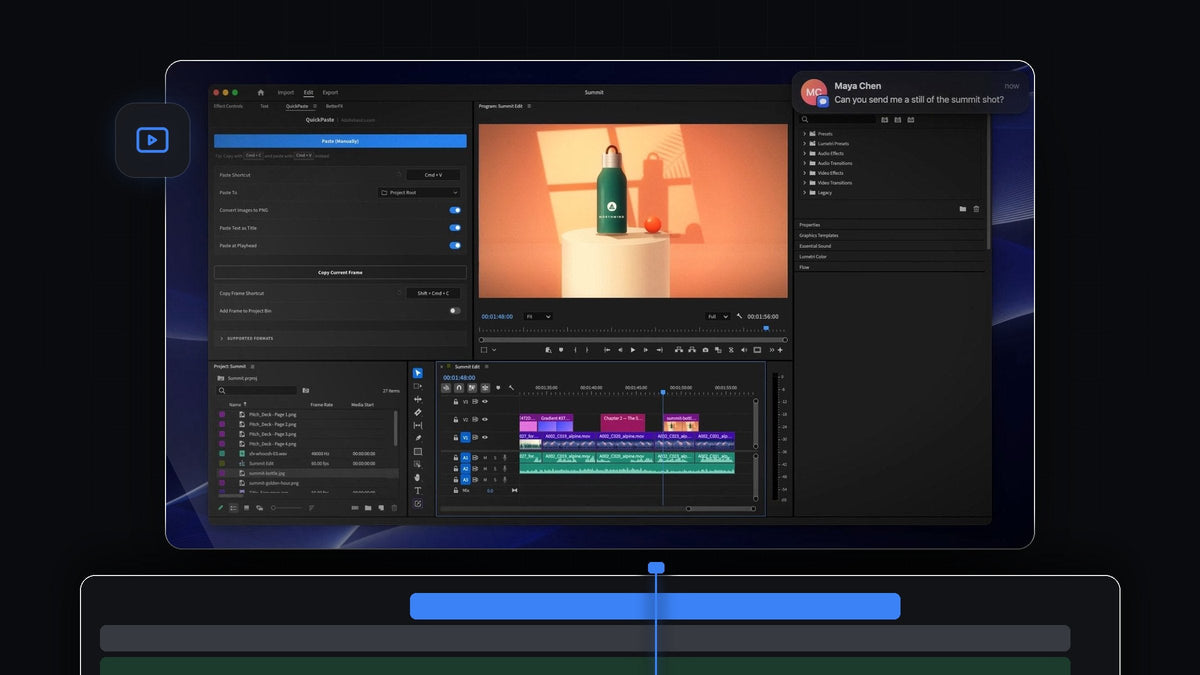
The best paste plugin for deadline day in Premiere Pro 2026
The best paste plugin for Premiere Pro 2026 is QuickPaste. It pastes anything you copy into Premiere Pro with Cmd + V (Ctrl + V on Windows), and it copies the current frame out of Premiere Pro with one shortcut. It works in Premiere Pro 2026 (version 26) on Mac and Windows, for $24.99 one-time.
It is four in the afternoon on delivery day. The producer wants a still for the client, the account manager just sent a new logo, and half the team is on Windows. This is the day QuickPaste was built for.
Watch the intro
Why teams lean on it at crunch time
On a deadline, every extra click is time you don't have. QuickPaste removes the clicks between your clipboard and your edit, in both directions.
- Copy the current frame. One shortcut copies the frame under the playhead as a full-resolution PNG, ready to paste into a chat, an email or a review document.
- Keep the frame too. Switch on Add Frame to Project Bin and every still you send is also saved in your project.
- Custom shortcuts. Record your own paste and copy-frame shortcuts, and reset them to the default in one click.
- Mac and Windows. QuickPaste works the same on macOS and Windows, so a mixed team shares one workflow.
- Paste from anywhere in Premiere. No need to click into the QuickPaste panel first. Just press paste.
- Your normal paste shortcut. Cmd + V on Mac, Ctrl + V on Windows. Nothing new to learn when the clock is running.
- Updates install automatically. Every seat stays on the latest version without anyone chasing installers.
For every format QuickPaste can paste, see our QuickPaste plugin guide.
Step 1: Install it on every seat
Your download appears right after checkout and the link is emailed to you. Run the installer on each edit machine: it sets up the QuickPaste app and the Premiere Pro plugin for you, on Mac and on Windows.
Starting a fresh project for the job? Premiere Pro 2026 has a new Project creation dialog where you name the project, choose where it is stored and pick a template. QuickPaste is ready the moment the project opens.
Step 2: Agree on the shortcuts
Open the QuickPaste panel. Paste Shortcut uses Cmd + V or Ctrl + V by default, and the Copy Frame Shortcut is Shift + Cmd + C on a Mac. If your team already uses those keys for something else, record your own and share it, so everyone presses the same keys.

While you are there, set Paste To to the bin for this job and decide whether Add Frame to Project Bin should be on. Approval stills in the project make the next round of notes easier to track.
Step 3: Send approval stills in seconds
When the request comes in, scrub to the shot and press your copy-frame shortcut. The frame under the playhead is now on your clipboard as a full-resolution PNG.

Switch to your chat or email and paste. There is no export dialog, no file to find and nothing to attach by hand, so the client sees the frame while you keep cutting.

Working on a shared project? Our guide to team projects in Premiere Pro covers collaboration, and the screenshot guide shows Premiere's own export options. For brand-heavy ad work, read the 2024 edition.
FAQ
Does QuickPaste work with Premiere Pro 2026?
Yes. QuickPaste works with Premiere Pro 2026 (version 26) on Mac and Windows, and with every version back to Premiere Pro 2021.
How do I copy a frame from Premiere Pro to the clipboard?
With QuickPaste, press the copy-frame shortcut (Shift + Cmd + C on a Mac by default) or click Copy Current Frame. The frame under the playhead is copied as a full-resolution PNG, ready to paste into any app.
Can a team on Mac and Windows use QuickPaste?
Yes. QuickPaste works the same on macOS and Windows, so everyone on the team gets the same paste and copy-frame workflow.
Can I change the paste shortcut?
Yes. It uses Cmd + V or Ctrl + V by default, and you can record your own shortcut and reset it back in one click.
How quickly can I get set up?
Right away. Your download is ready immediately after checkout, and one guided installer sets up the app and the Premiere Pro plugin. QuickPaste is $24.99 one-time with lifetime access and free updates.
Make deadline day a little calmer. Get QuickPaste for Premiere Pro 2026.



